


Reverse image search has quietly become one of the most powerful tools in a marketer’s verification arsenal and most teams are still using it wrong, or not at all.
The technology has matured significantly. What started as a simple “find where this image appears” function has bifurcated into two distinct disciplines: general reverse image search (finding where an image file exists online) and AI-powered facial recognition search (finding where a person appears across different photos). In 2026, each has its own best-in-class tools, its own use cases, and its own set of ethical guardrails that brands operating globally need to understand.
This guide covers what reverse image search is, how the technology works, which tools are best for which jobs, and for BrandClickX’s audience where this technology is actually moving the needle for marketing teams, brand protection, and content operations.
AI Overview
Reverse image search is the practice of using an image as a search query rather than text, returning results that show where that image appears online, what it depicts, or in the case of AI-powered face matching who it shows. Unlike forward search (typing words to find images), reverse image search works by analyzing the visual content of the uploaded image itself and comparing it against indexed databases.
In 2026, the reverse image search landscape has split into two clear categories. General-purpose tools Google Images, Bing Visual Search, TinEye, Yandex, Lenso.ai find where image files appear, identify objects, products, and landmarks, and track image provenance across the web. Facial recognition search tools PimEyes, FaceCheck.ID, Yandex (face mode), PeopleFinder go further, matching a person’s face across completely different photos using AI biometric analysis.
Google Images, with over 10 billion indexed images, remains the widest-coverage free tool for general use. TinEye, with 60+ billion images indexed specifically for reverse search, is the specialist for origin tracking and copyright verification. Yandex outperforms Google on facial similarity matching and non-Western content. PimEyes is the most powerful dedicated face-matching engine. The right tool depends entirely on what you’re trying to find.
Key Takeaways
| Tool | Category | Best For | Free? | Pricing |
| Google Images / Lens | General | Broadest index, products, landmarks, objects | Yes | Free |
| TinEye | General | Image origin tracking, copyright, 60B+ index | Yes | Free / $200/mo API |
| Yandex Images | General + Face | Facial similarity, Eastern European index | Yes | Free |
| Bing Visual Search | General | Product identification, OCR, shopping | Yes | Free |
| Lenso.ai | General + Face | Multi-mode AI search faces, places, duplicates | Limited | Tiered |
| PimEyes | Face | Deepest facial recognition accuracy | Limited | From $29.99/mo |
| FaceCheck.ID | Face | Social media + criminal record cross-reference | Limited | From $9.99 |
| PeopleFinder (Lurq) | Face + People | Face → full profile identity research | 1 free | From $4.99 |
| Pixsy | General | Copyright monitoring, automated enforcement | Limited | From $24.99/mo |
| Berify | General | Bulk scanning (up to 6,000 images) | 5 free | From $5.95/mo |
| CatfishLens | Face | Cropped/edited image search, AI fake face detection | Yes (plans) | Pay per search |
| Pinterest Visual Search | General | Fashion, decor, shopping discovery | Yes | Free |
How Reverse Image Search Actually Works
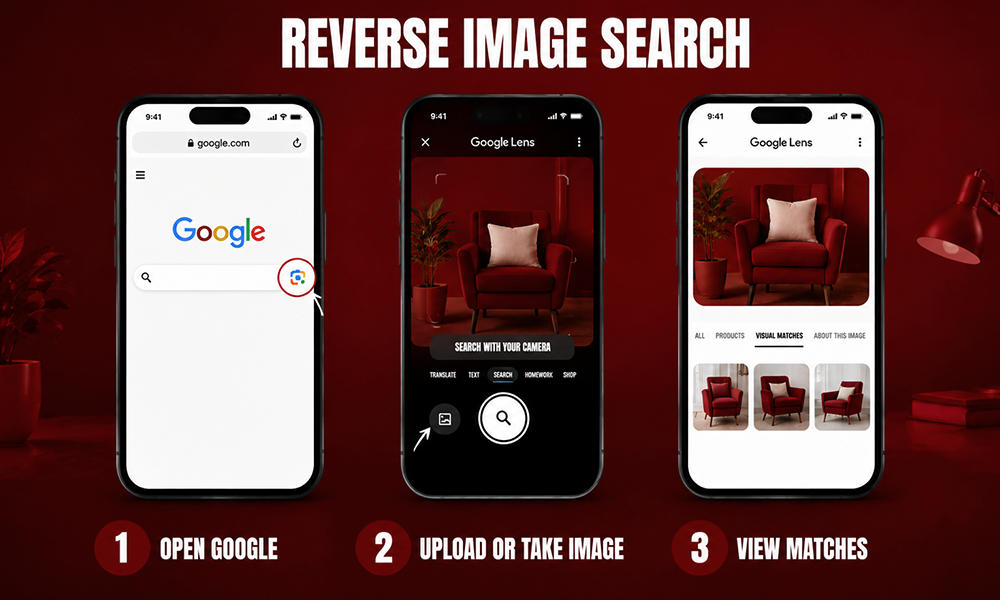
Understanding the mechanics matters because it determines which tool to use for which job.
Pixel-based matching the oldest form finds images that are identical or near-identical at the file level. Upload an image and the engine returns pages where the same file (or a very similar file) exists. TinEye is the specialist here, having indexed over 60 billion images specifically for this purpose. It detects cropped, resized, and lightly edited versions of the same original file. Google Images uses pixel matching as its primary mechanism but layers in object recognition.
AI object and scene recognition what Google Lens and Bing Visual Search do most powerfully. The AI identifies what’s in the image (a type of plant, a furniture style, a landmark, a text excerpt) and returns semantically related results rather than just pixel matches. This is why Google Lens can identify a succulent from a bad photo but struggles to find a non-famous person by their face.
Visual similarity matching finding images that look similar rather than identical. Yandex’s visual search goes beyond pixel matching to find images with similar compositions, color profiles, and subject matter. This makes it more useful for finding how a concept has been interpreted across different images.
Facial recognition matching the most technically sophisticated form. AI maps the geometry of a face (eye distance, jaw shape, nose proportions) into a biometric template and matches it against indexed faces regardless of photo differences. PimEyes and FaceCheck.ID use neural networks trained specifically on faces. Yandex applies its more general visual AI with a face-biased mode. This produces results across completely different photos of the same person different lighting, different age, different context.
The 2026 insight from VanceAI’s testing: “Reverse search is bifurcating into AI summarises what the image is (Google handles this) and specialist tools answer where, when, and who (everything else).”
The 10 Best Reverse Image Search Tools in 2026
1. Google Images with Google Lens Best for Breadth
Google Images indexes more of the public internet than any other search engine over 10 billion images by current estimates. Google Lens, now integrated directly into the desktop search bar, Chrome, Android, and the Google app, extends this to real-time camera identification and the ability to circle any object on screen to search without downloading an image.
Google excels at identifying landmarks, products, plants, animals, and text within images. It surfaces shopping results, related pages, and image-based AI summaries that answer “what is this?” for casual queries.
Its meaningful weakness: people. Google deliberately limits its facial recognition in consumer search, citing privacy commitments. For identifying a non-famous person from a photo, Google typically returns people who look vaguely similar rather than identifying the specific individual. This is by design, not a technical limitation.
Tested results: A professional headshot uploaded to Google returned 847 results the widest result set across all tools tested, but mostly pages featuring similar-looking people rather than confirmed matches.
Best for: Product identification, landmark recognition, object classification, finding where a specific image appears across the English-language web
Free: Yes, fully free
2. TinEye Best for Image Origin and Copyright
TinEye has one job and does it better than any other tool: finding where an image came from, when it was first published, and how it has spread or been modified across the web. Its index of 60+ billion images, built specifically for reverse search (not general crawling), gives it forensic-level depth for image provenance.
Upload an image and TinEye returns not just matching pages but timestamps showing when the image first appeared online, which domain published it first, and a history of how it has spread. The browser extension makes it a one-right-click operation on any image. Its algorithm specifically detects cropped, resized, and lightly edited versions of original files catching modifications that fool other tools.
Tested results: A landscape photo returned 891 results on TinEye, significantly more than the 234 on Google, because TinEye’s index is deeper for non-commercial images that Google deprioritizes.
Best for: Copyright verification, image provenance research, journalism fact-checking, tracking unauthorized image use, detecting recycled photos used out of context
Free: Yes, basic searches free. API from $200/month for commercial volume.
3. Yandex Images Best Free All-Rounder (Especially for Faces)

Yandex is the most consistently underestimated tool in the reverse image search toolkit. Russia’s largest search engine indexes content that Western tools miss particularly from Eastern Europe, Russia, Asia, and regional platforms that Google doesn’t prioritize and its facial recognition algorithm is more aggressive than Google’s by design.
Tested results: The same professional headshot that returned 847 results on Google and 89 facial matches on PimEyes returned 1,203 matches on Yandex. As SearchCompared’s investigative editor noted after testing: “For reverse image search with facial similarity, it returned matches that Google completely missed. It’s the tool I now recommend to journalists doing source verification.”
Yandex also performs strongly for visual similarity matching on clothes, furniture, and design elements particularly useful for fashion and product teams verifying whether a design has been copied in markets outside the US.
The trade-off is data privacy: Yandex is subject to Russian data laws, and using its facial recognition in the EU sits in a GDPR gray zone that data protection authorities have flagged. Consider what you upload carefully.
Best for: Free facial similarity matching, Eastern European and Asian content indexing, cross-geographic image verification, fashion and product visual similarity
Free: Yes, fully free
4. Bing Visual Search Best for Products and Shopping
Bing Visual Search has developed into a capable specialist for commercial image identification. Its object recognition excels at products snap a photo of a chair, an outfit, or a piece of technology and Bing returns where to buy it, comparative pricing, and similar products.
Its OCR (text recognition from images) is frequently faster and more accurate than Google’s for pulling text from cluttered images useful for identifying signage, brand names in packaging, and document text. The Creative Commons license filter is the best implementation of license-aware image search among the major tools, making it particularly useful for content teams sourcing images legally.
Best for: Product identification and shopping discovery, OCR from images, license-filtered image sourcing, creative professionals sourcing compliant visual assets
Free: Yes, fully free
5. Lenso.ai Best Multi-Mode AI Platform
Lenso.ai categorizes reverse image search into five distinct modes: People (face matching), Places (location identification), Duplicates (exact copy finding), Related (thematically related images), and Similar (visually similar images). Each mode uses a different AI model, producing more targeted results than a single general algorithm.
The multi-mode architecture makes Lenso particularly valuable for teams that need to run different types of image queries as part of the same workflow photographers protecting copyright, researchers identifying locations, and brand teams tracking visual identity usage across the web. Its developer API supports up to 5,000 calls per month on its developer plan.
Best for: Multi-purpose reverse image workflows, creators tracking image reuse, developer API integration, teams needing different query types in one platform
Free: Limited free searches
6. PimEyes Best Facial Recognition Accuracy
PimEyes is the gold standard for dedicated facial recognition search. The Washington Post called it “one of the most capable face-searching tools on the planet.” The BBC described it as “quick, accurate, facial recognition on steroids.” Its neural networks are trained specifically on faces not a general image matching algorithm applied to faces as an afterthought.
Results are returned with similarity percentages: above 90% is typically a reliable match, 70–90% is probable, below 70% is uncertain. PimEyes’s November 2025 update added stronger user controls, better security architecture, and removed all advertising from the platform.
Its primary commercial use case is privacy monitoring individuals and organizations finding where a specific face appears online without consent. Enterprise plans with audit trails support OSINT professionals, journalists, and security teams.
Best for: Privacy monitoring, OSINT research, journalist identity verification, executive image protection, deepest facial recognition accuracy
Free: Results blurred without subscription
Pricing: From $29.99/month
7. FaceCheck.ID Best for Social Media Cross-Reference
FaceCheck.ID specializes in finding a face across social media platforms, news coverage, blogs, online videos, and public criminal record databases including mugshot registries and sex offender listings. Upload a photo and it returns social profiles, news appearances, and any criminal record associations found in its indexed databases.
The tool explicitly positions itself for safety verification: confirming dating profiles, detecting romance scammers using stolen photos, identifying catfish accounts where the same face appears under multiple names. FaceCheck carries its own important disclaimer on the platform: “Many unrelated people look alike. Never rely solely on a face search alone.”
Best for: Dating profile verification, romance scam detection, social media identity cross-reference, criminal background flagging
Free: Limited free searches
Pricing: From $9.99
8. PeopleFinder (Lurq) Best for Full Identity Research
PeopleFinder, powered by the Lurq app, is less a reverse image search tool and more a full investigative platform that starts with a face. Upload a photo, and its AI facial recognition (claimed 99.2% accuracy) identifies the face and then extends into social media discovery across Instagram, Facebook, LinkedIn, and TikTok, professional history, public records, and AI-generated research reports.
For teams doing thorough due diligence verifying a potential partner, confirming an influencer’s identity, or researching a new business contact PeopleFinder goes further than any other tool on this list in connecting a face to a verified identity with supporting context.
Best for: Full identity research starting from a photo, influencer due diligence, partner verification, thorough background context
Free: One free search
Pricing: From $4.99 per search or $99.99/year for 50 searches/month
9. Pixsy Best for Copyright Monitoring and Enforcement
Pixsy is purpose-built for image copyright protection. It continuously monitors the web for unauthorized use of your uploaded images, alerts you when your photos appear on other sites without permission, and on premium plans provides legal assistance and automated enforcement for copyright claims.
For photographers, content creators, and brand teams with large proprietary image libraries, Pixsy converts the passive process of wondering whether your images are being stolen into an active monitoring system with an enforcement pipeline attached.
Best for: Ongoing copyright monitoring, unauthorized image use detection, automated takedown assistance, professional photographers and content creators
Free: Limited
Pricing: From $24.99/month
10. Berify Best for Bulk Image Scanning

Berify combines its proprietary engine with Google, Yandex, and Bing simultaneously, running up to 6,000 images concurrently for comprehensive reverse image coverage. For teams managing large image libraries who need to audit usage at scale rather than searching one image at a time, Berify’s bulk processing capability is unmatched.
Best for: Large-scale image portfolio monitoring, bulk copyright auditing, agencies managing multiple client image libraries
Free: 5 images free
Pricing: From $5.95/month
How Brands and Marketing Teams Are Using Reverse Image Search
This is where reverse image search moves from a consumer curiosity into a professional tool. Here are the use cases generating the most traction for marketing and brand teams in 2026:
Influencer Verification and Fraud Detection
Influencer marketing fraud cost brands an estimated $1.14 billion in 2023, according to the FTC, with much of it involving fake profiles using stolen or AI-generated profile photos. Reverse image search adds a verification layer that takes under two minutes and costs nothing if you use free tools.
Run a reverse image search on an influencer’s profile photo before signing a contract. If that photo appears on multiple accounts under different names, or on stock photo sites, or doesn’t appear anywhere except that one account (suggesting a freshly generated AI image with no web history), it’s a significant red flag that warrants deeper investigation before committing budget.
The most effective workflow: Google Images for broad coverage, Yandex for facial similarity, FaceCheck.ID if social media cross-reference is needed. Total time: under five minutes per influencer.
Brand Image Monitoring
Every brand generates visual content that gets scraped, repurposed, stolen, and redistributed without authorization. TinEye and Pixsy allow marketing teams to track where specific images appear online, identify unauthorized commercial use, and build evidence for takedown requests or legal action.
A brand’s proprietary campaign photography appearing on a competitor’s website, a scam account, or an unauthorized reseller’s listing is both a reputational risk and a legal issue. Pixsy automates this monitoring continuously; TinEye handles it for individual spot checks.
Content Authenticity Verification
Journalism, PR, and brand communications teams increasingly use TinEye and Google Images to verify whether an image submitted to them from a freelancer, an event, or a third-party source is original or pulled from elsewhere. A “news photo” that has actually been circulating since 2019 in a different context is discovered in seconds with TinEye’s provenance tracking.
Executive and Spokesperson Protection
Deepfake content, unauthorized use of executive likenesses in scam advertising, and image-based fraud targeting senior leaders are growing threats. Regular PimEyes searches on key executives and brand spokespersons surface these issues before they become public crises. Some enterprise security teams now run scheduled face searches on C-suite leadership as part of standard digital risk monitoring the same way they monitor brand keyword mentions.
Visual Competitive Intelligence
Brands and agencies use Yandex’s visual similarity search to monitor whether their designs, packaging aesthetics, or campaign visuals are being replicated by competitors including in markets and regions where traditional keyword monitoring is less effective. Uploading your product packaging to Yandex and filtering for similar images surfaces copycat products in Eastern European and Asian markets that Google doesn’t prioritize in its index.
UGC (User Generated Content) Rights Management
When brands want to repurpose user-generated content a great customer photo, a fan video still, a repost-worthy image reverse image search helps establish whether the content is genuinely original or whether it was itself copied from somewhere else. Before paying licensing rights for UGC, teams can run a quick TinEye check to confirm the image’s origin.
The Marketing Technology Implications
Three developments in 2026 are specifically relevant to marketing technology teams integrating reverse image search into their workflows:
API availability is expanding. TinEye, Lenso.ai, FaceCheck.ID, and PimEyes all offer commercial API access. This means reverse image search is no longer a manual tool it can be integrated into brand asset management systems, influencer marketing platforms, and content verification pipelines as an automated step rather than a human one.
AI image generation is creating a new problem. CatfishLens, which launched specifically for detecting AI-generated faces in profile photos, reflects a new and growing use case: distinguishing between a real person and a synthetically generated image designed to look real. Standard reverse image search doesn’t solve this a freshly generated AI face has no web history, so it returns zero results, which can itself be a red flag. AI face detection is becoming a distinct capability from AI image matching.
Google’s AI Overview is absorbing casual queries. Google’s AI Overview now answers many “what is this image?” questions directly in the SERP, without requiring the user to click through to a reverse image search tool. For casual identification (plants, landmarks, products), this is often sufficient. The practical implication: the remaining use cases for dedicated reverse image search tools are increasingly the high-stakes ones identity verification, copyright enforcement, and forensic provenance research where the casual AI summary is not enough.
The Multi-Tool Strategy
The most important insight from testing every major tool in 2026: no single tool wins every category. Different indexes, different algorithms, different coverage areas mean that different tools produce meaningfully different results on the same image.
The professional workflow most experienced reverse image researchers use:
Step 1 — Broad sweep: Google Images or Bing Visual Search for general coverage and object identification
Step 2 — Provenance check: TinEye for image origin, first publication date, and modification history
Step 3 — Expanded reach: Yandex for facial similarity, Eastern European/Asian content, and visual similarity beyond pixel matching
Step 4 — Face match (if needed): PimEyes or FaceCheck.ID for dedicated facial recognition accuracy
Step 5 — Identity confirmation (if needed): PeopleFinder for connecting face matches to verified identity with supporting public records
Running Steps 1–3 costs nothing. Steps 4–5 require subscriptions or per-search fees but add significant depth when identity verification is the actual goal.
Ethics and Legal Considerations
Reverse image search is a legal activity when used for legitimate purposes: verifying your own images, fact-checking publicly published photos, conducting due diligence on business relationships, and monitoring for unauthorized use of your own intellectual property.
The ethical lines sharpen around facial recognition specifically. Using PimEyes or FaceCheck.ID to investigate someone without their knowledge raises consent questions that vary significantly across jurisdictions. In the EU, GDPR imposes strict requirements on biometric data processing. In the US, state laws including Illinois’s BIPA create compliance obligations for organizations handling facial recognition data at scale.
The practical guidance for marketing teams and agencies:
- Document the legitimate business purpose for any search involving facial recognition
- Treat face match results as a starting point for human verification, not a definitive conclusion
- Ensure your use complies with applicable data privacy laws in every market you operate in
- Do not use consumer-grade face search tools for employment screening, housing decisions, or credit determinations these are explicitly restricted uses under consumer protection law
FAQs
What is reverse image search?
The practice of using an image as a search query instead of text returning results that show where the image appears online, what it depicts, or (in face-specific tools) who it shows.
What is the best reverse image search tool in 2026?
It depends on your goal. Google Images is best for broadest coverage and product/object identification. TinEye is best for image origin and copyright verification. Yandex is best for free facial similarity matching. PimEyes is best for deep facial recognition accuracy.
Is reverse image search free?
Google Images, Bing Visual Search, Yandex, and TinEye basic searches are completely free. Dedicated face search tools like PimEyes and FaceCheck.ID have free tiers with limited results and paid subscriptions for full access.
How accurate is reverse image search for finding people?
General tools like Google deliberately limit facial identification. Yandex performs meaningfully better on facial similarity for free. PimEyes is the most accurate dedicated face-matching tool, with matches above 90% similarity generally reliable. All results should be treated as leads for verification, not definitive identifications.
Can brands use reverse image search commercially?
Yes for influencer verification, brand image monitoring, content authenticity checking, and copyright protection. API access from TinEye, Lenso.ai, and others supports integration into automated marketing workflows. Use involving facial recognition must comply with applicable data privacy laws.
What is the difference between reverse image search and face search?
Reverse image search finds where an image file (or similar file) appears online matching pixels and visual content. Face search uses AI facial recognition to match a person across different photos regardless of file similarity, matching biometric geometry rather than visual pixels.


