
AI Summary
To check if your images are being used without permission, run them through TinEye, Google Lens, or Copyscape’s image tool. These engines scan the web for copies of your exact photo and return every page where it appears. If you find unauthorized use, document it with screenshots, check the site’s licensing terms, then send a takedown request or DMCA notice if no license was ever granted.
The Problem Most Creators Don’t Realize They Have
Photographers, designers, and small business owners rarely think to check whether their work has been copied until a client mentions seeing “their” product photo on a competitor’s site, or a reverse search turns up a personal photo on a scam profile.
Image theft online is largely invisible unless you go looking for it. Unlike text plagiarism, which tools like Copyscape have long made easy to detect, image theft requires a different kind of search one built on visual fingerprints rather than words.
This guide walks through exactly how to find out if your images have been stolen, which tools actually work for copyright enforcement (not just casual identification), and what your realistic options are once you find a violation.
Why Reverse Image Search Is the Right Tool for This
Text-based plagiarism checkers compare words. Copyright image checkers compare pixels, shapes, and color patterns a process called perceptual hashing. When you upload your photo, the engine converts it into a unique visual signature and searches its index for matches, including resized, cropped, or color-adjusted copies that a human eye might not immediately recognize as the same file.
This is why TinEye, not Google, has become the go-to tool for photographers specifically: it was built from day one for exact-match detection, not general-purpose search.
Step 1: Run Your Image Through TinEye
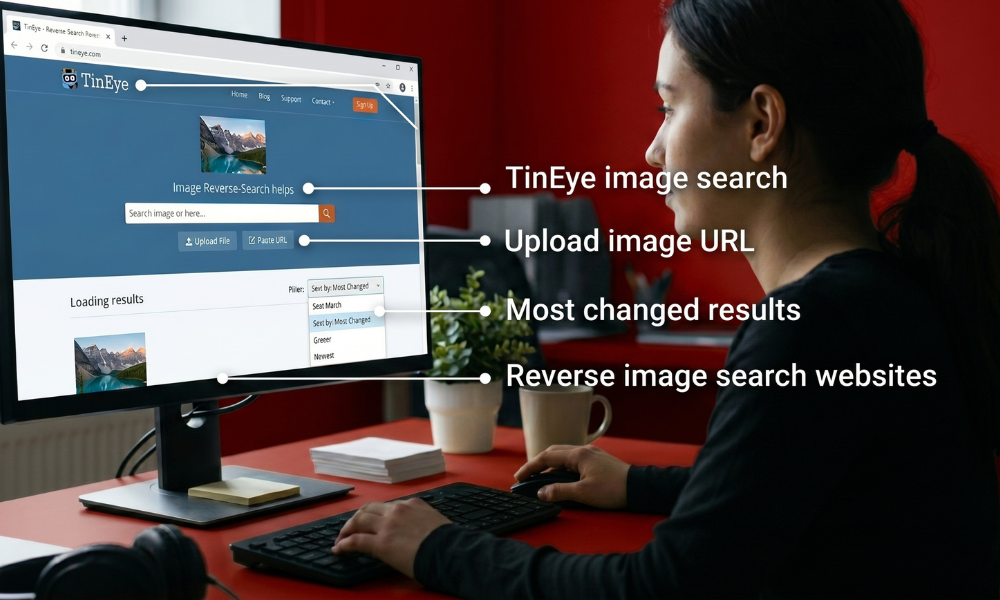
TinEye remains the most precise free tool for spotting unauthorized image use.
- Go to tineye.com.
- Upload your photo or paste its URL.
- Review every page where the image (or a modified version of it) appears.
- Sort results by Most Changed to surface heavily cropped, filtered, or resized copies these are often signs of deliberate reuse rather than accidental duplication.
TinEye’s Domains filter is particularly useful here: it groups results by website, so you can quickly see if your photo has spread across multiple unrelated sites, which often signals a stock-photo-style scraping operation rather than a one-off case.
Step 2: Cross-Check With Google Lens and Yandex
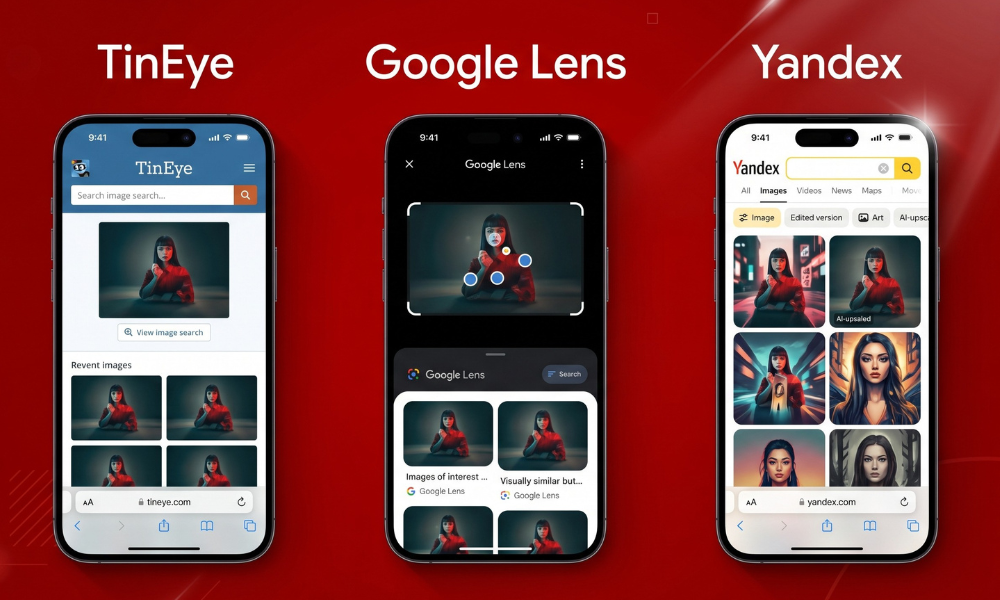
TinEye is excellent for exact matches, but it can miss copies that have been color-graded, mirrored, or partially edited. Running the same image through Google Lens and Yandex Images widens the net, since both use broader visual-similarity matching rather than TinEye’s stricter exact-match approach.
A combination workflow looks like this:
- TinEye → catches verbatim copies and near-duplicates fast.
- Google Lens → surfaces visually similar results TinEye’s stricter matching misses.
- Yandex → strong for heavily edited or AI-upscaled copies, and indexes regions other engines under-cover.
Step 3: Set Up Ongoing Monitoring (Don’t Just Check Once)

A single search only tells you what’s been copied so far. For creators publishing regularly — photographers, illustrators, brands with product photography — ongoing protection matters more than a one-time check.
Options for continuous monitoring:
- Google Alerts won’t catch image theft directly, but pairing it with periodic manual reverse searches on your most-used images catches new copies over time.
- Pixsy and Copytrack are paid services built specifically to scan the web continuously for stolen images and can handle licensing enforcement on your behalf for a cut of any settlement.
- Manual quarterly checks on your top 5–10 most valuable images is a free, low-effort middle ground for solo creators who don’t want a subscription service.
Decision Tree: What To Do When You Find a Stolen Image
Use this to figure out your next move once a search turns up unauthorized use:
Found your image on another site
│
├─ Is it credited with a link back to you or your site?
│ ├─ Yes → Decide if attribution alone is acceptable to you, or request removal/compensation
│ └─ No → Continue below
│
├─ Is the site using it for commercial purposes (selling a product, monetized content)?
│ ├─ Yes → Stronger case for compensation; consider a direct invoice or formal DMCA notice
│ └─ No → Often a simple takedown request resolves it
│
├─ Can you find direct contact info for the site owner?
│ ├─ Yes → Send a polite request first; many resolve without escalation
│ └─ No → Use the hosting provider’s abuse contact or file a DMCA notice with the platform
│
└─ Is the site unresponsive or hosted anonymously?
└─ File a formal DMCA takedown with the site’s host or relevant search engines
Writing an Effective Takedown Request
Whether you go the informal or formal route, a strong request includes:
- Direct link to your original image (ideally on your own site, with a publish date).
- Direct link to the infringing page.
- Clear statement that you did not authorize the use.
- Specific request: removal, attribution, or licensing payment — be explicit about what resolution you want.
- Reasonable deadline (7–14 days is standard before escalating).
Keep correspondence calm and factual. Many website owners are using a contractor or freelancer’s content without realizing it was unlicensed, and a clear, professional message often resolves things faster than an aggressive legal threat.
When to File a Formal DMCA Notice
If a direct request doesn’t work, U.S.-based creators (and creators whose work is hosted on U.S.-based platforms) can file a DMCA takedown notice. This generally requires:
- Identification of the copyrighted work
- The infringing URL
- A statement of good-faith belief that the use is unauthorized
- Your contact information and a physical or electronic signature
Most major hosts (GoDaddy, Cloudflare, Google, social platforms) have a dedicated DMCA submission form. This guide explains the process of finding infringement, not legal strategy for anything beyond a routine takedown, especially disputes involving real financial damages, consult an attorney who handles copyright law, since rules vary outside the U.S. and disputed claims can get legally complicated quickly.
Best Tools Compared
| Tool | Best For | Cost |
| TinEye | Exact-match detection, sorting by date/changes | Free |
| Google Lens | Quick visual-similarity check | Free |
| Yandex Images | Edited or heavily altered copies | Free |
| Pixsy | Continuous monitoring + enforcement | Free scan, % fee on recovery |
| Copytrack | Continuous monitoring + enforcement | Free scan, % fee on recovery |
| Copyscape (image tool) | Bulk-checking many images at once | Paid |
Proving Ownership Before You Need To
The best protection happens before theft occurs, not after:
- Embed metadata (EXIF/IPTC) with your name and copyright notice at the point of export.
- Register copyright with your country’s copyright office for high-value work, registration significantly strengthens any legal claim.
- Keep original raw files with timestamps; these are far stronger evidence of authorship than a compressed web-export copy.
- Add a visible or subtle watermark on web-published versions, especially for portfolio or commercial photography.
None of these stop theft outright, but each makes your case faster to prove if a dispute ever escalates.
Common Mistakes Creators Make
- Only checking once — new copies appear continuously; a single search gives a snapshot, not ongoing protection.
- Assuming attribution equals permission — a credit link isn’t a license unless you explicitly granted one.
- Going straight to threats — most infringement is unintentional reuse, not malicious theft; a calm request resolves most cases.
- Not documenting before reaching out — screenshot the infringing page immediately, since content can be edited or removed once the site owner is contacted.
- Ignoring jurisdiction differences — DMCA is a U.S. mechanism; enforcement options differ for sites hosted outside the U.S.
Frequently Asked Questions
What’s the best free tool to check if my photos were stolen?
TinEye is the strongest free option for exact-match detection, since it’s purpose-built for finding copies of a specific file rather than general visual similarity. Pair it with Google Lens for broader coverage of edited or cropped versions.
Does a credit or link-back count as permission to use my photo?
No. Attribution and licensing are separate things. A website can credit you by name while still using the image without your consent, unless you explicitly granted a license permitting that use.
Can reverse image search find every stolen copy of my photo?
No tool guarantees full coverage, since each engine indexes a different slice of the web. Combining TinEye, Google Lens, and Yandex catches more copies than relying on a single tool alone.
Do I need a lawyer to send a takedown request?
Not for a routine, good-faith DMCA notice, most hosts provide a standard submission form. A lawyer becomes worth involving if the infringer disputes the claim or if you’re pursuing financial compensation.
How often should I check if my images are being used without permission?
Quarterly manual checks work for most individual creators. Businesses or photographers with high-value portfolios often benefit from a paid monitoring service that scans continuously instead of relying on periodic manual searches.