
AI Summary
To find the original source of an image, run it through a reverse image search tool like Google Lens, TinEye, or Yandex Images. These tools scan the web for matching or visually similar photos and surface the earliest indexed appearance, the uploader, or the original publisher. TinEye specializes in exact-match tracing, while Yandex often performs better on faces and edited photos.
Why Finding an Image’s Source Matters
An image’s source tells you who created it, when it first appeared, and whether it’s been altered or recycled. This matters for:
- Verifying news photos before sharing them
- Checking copyright ownership before using an image commercially
- Confirming a product photo is from the real brand, not a knockoff listing
- Spotting catfishing or fake social media profiles
- Crediting photographers and artists correctly
Behind the scenes, each tool builds a visual fingerprint of the image shapes, colors, pixel patterns and compares it against a massive index of crawled photos. The “original” result is typically the earliest-dated, highest-resolution, or most-referenced version found in that index.
Method 1: Google Lens (Best All-Around)
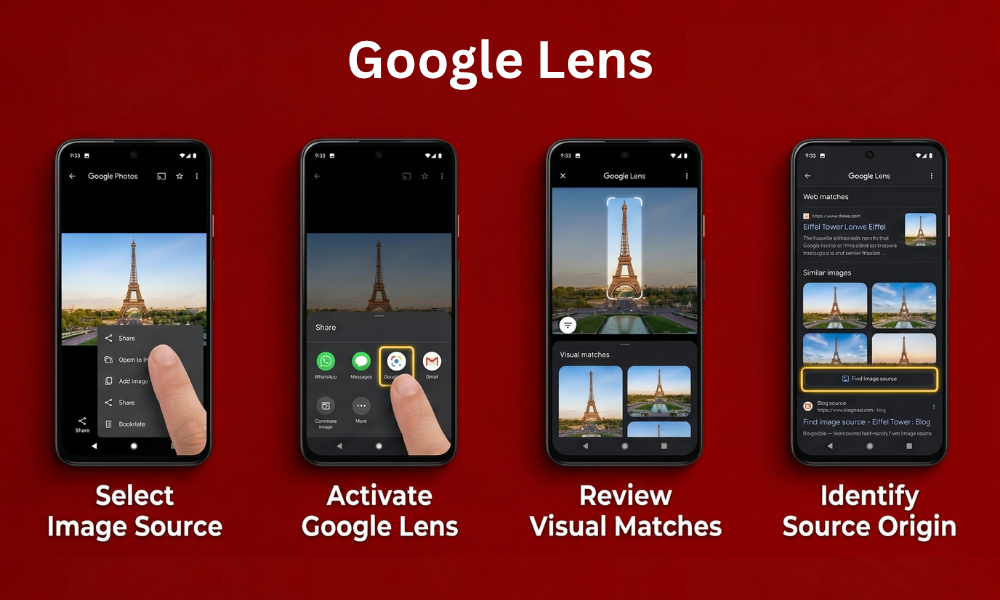
- Open the image in Google Photos, Chrome, or any Android/iOS share menu.
- Tap the Lens icon or select Search image with Google Lens.
- Review Visual matches and tap Find image source if available.
- Open the earliest or most authoritative-looking result.
Lens is strongest for general images products, places, memes but it isn’t built specifically for source-tracing, so always cross-check with TinEye or Yandex for precision.
Method 2: TinEye (Exact Match Specialist)

TinEye is the original reverse image search engine, purpose-built for finding exact and near-exact matches rather than visually similar ones.
- Go to tineye.com.
- Click the camera icon to upload a file, paste an image URL, or drag-and-drop the photo.
- Results show every page where that exact image appears, sortable by Oldest, Newest, or Most Changed.
- Sort by Oldest to identify the likely original source.
Why it’s useful: TinEye doesn’t try to guess what’s “similar” it finds copies of the exact same file, which makes its date-sorting feature one of the most reliable ways to trace true origin.
Method 3: Yandex Images (Best for Faces & Edited Photos)

Yandex’s image search frequently outperforms Google and TinEye for facial recognition and images that have been cropped, filtered, or resized.
- Go to yandex.com/images.
- Click the camera icon, then upload the image or paste a URL.
- Review the results, paying attention to similar images and any linked source pages.
- Use the size filter to spot the highest-resolution version, which is often closer to the original upload.
Yandex indexes large volumes of Russian and Eastern European sites that other engines miss, which makes it valuable for images that originated outside the typical English-language web.
Method 4: Bing Visual Search

- Go to bing.com/images.
- Click the camera icon in the search bar.
- Upload the image or paste a URL.
- Review Pages with this image for source links.
Bing’s index overlaps with Google’s in places but occasionally surfaces results the others miss, especially for product and e-commerce images tied to Microsoft-indexed retail sites.
Method 5: Right-Click Search (Desktop Browsers)

The fastest desktop method when you’re already looking at the image on a webpage:
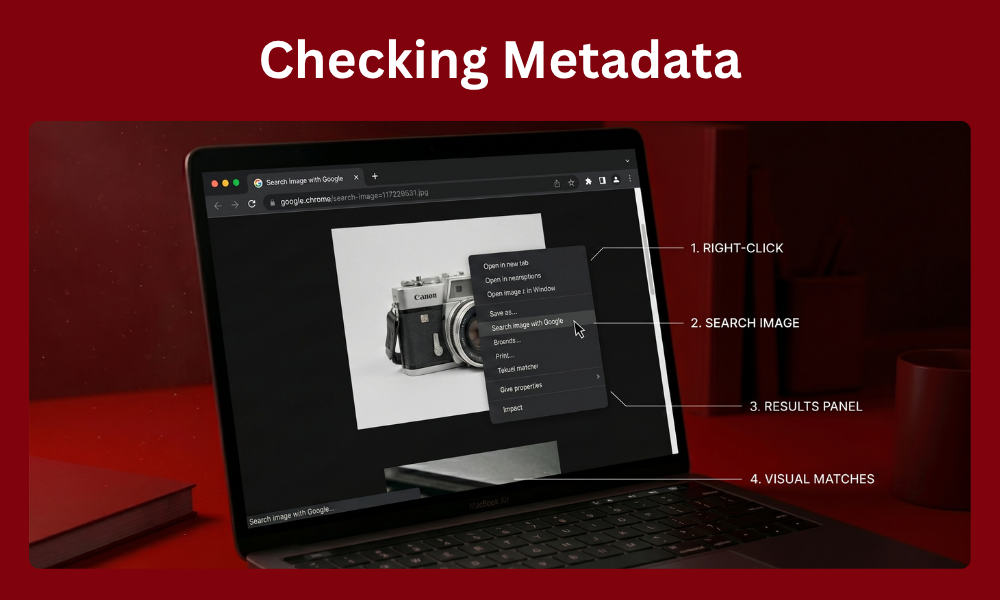
- Right-click the image.
- Select Search image with Google (Chrome) or your browser’s equivalent.
- Review the results panel for source links and visual matches.
This skips the upload step entirely and works directly from any web page.
Method 6: Checking Metadata (EXIF Data)
Reverse search finds where an image appears online metadata can reveal where it was created.
- Download the original image file (not a screenshot).
- Use a metadata viewer like Jeffrey’s Exif Viewer or Metadata2Go.
- Check for camera model, GPS coordinates, date taken, and software used.
Caveat: most social platforms strip EXIF data automatically on upload, so this method works best on raw files shared directly, not images pulled from Instagram, Facebook, or Twitter/X.
Comparison: Which Tool to Use
| Goal | Best Tool |
| Quick general search | Google Lens |
| Exact-match, date-sorted tracing | TinEye |
| Faces or heavily edited photos | Yandex Images |
| Cross-checking missed results | Bing Visual Search |
| Already viewing image on a webpage | Right-click search |
| Creation details (camera, date, location) | EXIF metadata viewer |
Step-by-Step Workflow for Maximum Accuracy
- Start with TinEye to check for exact matches and sort by oldest date.
- Run the same image through Yandex if TinEye returns few or no results, especially for faces or edited photos.
- Confirm with Google Lens to catch any visually similar versions TinEye’s exact-match approach might miss.
- Check metadata if you have the original file and need creation details beyond where it’s published.
- Cross-reference dates across all sources — the earliest consistently-dated result is usually the true original.
Common Mistakes to Avoid
- Relying on one tool only — TinEye, Yandex, and Google index different parts of the web; using just one leaves gaps.
- Trusting the first result as “original” — always sort by date or check multiple matches before concluding.
- Searching a screenshot instead of the saved file — screenshots compress and crop images, weakening match accuracy.
- Ignoring re-uploads with watermarks — a watermarked version found early often points you toward the real original publisher or photographer.
- Skipping metadata when available — even partial EXIF data can confirm or contradict what reverse search suggests.
When Reverse Search Won’t Find the Source
Some images simply won’t trace back cleanly:
- AI-generated images have no “original” source since they weren’t published anywhere first — reverse search may show similar AI outputs instead.
- Private or unindexed images (shared only in private messages or closed groups) won’t appear in any public search index.
- Heavily edited or AI-upscaled photos can shift visual fingerprints enough that matching tools fail to connect them to the source.
- Brand-new uploads may not yet be crawled and indexed, especially on smaller or newer websites.
In these cases, combining reverse search with manual investigation checking captions, watermarks, linked accounts, or asking in relevant online communities is often the only path forward.
Real-World Use Cases
- Journalism and fact-checking: Newsrooms reverse-search viral photos before publishing to confirm they’re current and not recycled from an unrelated event years earlier.
- E-commerce and dropshipping checks: Buyers trace product photos back to the original manufacturer to confirm a listing isn’t a reseller using stolen images.
- Stock photo licensing disputes: Photographers use TinEye to find unauthorized uses of their work across the web for copyright enforcement.
- Dating and social media verification: Tracing a profile photo back to its source can reveal if it was lifted from a model’s portfolio, another person’s account, or a stock photo site.
- Academic and research integrity: Researchers verify the origin of images used in papers, presentations, or reports to avoid misattributing visual data.
How Search Engines Determine “Original”
No single tool can guarantee 100% accuracy on which result is truly first, since none of them crawl the entire web instantly. Instead, each engine relies on a combination of factors:
- Index date: When the engine’s crawler first discovered the image at a given URL not necessarily when it was actually published.
- File metadata: If present, the embedded creation date can help corroborate (or contradict) what indexing suggests.
- Domain authority and context: A photo appearing on a known stock photography site or news outlet is more likely the original than the same photo on a low-authority blog or forum.
- Resolution and watermarks: Original uploads are often the highest-resolution version available, frequently carrying the creator’s watermark before being stripped by re-uploaders.
Because indexing dates aren’t perfect proof of publication dates, treat reverse search results as strong evidence rather than absolute confirmation especially for high-stakes use cases like copyright claims or fact-checking.
Frequently Asked Questions
What’s the best free tool to find an image’s original source?
TinEye is the most reliable free tool for exact-match tracing, since it sorts results by date to highlight the earliest known appearance. Combine it with Google Lens or Yandex for broader, visually-similar matches it might miss.
Can I find an image’s source without downloading it?
Yes. Right-click the image in a desktop browser and select “Search image with Google,” or copy the image URL and paste it directly into TinEye or Yandex’s search bar.
Why does TinEye show no results for an image?
TinEye only finds exact or near-exact matches, so heavily edited, cropped, or newly created images may return nothing. Try Yandex or Google Lens, which match broader visual similarity instead of exact pixels.
Does metadata always reveal where a photo was taken?
No. Most social media platforms strip EXIF metadata during upload for privacy reasons, so this method only works on original, unedited files shared directly rather than downloaded from social apps.
Is Yandex safe to use for reverse image search?
Yes, Yandex Images is a legitimate, widely-used search engine for reverse image lookups. It’s particularly strong for facial matches and edited photos, though as with any search tool, avoid uploading sensitive personal images.