What You’ll Be Able to See
Microsoft Clarity’s Bot Analytics dashboard now shows exactly which AI crawlers are visiting your site, which pages they’re hitting, and as of a June 23, 2026 update which ones are ignoring your robots.txt rules entirely.
Setup takes a CDN connection or WordPress plugin update, and once enabled, you get free, server-log-based visibility into bot traffic that previously required manually parsing server logs or paying for a dedicated log analysis tool.
Why This Matters Now

Your robots.txt file has always been advisory, not enforced it asks crawlers to stay out of certain paths, but nothing technically stops a bot from ignoring it. That gap has become more consequential as AI crawlers have proliferated: training bots, retrieval bots, and AI assistant browsing agents now access content at a scale and frequency traditional search crawlers never did.
Until recently, finding out whether a specific crawler was respecting your rules meant manually parsing server logs and cross-checking user-agent strings against your robots.txt not something most teams can do at scale.
Microsoft Clarity has been closing that gap in stages: first by surfacing general AI bot activity, then by adding deeper analytics, and most recently, by directly flagging robots.txt violations inside the same dashboard.
What’s New: The Robots.txt Violations Feature
On June 23, 2026, Microsoft Clarity added a dedicated Violations card to its existing Bot Analytics dashboard. Here’s exactly what it does:
- When a bot requests a page on a Clarity-connected site, Clarity checks that request against your robots.txt directives to determine whether the path was disallowed.
- Disallowed requests are calculated and displayed as a percentage of total bot activity over a selected time frame, not just a raw count — making it easy to compare violation rates across sites of different sizes.
- A violation trendline shows how non-compliant activity changes over time, so you can spot a sudden spike that might indicate a new crawler entering the field or an existing one changing behavior.
- You can filter by bot operator, bot name, and activity type, letting you go from “some crawler is ignoring my rules” to “Operator X’s bot named Y is hitting these specific paths.”
- A side-by-side view lets you compare crawlers generally considered compliant against those showing violations.
One important caveat directly from Microsoft and confirmed in reporting: this only counts requests that reached a disallowed path. Robots.txt has no technical blocking mechanism, so Clarity is recording what got through, not what it stopped.
Step 1: Confirm You Have a Supported CDN (or WordPress)
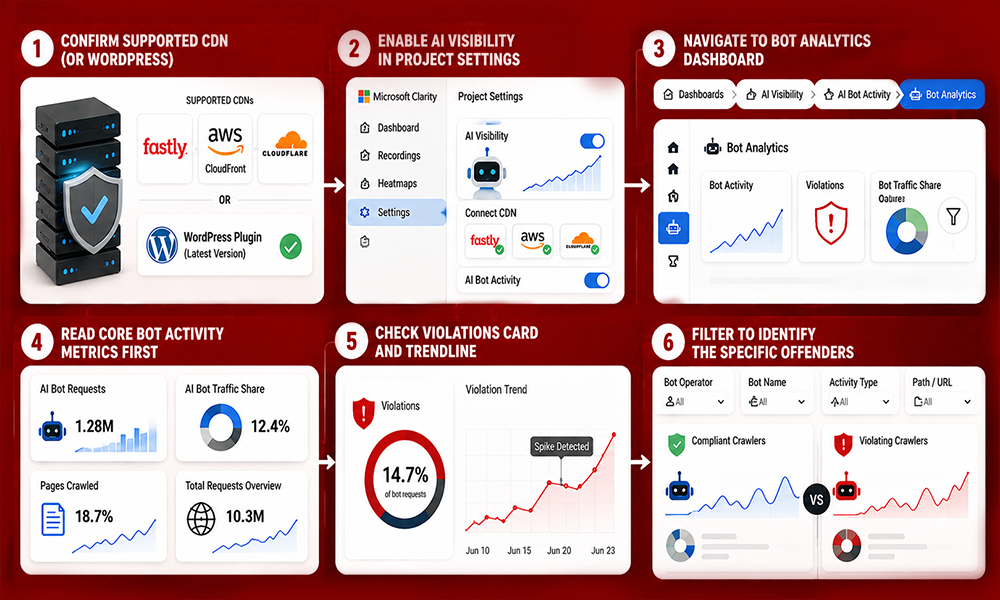
The feature doesn’t work for every site automatically. It requires either:
- A connected CDN from one of three supported providers: Fastly, Amazon CloudFront, or Cloudflare, or
- The latest version of the Microsoft Clarity WordPress plugin (older plugin versions need to be updated first).
This requirement exists because the underlying Bot Activity data comes from server-side CDN logs rather than client-side JavaScript tracking, which is what makes the bot attribution accurate enough to trust for this kind of analysis in the first place.
Step 2: Enable AI Visibility in Project Settings
The violations feature sits inside Clarity’s broader AI Visibility section, and it isn’t turned on automatically:
- Log into your Microsoft Clarity dashboard.
- Go to Project Settings.
- Open the AI Visibility section.
- Connect your supported CDN if you haven’t already Clarity’s self-serve onboarding flow will show you currently supported providers and any upcoming integrations.
- A project admin needs to explicitly enable the feature here; it won’t appear by default just because your CDN is connected.
If you’re on WordPress with the latest Clarity plugin, this step is largely automatic AI Bot Activity becomes available without the manual CDN connection process.
Step 3: Navigate to the Bot Analytics Dashboard
Once enabled, find the data at:
Dashboards → AI Visibility → AI Bot Activity → Bot Analytics
This is where the violations card, trendline, and filtering options live, alongside Clarity’s broader bot activity metrics.
Step 4: Read the Core Bot Activity Metrics First
Before diving into violations specifically, it’s worth understanding the baseline metrics Clarity surfaces for all bot traffic:
- AI bot requests (total volume) — the absolute number of requests from AI crawlers and automated systems.
- AI bot traffic share (%) — how much of your overall site traffic is automated.
- Pages crawled (%) — the proportion of your site’s pages being accessed by bots.
- Total requests overview — a unified view anchoring bot activity against all site traffic.
These give you the context to interpret violations meaningfully. A 5% violation rate against a small slice of bot traffic reads very differently than the same percentage against a crawler responsible for a large share of your total requests.
Step 5: Check the Violations Card and Trendline
With baseline context established, move to the violations data specifically:
- Look at the Violations card for the current violation rate as a percentage of total bot requests.
- Check the trendline for the same time period is the rate stable, rising, or did it spike around a specific date?
- If you see a spike, cross-reference the date against any recent AI model launches or known crawler updates, since a new model release is a common trigger for sudden upticks in non-compliant crawling.
Step 6: Filter to Identify the Specific Offenders
This is where the feature becomes genuinely actionable rather than just descriptive:
- Filter by bot operator to see which companies’ crawlers are generating violations.
- Drill down further by specific bot name within that operator.
- Filter by activity type and requested URL/path to see exactly what content the non-compliant crawler is targeting.
- Use the side-by-side compliant-vs-violating view to spot patterns — for instance, whether violations cluster around specific high-value content sections.
What to Do With This Data
A few practical next steps once you’ve identified offenders:
- Confirm it’s not a false positive. Some bots spoof user-agent strings; cross-check against known operator IP ranges where possible.
- Decide whether enforcement is warranted. Since robots.txt can’t block anything itself, persistent violations may justify a CDN or WAF-level rule that actually stops the requests.
- Track the trend, not just one snapshot. A one-time spike might be a temporary crawler test; a sustained rise is a stronger signal worth acting on.
- Check your own robots.txt logic too. If you want a specific AI assistant to cite your content, a violation from that operator’s bot might mean it’s reaching pages you didn’t intend to restrict.
A Reference: Common AI Crawlers and Compliance
| Bot | Operator | Purpose | Generally Respects robots.txt? |
| GPTBot | OpenAI | Training + retrieval for ChatGPT | Yes |
| OAI-SearchBot | OpenAI | Real-time search for ChatGPT | Yes |
| ChatGPT-User | OpenAI | User-initiated browsing | Yes |
| ClaudeBot | Anthropic | Training for Claude | Yes |
| Google-Extended | Training for Gemini | Yes | |
| Bingbot | Microsoft | Search indexing + Copilot retrieval | Yes |
| CCBot | Common Crawl | Open dataset for many AI labs | Yes |
| PerplexityBot | Perplexity | Real-time retrieval for answers | Yes |
| Applebot-Extended | Apple | Training for Apple Intelligence | Yes |
| Bytespider | ByteDance | Training data collection | Claims to, disputed |
This list changes frequently as new crawlers launch treat it as a starting reference; your own Clarity dashboard data will always be more current.
Why Microsoft Built This
Microsoft’s own research, published in December 2025, found AI-referred traffic grew 155% over eight months, while still under 1% of total visitors studied. The same research found AI-sourced visitors converted to sign-ups at 1.66%, versus 0.15% from organic search an 11-fold advantage despite the smaller volume.
That combination of fast growth and disproportionate value is the underlying reason Microsoft keeps building out this measurement layer rather than just filtering bot traffic out.
Frequently Asked Questions
Do I need a paid Clarity plan to see robots.txt violations?
No. Clarity’s Bot Analytics, including the violations feature, is part of Clarity’s free analytics platform. You do need a supported CDN connection (Fastly, Amazon CloudFront, or Cloudflare) or the latest WordPress plugin version to access it.
Does Clarity actually block bots that violate robots.txt?
No. Clarity only measures and reports violations; it doesn’t enforce blocking. Robots.txt itself is advisory, so any actual enforcement requires a separate CDN or WAF-level rule configured outside of Clarity.
Which CDNs work with Microsoft Clarity’s bot monitoring?
Fastly, Amazon CloudFront, and Cloudflare are the currently supported CDN providers. WordPress sites can get equivalent functionality through the latest Microsoft Clarity plugin without a separate CDN connection.
What’s the difference between Bot Activity and the new Violations feature?
Bot Activity shows overall AI crawler traffic volume, share of total traffic, and which pages are crawled. The Violations feature specifically isolates requests that reached paths your robots.txt disallows, shown as a percentage of total bot activity with trend tracking.
Why would an AI crawler ignore robots.txt in the first place?
Robots.txt has no technical enforcement mechanism, so compliance depends entirely on the crawler operator choosing to follow it. Most major AI companies’ crawlers generally comply, but violations can come from misconfigured crawlers, less-established operators, or bots that don’t prioritize compliance.