AI Summary
Image SEO comes down to five levers: descriptive alt text, keyword-rich filenames, modern compressed formats (WebP/AVIF), correct technical markup (width/height, srcset, lazy loading), and structured data (ImageObject schema). Alt text remains the single highest-impact factor, since Googlebot can’t interpret pixels directly and relies on explicit description. Most sites underperform here not from lacking strategy, but from skipping the basics entirely, missing alt text, generic filenames, and oversized files are still the norm on the majority of websites.
Why Image SEO Gets Ignored (And Why That’s a Mistake)
Most SEO effort goes toward titles, meta descriptions, and backlinks images get uploaded as an afterthought, named whatever the camera or screenshot tool assigned, and left without a single word of description.
That gap is exactly the opportunity: image search results appear on a meaningful share of Google SERPs, Google Lens processes billions of visual queries monthly, and AI systems like AI Overviews increasingly cite well-structured, properly-attributed images. Every unoptimized image on your site is lost visibility you’re not competing for.
This guide covers the five implementation areas that actually determine whether your images rank in order of impact, with exact specifications you can apply today.
Lever 1: Alt Text (Highest Impact, Most Neglected)
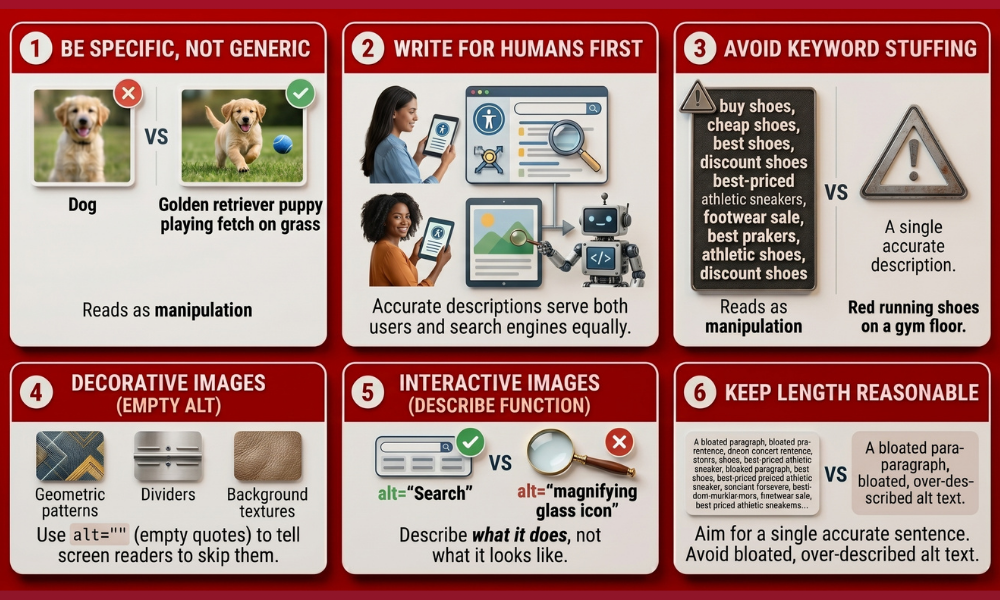
Alt text is the single most important image SEO signal because Googlebot doesn’t interpret pixels directly it relies on the code around an image, and the alt attribute is the most direct, unambiguous source of meaning available.
The rules that actually matter:
- Be specific, not generic. “Dog” tells a crawler almost nothing; “golden retriever puppy playing fetch on grass” tells it everything.
- Write for humans first. A screen reader user needs the same accurate description a crawler benefits from, these two audiences want the same thing.
- Avoid keyword stuffing. Repeating variations of a keyword inside one alt attribute reads as manipulation to both screen readers and ranking systems, and tends to underperform a single natural description.
- Use empty alt text for decorative images. alt=”” tells screen readers to skip purely aesthetic elements (dividers, background patterns), this is different from omitting the attribute entirely, which causes screen readers to read the filename instead.
- Describe function for interactive images. An icon used as a search button should have alt=”Search”, not alt=”magnifying glass icon”, describe what it does, not just what it looks like.
- Keep length reasonable. Aim for a single accurate sentence, long enough to be specific, short enough to stay useful. There’s no hard word-count rule, but bloated, over-described alt text serves neither users nor rankings.
Bad: alt=”image1″ Weak: alt=”shoes” Strong: alt=”navy blue men’s running shoes, side view”
Lever 2: Filenames (The Signal People Skip)
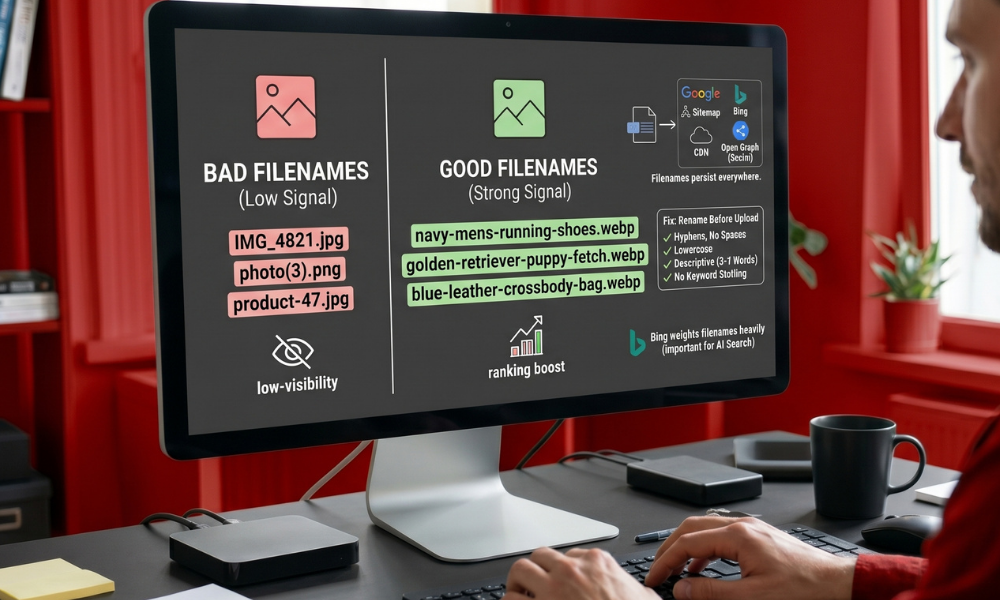
Filenames are a confirmed, if lighter-weight, ranking signal and they matter beyond just Google. Filenames persist everywhere alt text doesn’t: in image sitemaps, CDN URLs, srcset attributes, and Open Graph tags. Bing in particular is known to weight filenames heavily, which matters since several AI search tools sit on top of Bing’s index when citing images in responses.
The fix is mechanical:
- Rename the file before uploading renaming after the fact in your CMS doesn’t always update the underlying URL.
- Use lowercase letters and hyphens, never underscores or spaces: navy-mens-running-shoes.webp, not Navy_Mens_Running_Shoes.webp.
- Keep it brief but descriptive five to seven words covers almost any image accurately.
- Avoid stuffing every possible keyword variant into one filename; describe the actual subject.
| Bad Filename | Good Filename |
| IMG_4821.jpg | navy-mens-running-shoes.webp |
| photo (3).png | golden-retriever-puppy-fetch.webp |
| product-47.jpg | blue-leather-crossbody-bag.webp |
Lever 3: File Format and Compression
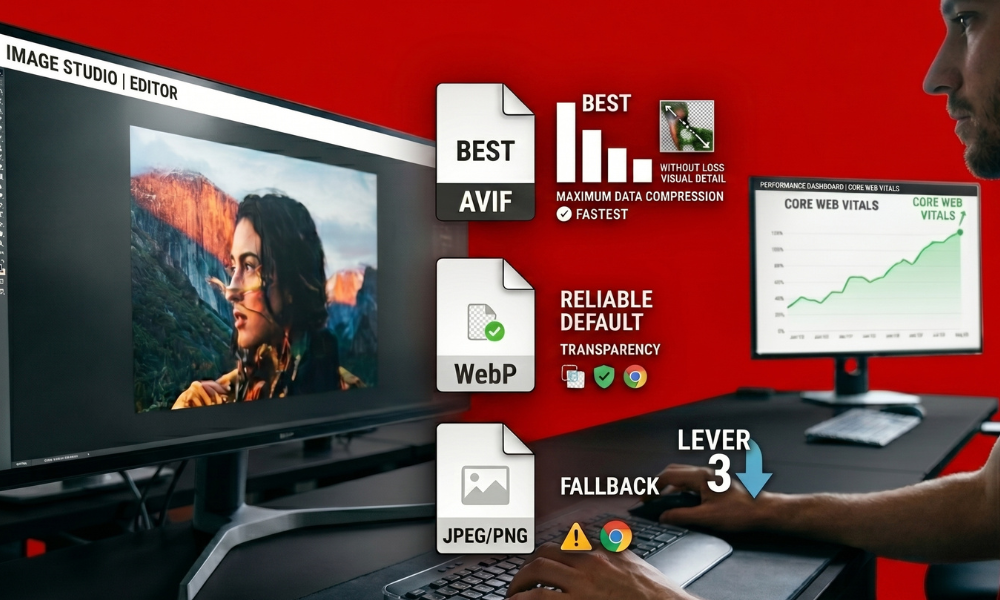
Format choice is the single biggest lever for page weight, and page weight feeds directly into Core Web Vitals, which is itself a confirmed ranking factor.
The current format hierarchy:
- AVIF — best compression available, often significantly smaller than JPEG at equivalent visual quality; encoding is more CPU-intensive and a small number of older browsers still lack support.
- WebP — the reliable default. Notably smaller than JPEG, supports transparency (unlike JPEG), and has near-universal browser support.
- JPEG/PNG — fallback only, for the rare legacy browser that can’t render either modern format.
Recommended implementation — serve AVIF first, WebP as the fallback, and JPEG/PNG as the final safety net, using the <picture> element:
<picture>
<source srcset=”/hero.avif” type=”image/avif”>
<source srcset=”/hero.webp” type=”image/webp”>
<img src=”/hero.jpg” alt=”Team reviewing organic traffic dashboard” width=”1920″ height=”1080″>
</picture>
This gives every visitor the smallest file their browser supports, without sacrificing compatibility for anyone.
Lever 4: Technical Implementation

Even perfectly-described, perfectly-compressed images underperform if the underlying markup is wrong. Four specifics matter most:
- Always set explicit width and height attributes. This reserves layout space before the image loads, preventing Cumulative Layout Shift (CLS) a direct Core Web Vitals signal.
- Use srcset and sizes for responsive delivery. Sending a 2000px-wide image to a 390px phone screen wastes bandwidth and slows load for no visual benefit.
- Lazy-load anything below the fold. Images outside the initial viewport shouldn’t compete for bandwidth with what the user sees first.
- Never rely on CSS background images for content that matters. Search engines don’t index images loaded purely through CSS anything you want discovered needs a standard <img> element.
<img
src=”/img/hero-1200.webp”
srcset=”/img/hero-640.webp 640w, /img/hero-1200.webp 1200w, /img/hero-2000.webp 2000w”
sizes=”(max-width: 768px) 100vw, 1200px”
width=”1200″ height=”630″
alt=”Example hero image used for landing page”
>
Lever 5: Structured Data (ImageObject Schema)

Schema markup gives search engines and AI systems explicit facts about an image instead of leaving them to infer everything. This matters increasingly for AI Overview citations, since these systems prioritize sources they can attribute confidently, creator and license fields specifically improve citation likelihood.
{
“@context”: “https://schema.org”,
“@type”: “ImageObject”,
“contentUrl”: “https://example.com/hero.webp”,
“license”: “https://example.com/license”,
“acquireLicensePage”: “https://example.com/how-to-license”,
“creditText”: “Your Site Name”,
“creator”: { “@type”: “Person”, “name”: “Photographer Name” },
“copyrightNotice”: “© 2026 Your Site Name”,
“width”: “1600”,
“height”: “900”
}
Pair this with an XML image sitemap for any site with a large or frequently-updated image library, it explicitly tells Google which image URLs exist, which speeds up discovery considerably for JavaScript-heavy pages where a normal crawl might miss lazy-loaded images entirely.
<url>
<loc>https://example.com/articles/image-seo</loc>
<image:image>
<image:loc>https://example.com/hero.webp</image:loc>
<image:title>Team reviewing organic traffic dashboard</image:title>
<image:caption>Weekly SEO review session</image:caption>
</image:image>
</url>
Context Still Matters as Much as the Image Itself
None of the five levers above work in isolation from the page they sit on. Placing an image near genuinely relevant text the right heading, the right paragraph, an accurate caption confirms to search engines what the file actually represents. An image floating in an unrelated section of a page, however well-optimized technically, sends a confusing signal.
A simple internal check: if you removed the image entirely, would the surrounding text still clearly describe what it showed? If not, the context needs strengthening before the alt text or schema can do its job properly.
E-Commerce: A Special Case Worth Calling Out
Product images carry more direct revenue weight than almost any other image category, so a few extra rules apply:
- Use multiple unique angles per product — shoppers expect to see more than one view, and duplicate stock-style photos rank worse than original photography.
- Add Product schema alongside ImageObject — this is what surfaces pricing, availability, and ratings inside Google Lens shopping results specifically.
- Keep product photos on a clean, consistent background — this measurably improves how confidently computer vision systems identify the subject, which factors into Lens visibility.
Common Mistakes That Undercut Everything Else
- Leaving the alt attribute blank rather than using alt=”” intentionally for decorative images, these are not the same thing, and blank attributes often cause screen readers to read the raw filename instead.
- Renaming files after upload only in the CMS title field, leaving the actual file URL unchanged.
- Shipping multi-megabyte images straight from a camera or stock site without compression.
- Treating filenames as an afterthought under alt text, when in practice they’re a separate, persistent signal that survives even when alt text gets stripped (as it often is on social platforms).
- Loading important visual content purely through CSS, where it’s invisible to crawlers entirely.
- Skipping schema because it “seems technical”, most CMS platforms and plugins can automate this with minimal manual work.
A Practical Rollout Order
If you’re tackling this for an existing site rather than a fresh build, this order yields the fastest visible improvement:
- Audit your highest-traffic pages first — homepage, top product pages, top blog posts, rather than trying to fix the entire media library at once.
- Fix alt text and filenames together on those pages, since they reinforce each other when aligned.
- Convert to WebP/AVIF and verify width/height attributes are present.
- Add ImageObject schema to your most important, most-linked images.
- Submit an image sitemap if you haven’t already, especially for large catalogs.
- Work backward through lower-traffic pages once the highest-impact pages are handled.
Frequently Asked Questions
What’s the single highest-impact thing I can do for image SEO today?
Write accurate, specific alt text for every meaningful image on your site. It’s the most direct signal search engines use to understand image content, and it’s also the most commonly skipped or left generic across the average website.
Do I need to convert all my images to WebP or AVIF right now?
WebP is the safe, universally-supported baseline worth adopting immediately. AVIF offers further savings but isn’t strictly required, serving AVIF with a WebP fallback through the <picture> element gets you the best of both without sacrificing compatibility.
Does image file size really affect SEO, or just page speed?
Both, and they’re connected. Large, uncompressed images slow page load, which directly impacts Core Web Vitals, a confirmed ranking factor, so file size affects rankings indirectly through performance, not as a separate isolated signal.
Is structured data necessary for small sites, or just large e-commerce catalogs?
It helps any site, though the payoff scales with traffic and image volume. Even a small site benefits from ImageObject schema on its most important images, particularly for AI Overview citation potential.
Can I skip alt text on every image if my page already has strong written content?
No. Surrounding text supports image understanding but doesn’t replace alt text, since Googlebot still relies on the alt attribute as the most direct image-specific signal strong page content and strong alt text work together, not as substitutes for each other.