
AI Summary
Search engines don’t “see” images the way humans do, they reconstruct meaning from signals around the file: alt text, filename, surrounding text, structured data, and increasingly, computer vision analysis of the pixels themselves. Google crawls the image, extracts these signals, indexes the image against likely search queries, then ranks it using a mix of relevance, visual quality, and page authority. Most sites underperform here simply because alt text is missing or vague not because of anything more complex.
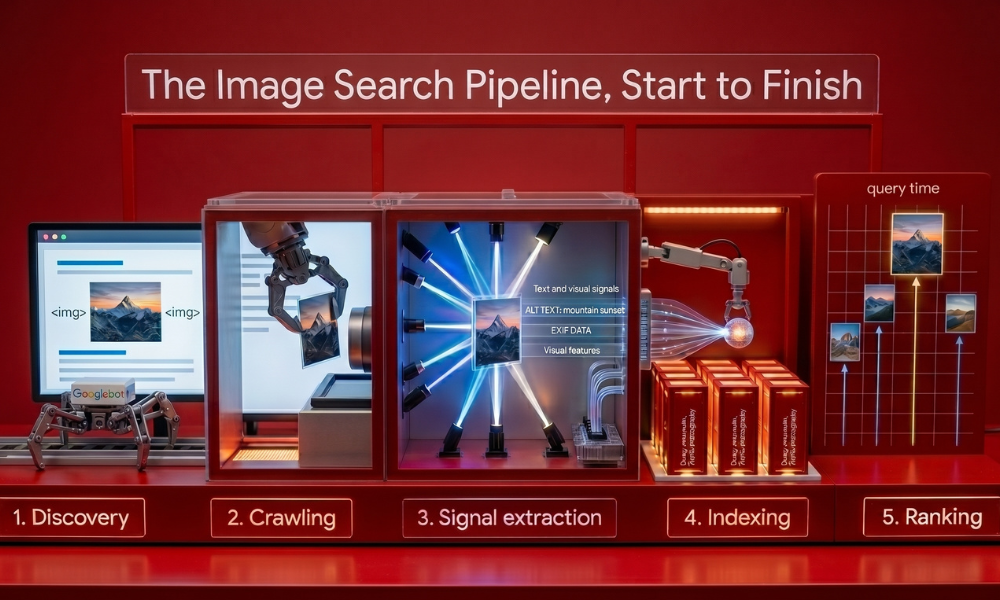
Every image that ranks in search went through the same five-stage pipeline. Understanding each stage explains why some images rank and others often higher quality ones don’t.
- Discovery → Googlebot finds the image, either through a standard <img> tag, an image sitemap, or a linked page. 2. Crawling → The image file itself is fetched and analyzed. 3. Signal extraction → Text and visual signals are pulled from the file and its surrounding context. 4. Indexing → The image is stored against the queries and topics it’s judged relevant to. 5. Ranking → At query time, the image competes against every other indexed image for that search.
Most image SEO failures happen at stage 3 the image gets crawled fine, but almost no usable signal is extracted from it, so it never indexes against anything meaningful.
Stage 1–2: How Images Get Discovered and Crawled

Search engines find images mainly through standard HTML image elements. Google can find images inside the src attribute of an <img> element, even when nested inside other elements like <picture>, but it doesn’t index images that are loaded purely through CSS backgrounds, which is a common, costly mistake on visually-heavy sites.
For large image libraries e-commerce catalogs, photography portfolios, news archives an XML image sitemap matters more than most site owners realize. It explicitly tells Google which image URLs exist, which speeds up discovery considerably for JavaScript-heavy sites where Googlebot may not render every lazy-loaded image on a normal crawl pass
Stage 3: What Signals Search Engines Actually Extract
This is the stage that determines almost everything downstream. Search engines combine two categories of signal:
Text-Based Signals
- Alt text — still widely regarded as the single most influential ranking signal for image search, because it’s the most direct, unambiguous description of what the image contains.
- Filename — navy-mens-running-shoes-size-10.webp tells a crawler far more than IMG_4821.jpg. Filenames have functioned as a direct ranking signal for years.
- Surrounding context — the heading above an image, the paragraph beside it, and any caption or figcaption all feed into how the image is understood and which queries it’s associated with.
- Structured data — ImageObject schema lets you explicitly declare attributes (creator, license, caption) rather than hoping the crawler infers them correctly.
Visual Signals (Computer Vision)
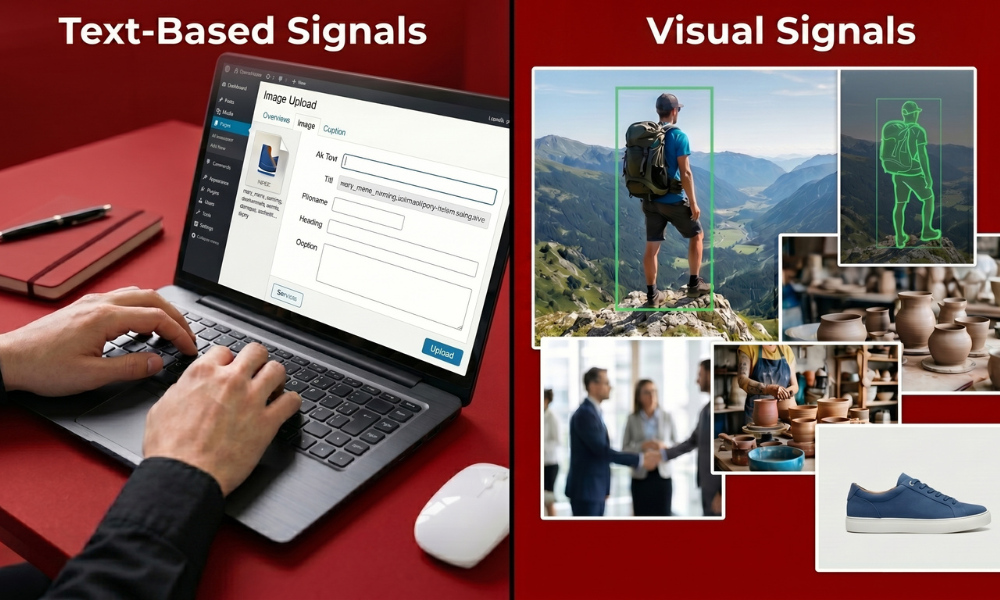
- Object and entity recognition — the same underlying computer vision technology behind Google Lens also informs regular image indexing, identifying what’s actually depicted independent of any text on the page.
- Visual quality and uniqueness — heavily duplicated stock photos get deprioritized in favor of original images, since an image seen on thousands of sites carries little distinguishing signal.
- Composition — a clear, well-lit, uncluttered subject is easier for vision models to classify confidently than a busy or low-quality shot.
The two categories reinforce each other. Strong alt text with a poor, blurry photo behind it still underperforms and a great photo with no text signal around it often goes completely unindexed for relevant terms.
Stage 4: How Indexing Actually Works
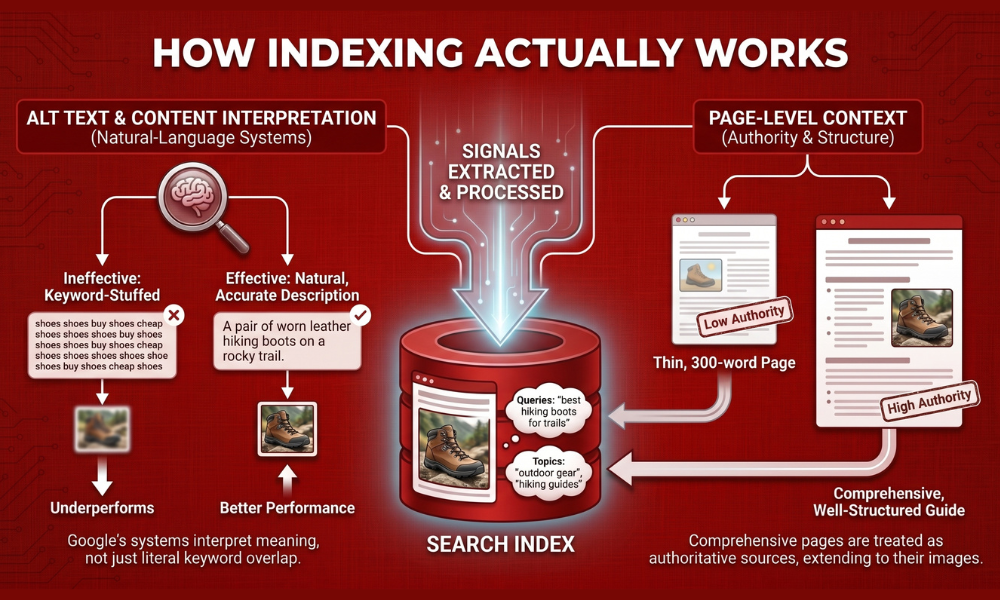
Once signals are extracted, the image gets stored in the index alongside the queries and topics it’s judged likely to satisfy. This isn’t a simple keyword match Google’s natural-language systems interpret the meaning behind alt text and surrounding content, not just literal keyword overlap.
This is part of why keyword-stuffed alt text (“shoes shoes buy shoes cheap shoes”) tends to underperform compared to a natural, accurate description.
Indexing also accounts for page-level context. An image sitting on a thin, 300-word page competes differently than the same image embedded in a comprehensive, well-structured guide comprehensive pages are more likely to be treated as authoritative sources for the topic, which extends to the images they contain.
Stage 5: How Ranking Actually Gets Decided
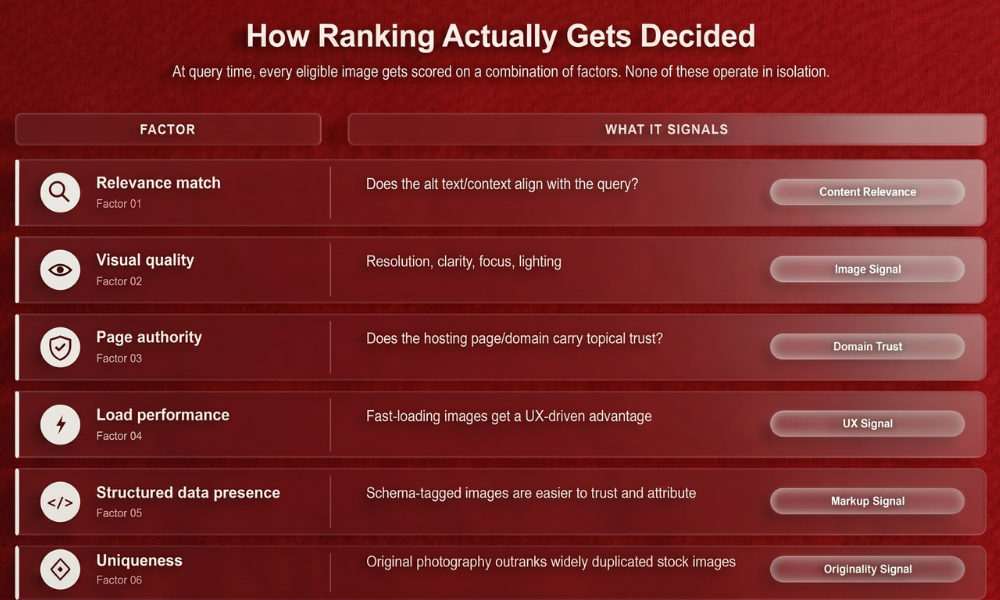
At query time, every eligible image gets scored on a combination of factors. None of these operate in isolation:
| Factor | What It Signals |
| Relevance match | Does the alt text/context align with the query? |
| Visual quality | Resolution, clarity, focus, lighting |
| Page authority | Does the hosting page/domain carry topical trust? |
| Load performance | Fast-loading images get a UX-driven advantage |
| Structured data presence | Schema-tagged images are easier to trust and attribute |
| Uniqueness | Original photography outranks widely duplicated stock images |
A useful distinction: page authority isn’t a prerequisite for image ranking the way it is for text ranking. A product photo on a smaller site can outrank the same photo on a major retailer’s page if it has stronger alt text, correct structured data, and better technical setup page authority still helps, but it doesn’t gate image ranking the same way it gates standard text rankings.
How This Differs Across Search Surfaces
“Image search” isn’t one single product anymore, and each surface weighs signals slightly differently:
- Google Images tab — classic text + visual signal blend described above.
- Google Lens / visual search — leans far more heavily on visual matching; an object needs to be a clear, unambiguous focal point, and product images benefit specifically from Product schema.
- AI Overviews and AI Mode — images get pulled into generated answers based on how attributable and well-sourced they are; schema fields like creator and license matter more here than in classic image search, since these systems prioritize sources they can cite confidently.
- Image packs inside regular search results — blend relevance to the text query with the same visual/technical signals as the Images tab.
Optimizing well for one surface generally helps across all of them, since the underlying signals alt text, schema, quality, context feed every surface simultaneously rather than requiring separate strategies.
Common Mistakes That Block Indexing Entirely
- CSS background images — never crawled the same way <img> tags are; anything important shouldn’t live purely in CSS.
- Missing or generic alt text — “image1,” “photo,” or a blank attribute gives the crawler nothing to index against.
- No image sitemap on large catalogs — leaves Google guessing about which images exist rather than discovering them directly.
- Heavy, unoptimized files — large file sizes slow page load, which factors into ranking and can also delay crawling on large sites with limited crawl budget.
- Duplicate stock imagery — visually identical to thousands of other pages, giving search engines no unique signal to rank it on.
- Keyword-stuffed alt text — reads as manipulation to both users (via screen readers) and ranking systems, and tends to underperform natural description.
A Practical Checklist for Getting Images Properly Understood
- Write specific, natural alt text describing what’s actually in the image no keyword stuffing.
- Use descriptive, hyphenated filenames before upload, not camera-default names.
- Add ImageObject structured data, including creator and license fields where applicable.
- Place images near genuinely relevant text, headings, captions, and surrounding paragraphs all count as context.
- Submit an XML image sitemap for any site with a large or frequently-updated image library.
- Compress and serve modern formats (WebP/AVIF) to protect load speed without sacrificing visible quality.
- Avoid CSS-only image implementation for anything you want indexed.
- Prefer original photography over stock images wherever feasible, especially for product and hero images.
Frequently Asked Questions
Do search engines actually “look at” the pixels in an image, or just read the text around it?
Both. Computer vision analyzes the visual content directly to identify objects and scenes, while text signals like alt text and surrounding context provide additional meaning the visual analysis alone can’t capture, such as brand names or specific use cases.
Is alt text still the most important image SEO factor?
Yes, alt text remains widely regarded as the single strongest direct signal for image ranking, since it’s the clearest, most unambiguous description of an image’s content available to a crawler.
Can an image rank well even on a low-authority website?
Yes. Image ranking depends less on domain authority than text ranking does, strong alt text, correct structured data, and good technical setup can outrank the same image on a higher-authority site, though authority still provides some advantage.
Why doesn’t Google index my background images?
Google doesn’t index images that are loaded purely through CSS backgrounds. Any image you want discovered and ranked should use a standard HTML <img> element instead.
Does an image sitemap actually make a measurable difference?
Yes, particularly for large or JavaScript-heavy sites. It explicitly tells search engines which image URLs exist, speeding up discovery for images that might otherwise go uncrawled during a standard page render.