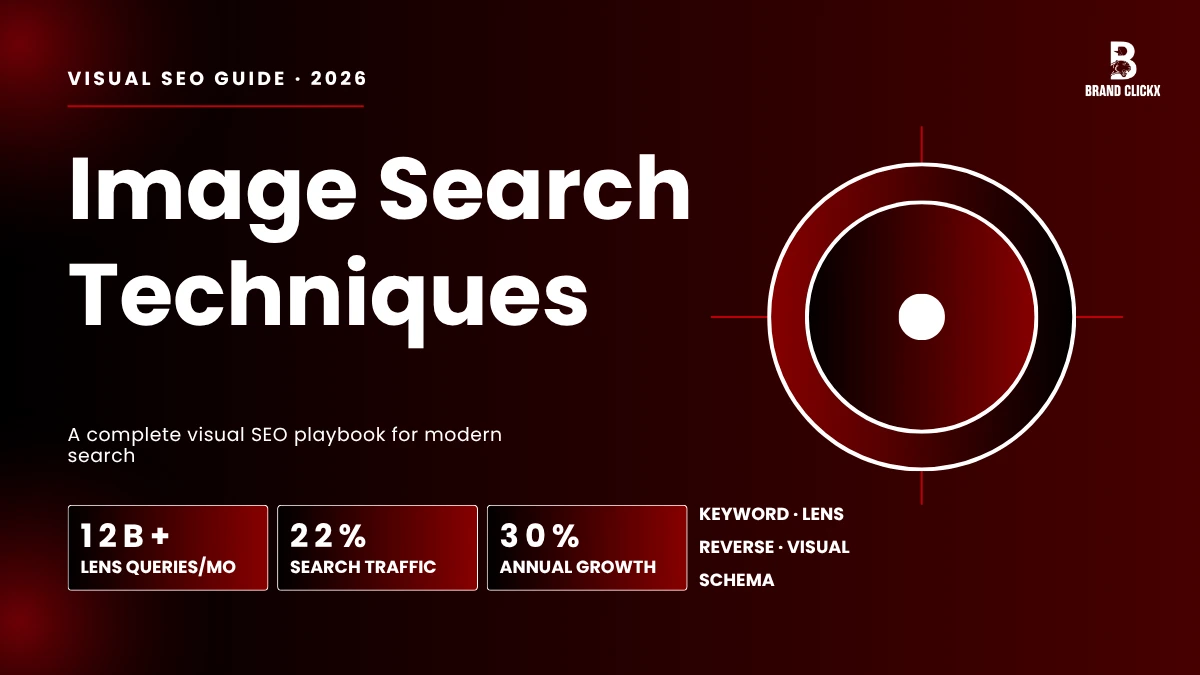
KEY TAKEAWAYS
✓ 10 image search techniques explained with real examples
✓ 9 Google Images ranking factors with optimization steps
✓ Tool comparison table: Google Images, Lens, TinEye, Bing, Yandex, Pinterest
✓ Complete image SEO checklist for 2026
✓ Schema markup templates (JSON-LD) you can copy and use
1. Introduction
Type a few words into Google, and you’ll get a wall of text results. Point your camera at something instead, and increasingly, that’s how people search now. Image search techniques are simply the methods and strategies behind finding, identifying, ranking, and optimizing images across search engines, and if you’re building an SEO strategy in 2026 without accounting for them, you’re leaving a huge chunk of traffic on the table.
Google Lens alone now handles more than 20 billion visual searches every month, and Google Images still drives around 22% of all web search traffic. This isn’t a niche feature anymore; it’s foundational infrastructure.
What’s driving this shift is pretty intuitive once you think about it: visual search adoption has grown roughly 43% year-over-year, because people would rather show you what they mean than describe it.
A screenshot replaces a paragraph of typed context.
A photo of a plant replaces “what is this leafy thing with purple veins.” People search with what they see, not with what they can name, and if your images aren’t discoverable, your content is functionally incomplete, no matter how good the writing around it is.
This guide walks through the 10 core image search techniques, how search engines actually process visual content, which tools give you the best results, and the exact steps to get your visuals ranking across every Google surface: the Images tab, the Image Pack, AI Overviews, Google Lens, and Discover.
2. Why Image Search Techniques Matter in 2026
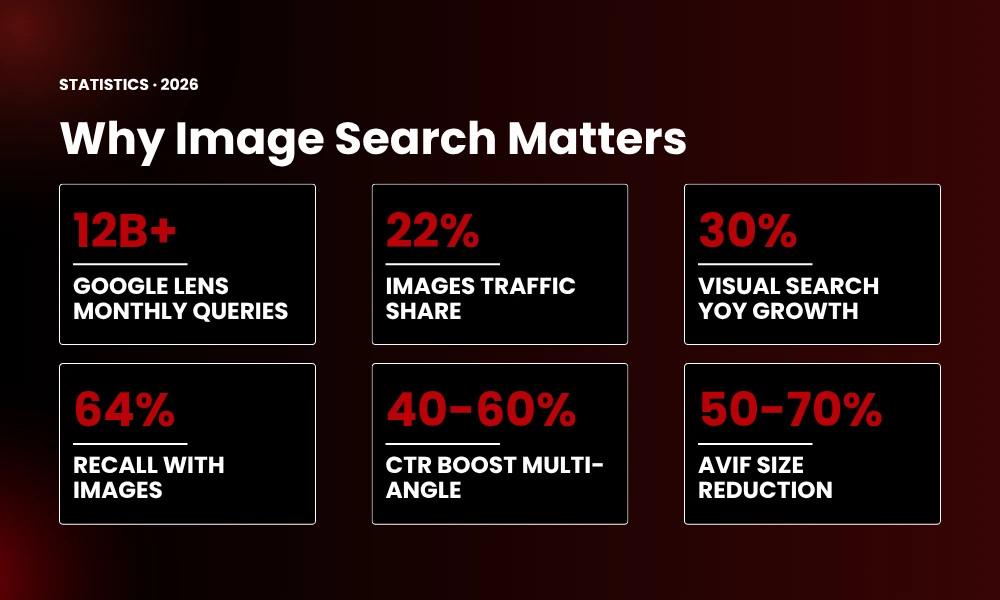
The move from text-first to visual-first search isn’t a passing trend, it’s a real structural shift in how people find information.
Key Statistics:
| Metric | Value |
|---|---|
| Google Lens monthly queries | 12 billion+ |
| Google Images traffic share | ~22% of all search |
| Visual search adoption growth | 30% year-over-year |
| Users who remember content with images | 64% |
| Multi-angle product image CTR boost | 40–60% |
| WebP size reduction vs JPEG | 25–35% |
| AVIF size reduction vs JPEG | 50–70% |
There’s also something worth noting about the quality of traffic image search sends you: people who click through from an image have usually already seen the visual context before they land on your page. They know roughly what they’re getting. That tends to mean lower bounce rates and higher conversion intent than a cold text-search click.
For ecommerce sites, recipe blogs, local service businesses, design portfolios, real estate listings, and tutorial content in particular, image search traffic isn’t a nice-to-have add-on, it’s often the primary growth lever for the whole site.
EXPERT TIP: Open your Google Search Console performance report and filter by “Search type: Image.” Most site owners never touch this tab. If your image impressions are flat while your overall page impressions are climbing, that’s a clear sign your visual content is under-optimized, and this one report will tell you exactly which pages need attention.
3. 10 Types of Image Search Techniques
Not every image search works the same way, and knowing the differences helps you pick the right method for the task and optimize your own visuals for the right discovery pathway.
3.1 Keyword-Based Image Search
This is the one everyone already knows: you type descriptive words into Google Images, Bing, or DuckDuckGo, and the engine matches your query against alt text, captions, filenames, surrounding page content, and other image SEO signals.
Best for: General image discovery, content creation, concept research, stock photo sourcing.
Pro tip: Reach for long-tail, descriptive phrases, “minimalist Scandinavian bedroom with natural light” beats a generic “bedroom” every time. The same precision you’d want in a search query is exactly what you should be putting into your own image optimization.
3.2 Reverse Image Search
Reverse image search flips the usual process on its head, instead of typing words to find an image, you upload an image to find out where it’s been. Where does it appear online? What’s visually similar to it? Where did it originally come from? What object, landmark, or product is actually in it?
Best for: Copyright protection, source verification, link building (finding sites using your images without credit), brand monitoring, competitive analysis.
How it works at the technical level: these engines break an image down into visual features, shapes, colors, patterns, edges, textures, and convert all of that into mathematical vectors called embeddings. Your image’s embedding then gets compared against billions of indexed images using cosine similarity, which is how the engine finds matches.
3.3 Visual Similarity Search
This one isn’t looking for the same file, it’s looking for images that feel aesthetically similar even though they’re completely different pictures. It’s the engine behind Pinterest Lens and Google Lens matching by style, color palette, and composition rather than exact content.
Best for: Fashion discovery, interior design inspiration, product hunting, aesthetic research.
3.4 Object Recognition Search
Here, AI picks out individual objects inside a photo and lets you search for just that piece rather than the whole image. Bing Visual Search takes this further by letting you literally draw a crop box around one object in a photo and search for that item alone.
Best for: Shopping, product identification, component sourcing, price comparison.
3.5 Facial Recognition Search
This technique matches faces across image databases with a surprising degree of precision. Yandex Images in particular leans hard into facial matching and often beats Google outright at this specific task.
Best for: Identity verification, fraud detection, security research, journalism fact-checking.
3.6 Color-Based Image Search
Sometimes you’re not looking for a subject at all, you’re looking for a palette. Both Google Images and Adobe Stock let you filter by dominant color or color scheme.
Best for: Brand identity work, design projects, color psychology research, creative direction.
3.7 Pattern-Based Image Search
This one identifies repeating textures, patterns, and designs across large collections of images, genuinely useful if you work in textiles, wallpaper, or surface design, where the pattern itself is the point.
Best for: Textile design, wallpaper sourcing, art history research, material discovery.
3.8 Metadata-Based Search
Every image can carry hidden data alongside its pixels, EXIF data (camera settings, lens, exposure), IPTC data (copyright, creator, keywords), and XMP data (rights management, workflow info), sometimes including geolocation.
Best for: Photo archiving, copyright enforcement, geolocation research, forensic analysis.
3.9 Context-Based Image Search
This is the layer most people don’t think about: the same image can rank differently for different people, because the engine factors in page context, your behavior, your search history, your device, your location, even the time of day.
Best for: Personalized discovery, local search optimization, mobile search experiences.
3.10 Multimodal AI Search
The newest and arguably most powerful technique , combining text, image, and voice in a single query. Google’s multimodal AI and ChatGPT’s vision tools now let you have an actual back-and-forth about what you’re looking at.
Best for: Complex research queries, conversational discovery, AI-assisted shopping, educational exploration.
4. Best Image Search Tools: Comparison Table
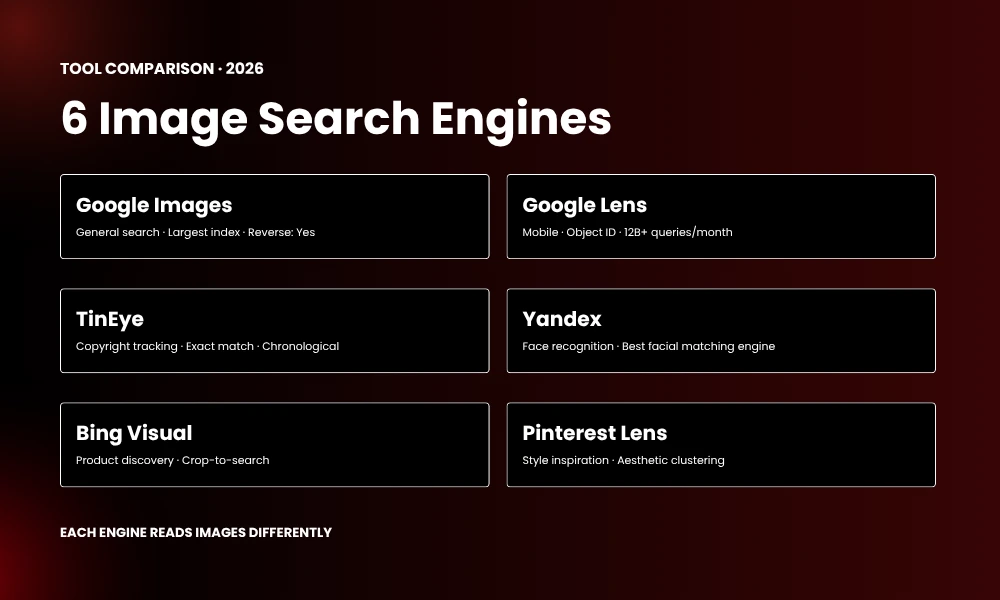
Each image search engine indexes differently and excels at different use cases. Understanding these differences helps you choose the right tool for each task.
| Tool | Best For | Reverse | Similarity | Unique Strength |
|---|---|---|---|---|
| Google Images | General search | Yes | Basic | Largest index |
| Google Lens | Mobile/object ID | Yes | Advanced | 12B+ monthly queries |
| TinEye | Copyright tracking | Yes | Exact match | Chronological results |
| Yandex | Face recognition | Yes | Moderate | Best facial matching |
| Bing Visual | Product discovery | Yes | Advanced | Crop-to-search |
| Pinterest Lens | Style inspiration | Partial | Style-based | Aesthetic clustering |
How to choose: reach for Google Images when you need volume, TinEye when you’re enforcing copyright, Yandex for facial matching, Bing for product-level object search, and Pinterest for style and aesthetic discovery. If you’re doing competitive SEO research, run the same image through all five and compare what text surrounds it in each engine’s top results, the differences tell you a lot.
5. Google’s 5 Image Search Surfaces
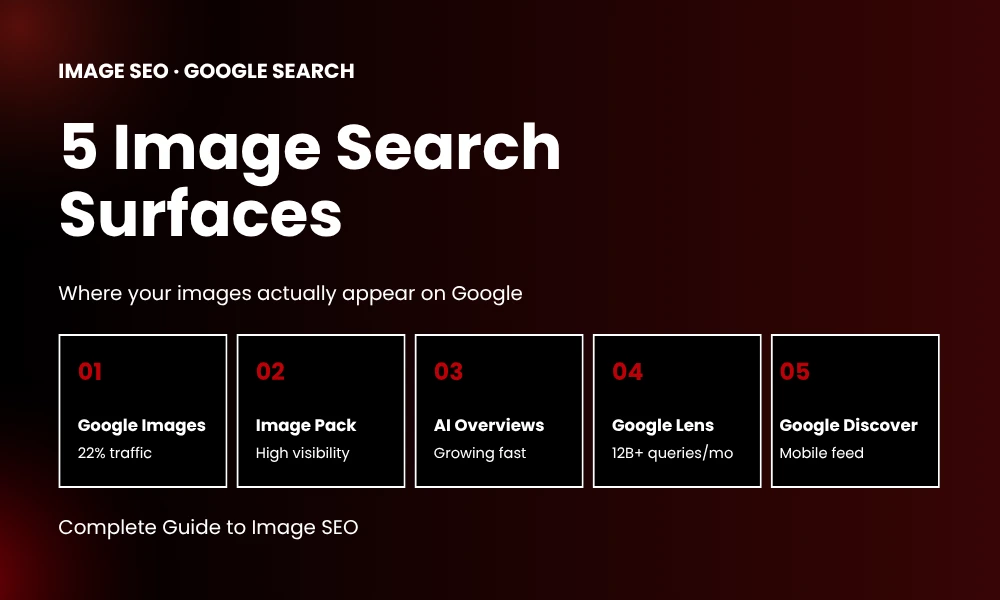
Most guides stop at Google Images, but that’s only one piece of the picture. Google actually displays and ranks images across five distinct surfaces, and each one plays by slightly different rules.
| Surface | Where | Traffic | Min Width | Key Signal |
|---|---|---|---|---|
| Google Images | images.google.com | ~22% | 800px | Alt text + authority |
| Image Pack | Main SERP carousel | High visibility | 1200px | Relevance + quality |
| AI Overviews | Above organic | Growing | 400px | ImageObject schema |
| Google Lens | Camera/visual | 12B+/mo | None | Visual similarity |
| Google Discover | Mobile feed | Significant | 1200px | Width + engagement |
Here’s the part worth remembering: a single well-optimized image can show up across all five surfaces at once. Strong alt text, ImageObject schema, 1200px width in WebP, and relevant surrounding context give you the best shot at multi-surface visibility, and missing even one of those signals tends to cap your visibility on at least two of the five.
6. How Search Engines Actually Read Images
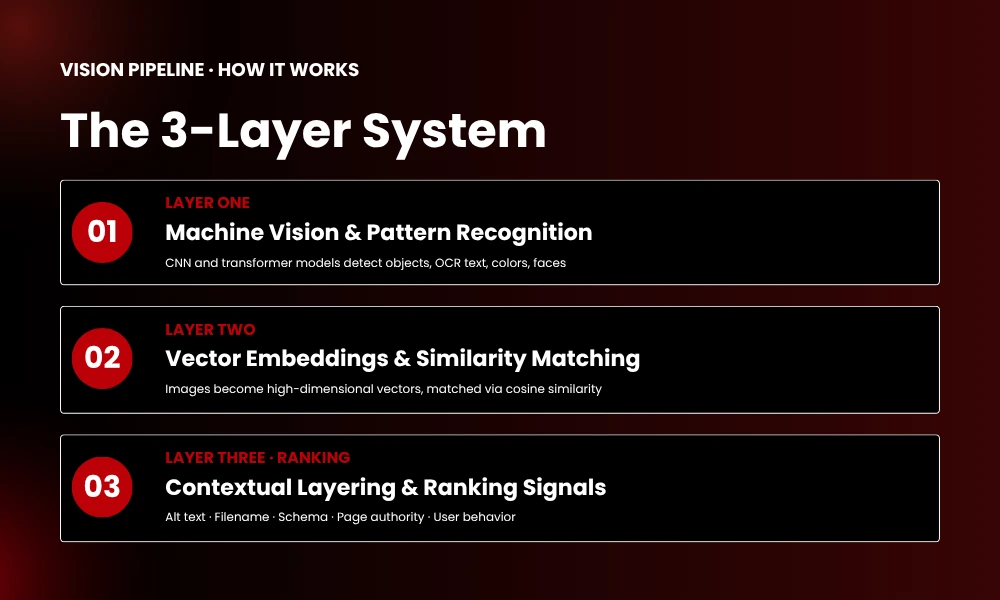
Search engines don’t “see” an image the way you do. They take it apart through a layered pipeline of computer vision, pattern recognition, and contextual inference.
6.1 Machine Vision and Pattern Recognition
The first pass is pure pixel analysis. Google’s and Bing’s vision models, built on convolutional neural networks and transformer architectures, pick out objects, read text via OCR, and identify colors, shapes, faces, and scenes.
6.2 Vector Embeddings and Similarity Matching
Once those features are extracted, the image gets converted into a high-dimensional vector embedding, essentially a mathematical fingerprint of what the image visually is. Google’s Multitask Unified Model (MUM) processes these embeddings alongside text embeddings, which is how it understands the relationship between an image and the words around it.
When a visual search runs, the engine compares your image’s embedding against billions of stored embeddings using cosine similarity. Whichever images have the smallest vector distance to yours rank highest.
6.3 Contextual Layering
The vision model tells the engine what’s physically in the image. Context is what tells it what the image means. That context stack includes the page topic, surrounding text, alt text, filename, caption, schema markup, and user behavior signals.
This is where most image optimization quietly fails. People pour all their effort into one layer, usually alt text, and ignore the other six entirely. Real optimization means getting all of them pointing the same direction.
7. The IMAGE SEO Framework: 6-Step Optimization System
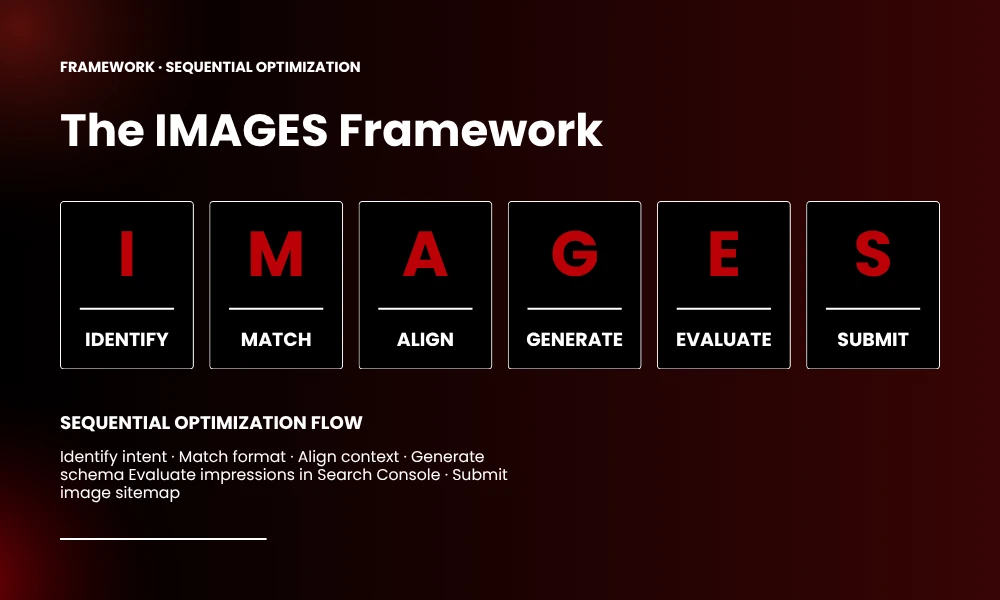
Most guides hand you a list of tips. This is a system instead, six sequential steps, spelling out IMAGE, that together push visibility across all five Google surfaces.
| Step | Action | Details |
|---|---|---|
| I | Identify Intent | Determine what someone would type or show to find this image |
| M | Match Format | Choose WebP/AVIF, 1200px width, correct aspect ratio for target surface |
| A | Align Context | Optimize all 7 layers: filename, alt text, surrounding text, heading, schema, caption, speed |
| G | Generate Schema | Add ImageObject JSON-LD; Product schema for ecommerce; Article schema for blogs |
| E | Evaluate | Track image impressions in Google Search Console; measure CTR and engagement |
| S | Submit Sitemap | Create dedicated image sitemap; submit via Google Search Console |
8. Image SEO Optimization Checklist
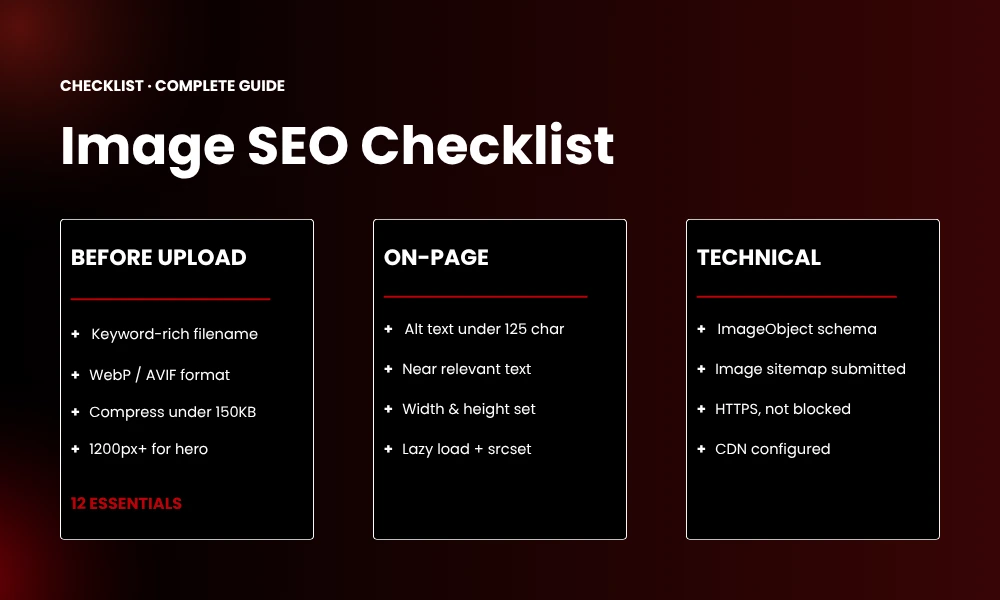
Use this checklist before publishing any page with optimized images.
Before Upload
- Filename is descriptive and keyword-rich (e.g., blue-leather-running-shoes.webp)
- File saved in WebP format (AVIF as progressive enhancement)
- Image compressed under 150KB (use Squoosh.app or ShortPixel)
- Dimensions: minimum 1200px wide for hero images
- Aspect ratio matches target surface (16:9 for Discover, 3:2 for articles)
On-Page Optimization
- Alt text written, specific, under 125 characters, includes target keyword naturally
- Image placed near relevant text (within 2 paragraphs)
- Heading (H2/H3) above the image contains semantic relevance
- Caption added where it adds context
- width and height attributes set in HTML (prevents layout shift)
- loading=”lazy” added for below-fold images
- srcset attribute with 3-4 responsive sizes (400w, 800w, 1200w)
Technical
- ImageObject schema added (JSON-LD)
- Image sitemap created and submitted to Google Search Console
- Image not blocked by robots.txt
- Image served over HTTPS
- CDN configured for image delivery
9. Reverse Image Search: Advanced Tactics
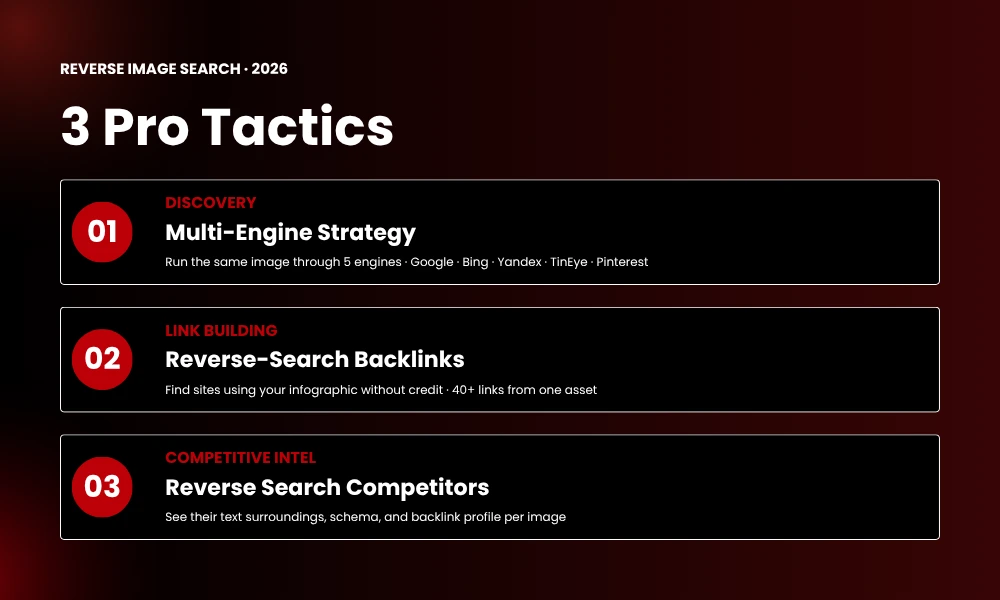
9.1 Using Multiple Engines Strategically
Each engine reads images differently. Google leans on context and authority. Bing leans harder into visual similarity. Yandex is aggressive with facial and object matching. Pinterest clusters everything by aesthetic style. TinEye is built for finding exact copies.
Run the same image through all five and pay attention to the differences, they reveal how each algorithm actually interprets the visual, and what surrounding text each one treats as relevant.
9.2 Link Building via Reverse Image Search
EXPERT TIP: Upload your original infographic, chart, or data visualization to Google Images and see who else is using it without crediting you. A polite outreach email asking for proper attribution with a backlink is one of the highest-ROI white-hat link building tactics you can run. We’ve personally built 40+ links from a single well-designed infographic using exactly this method.
9.3 Competitive Intelligence
Run a reverse search on your competitor’s hero images. You’ll see everywhere else those images appear, what text surrounds them on ranking pages, what schema they’re using, and who links to those pages. In a few minutes, you get a real look at their entire visual content strategy.
10. Google Lens Optimization
Google Lens isn’t a side feature anymore, it’s a primary search surface handling more than 20 billion queries a month, and optimizing for it takes a different approach than standard image SEO
10.1 How Google Lens Reads Images
Lens combines object detection, entity recognition (matching against Google’s Knowledge Graph), OCR for any text in the image, connections into the visual shopping graph, and scene understanding to interpret how objects relate to each other.
10.2 Optimization for Lens
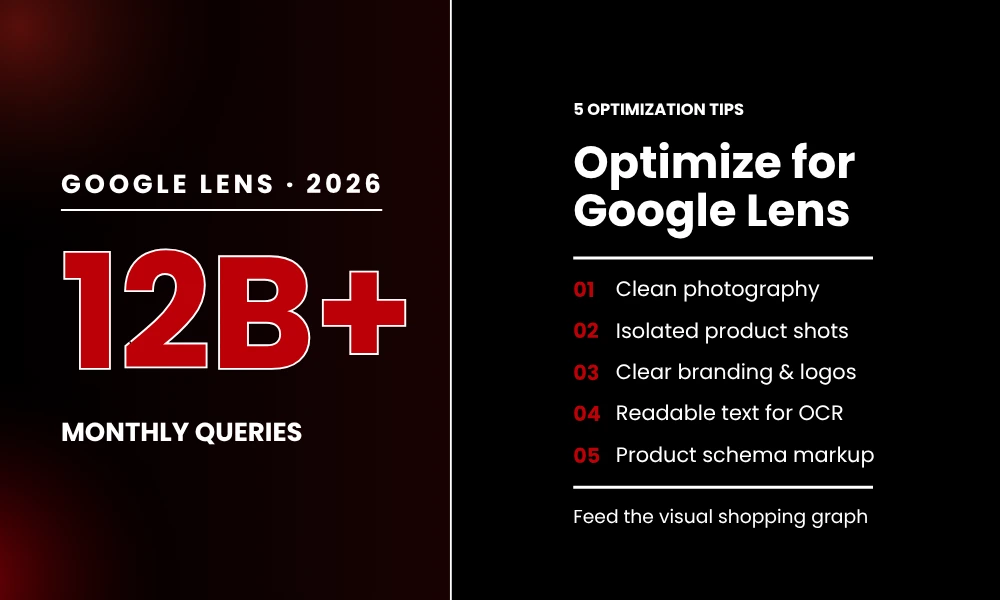
- Use clean, well-lit product photography – cluttered backgrounds reduce object detection accuracy
- Show products in isolation when possible – single-product shots outperform lifestyle shots
- Include recognizable branding, logos, and distinctive packaging to improve entity matching
- Ensure text in images is readable -Lens OCR reads signs, labels, and screenshots
- Add Product schema with high-resolution image URLs, feeds the visual shopping graph directly
11. Structured Data and Image Schema
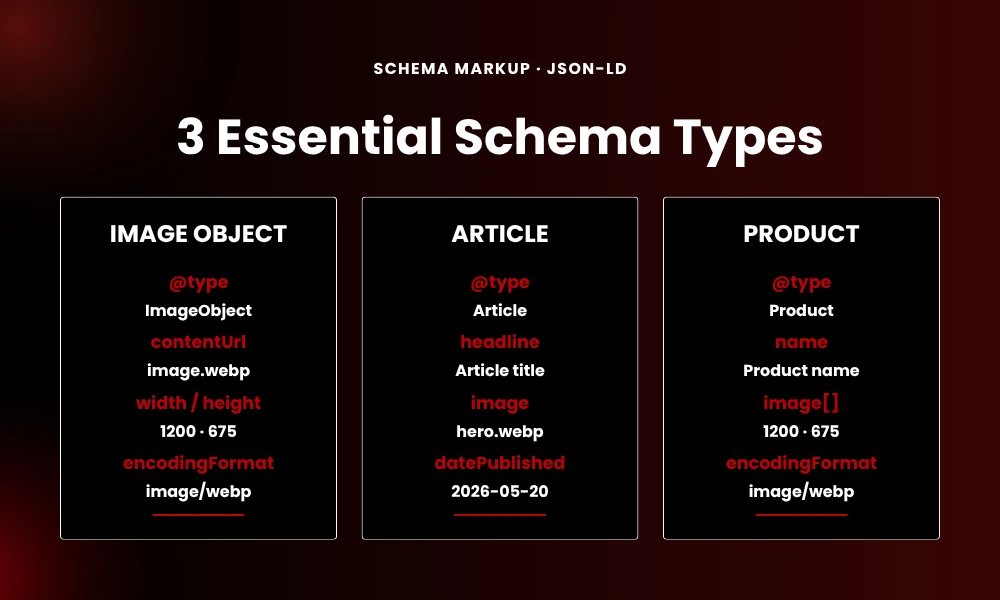
Structured data exists to remove ambiguity. It tells search engines exactly what an image is, who made it, what it represents, and how it should be treated. Without schema, an image is just a floating asset. With it, the image is anchored to your content, your brand, and real entities Google already understands.
11.1 ImageObject Schema Template
Add this JSON-LD to the <head> of any page with a key image:
{ “@context”: “https://schema.org”, “@type”: “ImageObject”, “contentUrl”:
“https://yoursite.com/images/photo.webp”, “width”: 1200, “height”: 675, “name”: “Descriptive Image Name”, “description”:
“Detailed description of the image content”, “creator”: { “@type”: “Organization”, “name”: “Your Brand” }, “encodingFormat”: “image/webp” }
11.2 Article Schema with Image
For blog posts and articles:
{ “@context”: “https://schema.org”, “@type”: “Article”, “headline”: “Your Article Title”, “image”:
“https://yoursite.com/images/hero.webp”, “author”: { “@type”: “Person”, “name”: “Author Name” }, “datePublished”: “2026-05-20”, “publisher”: { “@type”: “Organization”, “name”: “Your Brand” } }
11.3 Product Schema with Image Array
For ecommerce product pages:
{ “@context”: “https://schema.org”, “@type”: “Product”, “name”: “Blue Leather Running Shoes”, “image”:
[“https://yoursite.com/products/shoes-front.webp”, “https://yoursite.com/products/shoes-side.webp” ], “offers”: { “@type”: “Offer”, “price”: “129.99”, “priceCurrency”: “USD” } }
12. Image Sitemaps: XML Code Example
An image sitemap helps Google discover images that might not be found through normal crawling, particularly images loaded by JavaScript or those on pages with complex navigation.
12.1 Standalone Image Sitemap
| <?xml version=”1.0″ encoding=”UTF-8″?> <urlset xmlns=”http://www.sitemaps.org/schemas/sitemap/0.9″ xmlns:image=”http://www.google.com/schemas/sitemap-image/1.1″> <url> <loc>https://yoursite.com/page-url/</loc> <image: image> <image:loc>https://yoursite.com/images/photo.webp</image:loc> <image:title>Descriptive Image Title</image:title> <image:caption>Detailed caption for the image</image:caption> <image:license>https://yoursite.com/terms</image:license> </image: image> </url> </urlset> |
12.2 Image Sitemap Best Practices
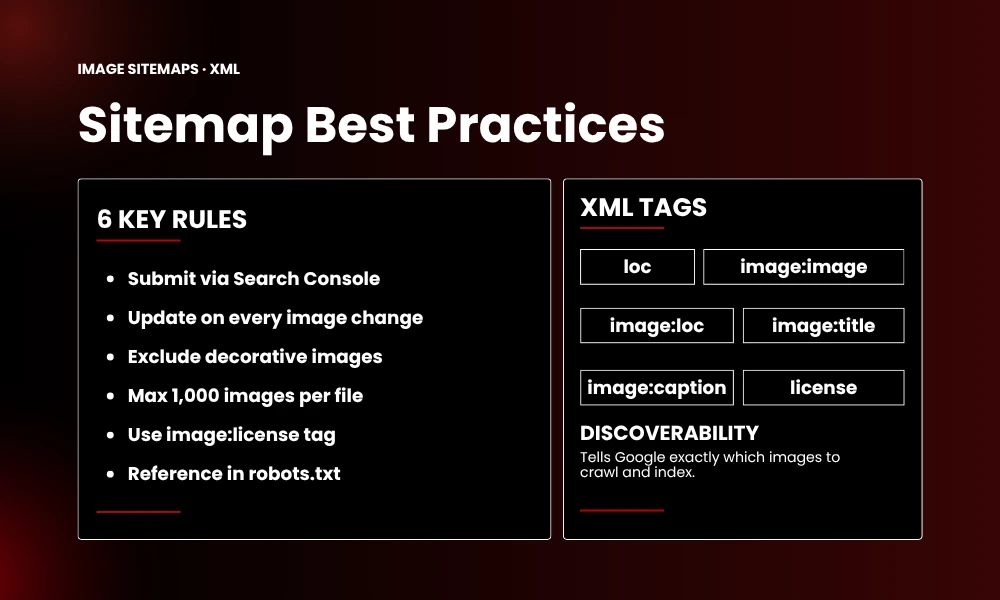
- Submit via Google Search Console > Sitemaps
- Update the sitemap when images are added or changed
- Include only images you want indexed (exclude decorative elements)
- Maximum 1,000 images per sitemap file
- Use <image:license> to specify usage rights
- Reference the sitemap in your robots.txt: Sitemap: https://yoursite.com/image-sitemap.xml
13. Image Search for Ecommerce
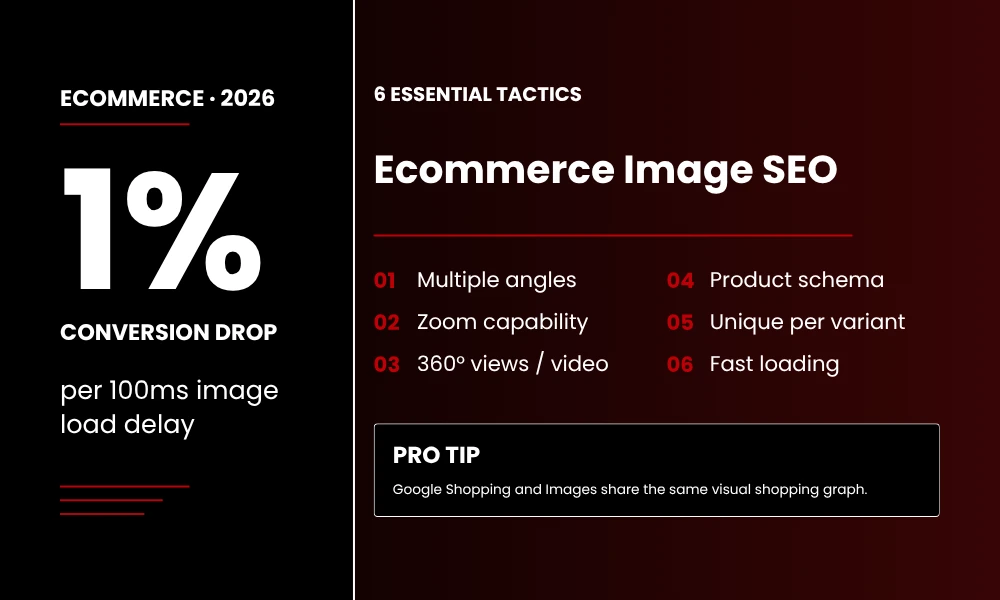
Ecommerce is where image search pays off the most. Product images aren’t decoration here, they’re conversion infrastructure.
13.1 Ecommerce Image SEO Priorities
- Multiple angles per product: front, back, side, detail, lifestyle, scale reference
- Zoom capability: 1200px minimum for zoom-worthy detail
- 360-degree views or video: significantly increase engagement signals
- Product schema with image array: feed the visual shopping graph
- Unique images per variant: color, size, and style variations need distinct visuals
- Fast loading: every 100ms delay in image load reduces conversion by 1%
13.2 Google Shopping and Image Search
Google Shopping and Google Images pull from the same visual shopping graph, so optimizing a product image for one benefits the other. Just make sure your Google Merchant Center feed uses high-resolution image URLs that match what’s actually on your product pages.
14. Image Search for Local Businesses
Local image search is one of the more underused levers out there. Photos of your business, products, team, and location can surface in Google Maps, the Local Pack, and Google Images, all of which translate into real foot traffic and calls.
14.1 Local Image Optimization
- Google Business Profile photos: upload fresh, high-quality interior, exterior, product, team, and “at work” shots every month.
- Geotagged original photography: EXIF location data reinforces local relevance.
- Local landmark photos: images of nearby recognizable spots strengthen local entity association.
- Customer-generated photos: encourage them, and respond to the ones users upload to your GBP.
15. Image Search for Content and Blogs
Blogs and content sites need a different image strategy than ecommerce; here, images are doing educational and engagement work, not selling directly.
15.1 Content Image Best Practices
- Every post needs at least one custom image.
- Stock photos quietly undercut perceived authority.
- Infographics earn backlinks; they’re consistently among the most linked-to content formats out there
- Screenshots do more work with annotations; arrows, highlights, and callouts noticeably boost engagement
- Data visualizations built on original data tend to get shared far more than generic charts
- Featured images need to be 1200×675 to be eligible for Google Discover
15.2 Image Surrounding Text
The paragraph directly before and after an image carries more ranking weight than most people realize. Keep images next to the text that actually explains them, don’t just float an image at the top of an article for looks. Contextual placement beats decorative placement every single time
16. AI-Generated Images and Search Risk
AI-generated images aren’t automatically penalized. But certain patterns in how they’re made can quietly suppress visibility.
16.1 The Problem with Generic AI Images
Generic AI images tend to lack real contextual specificity, carry that recognizable AI look (overly smooth surfaces, physically impossible lighting), have no real-world entity connections that Google’s knowledge graph actually values, and contain no EXIF data, camera info, or creation timestamp at all.
16.2 Making AI Images Rank
- Customize heavily: edit, crop, add overlays, work in real data
- Add original elements: blend AI backgrounds with genuine product photos
- Embed IPTC metadata: add copyright, creator, and keyword metadata yourself
- Treat it as a starting point, not a finished product: the more human editing goes in, the better it performs
17. Visual Duplication and Cannibalization
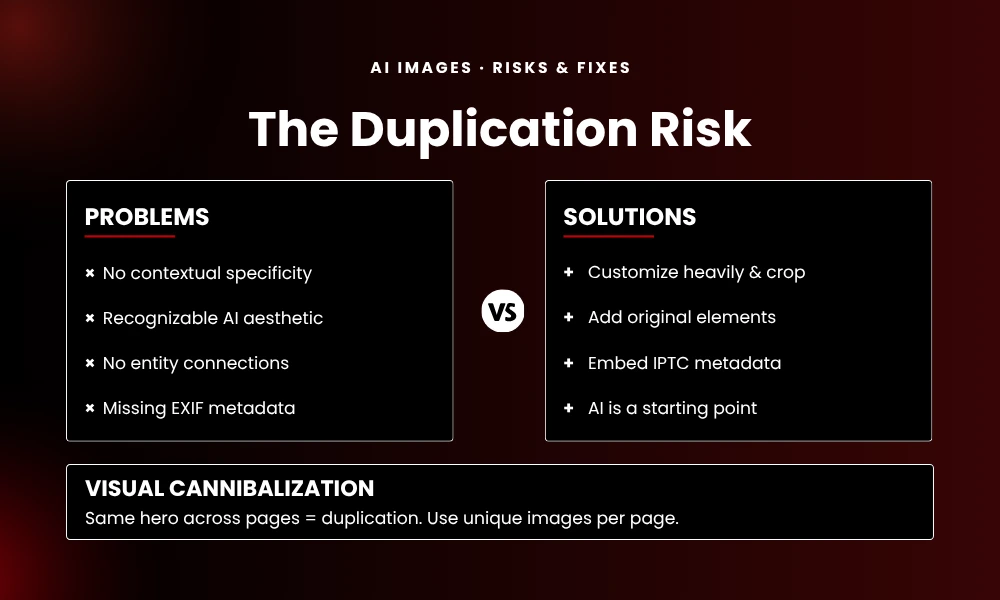
Using the same hero image across multiple pages is a common mistake with real SEO consequences.
17.1 The Split Signal Problem
When the same image appears on five different pages, search engines struggle to determine which page “owns” the image. This splits ranking signals across all five pages, weakening each one.
17.2 The Solution
- Assign a unique primary image to every key page
- If reuse is necessary, use visually distinct variants, different crops, overlays, or compositions
- For product variants, ensure each color/size has a distinct product photo
- Use rel=”canonical” on pages with necessary duplicate imagery
nuinely can’t be avoided
18. Image Accessibility and Rankings
Accessibility helps rankings indirectly through engagement signals, but it’s also a direct quality signal in its own right.
18.1 Accessibility Checklist
- Alt text for every meaningful image (decorative images use alt=””)
- Color contrast: text overlays need to meet WCAG AA standards (4.5:1 ratio)
- Readable text in images: don’t embed critical text in an image without an HTML equivalent somewhere
- Keyboard navigability: images inside interactive elements need to be focusable
- Descriptive link text: never use “click here” for an image link
Accessible images lead to better engagement, and better engagement feeds the ranking algorithms. It’s a gradual loop, but it compounds.
19. Graphics Image Alt Text and SEO Optimization
Alt text is arguably the single most important on-page element for image SEO. It’s the primary way search engines understand what an image actually contains and what it should rank for, without it, even a stunning image is effectively invisible to search.
19.1 Alt Text Best Practices
Alt text serves two audiences at once: screen readers helping visually impaired users, and search engine crawlers that can’t “see” the image at all. Both need text that’s descriptive, accurate, and concise.
The 6 Rules of Effective Alt Text:
- Be specific and descriptive: Describe what is actually in the image, not just the topic. Compare “blue leather running shoes side view on white background” versus the generic “shoes.”
- Keep it under 125 characters: Screen readers typically truncate after 125 characters. If you need more context, use the surrounding page text or captions.
- Include your target keyword naturally: If the image relates to your keyword, include it in the alt text. Do not force keywords where they do not belong.
- Do not start with “image of” or “picture of”: Search engines already know it is an image. Skip the preamble and get straight to the description.
- Use hyphens or spaces between words: Both “blue-running-shoes” and “blue running shoes” work. Avoid camelCase or underscores which reduce readability.
- Leave decorative images empty: Use alt=”” for purely decorative images (borders, backgrounds, spacers). This tells screen readers to skip them and prevents keyword dilution.
19.2 Alt Text Examples: Good vs Bad
| Type | Bad Alt Text | Good Alt Text |
|---|---|---|
| Product | shoes | Blue leather running shoes with white sole, side view on white background |
| Infographic | infographic | 10 image search techniques infographic showing reverse search, Google Lens, and AI visual search methods |
| Screenshot | screenshot | Google Search Console performance report showing image search impressions and click-through rate data |
| Team Photo | team | BrandClickX marketing team meeting in New York office conference room |
| Chart | chart | Bar chart comparing WebP vs JPEG vs AVIF file sizes for a 1200×800 product image |
| Decorative | red line divider | (Use alt=””) |
19.3 Image Filename SEO
Filenames are the second-most important on-page image signal. Search engines read filenames before they ever process the image itself.
Filename Optimization Rules:
- Use descriptive, keyword-rich filenames: IMG_8472.jpg tells Google nothing. blue-leather-running-shoes-side-view.jpg tells Google everything.
- Use hyphens, not underscores: Google treats hyphens as word separators. Underscores are treated as connectors, making “blue_running_shoes” read as “bluerunningshoes.”
- Keep filenames under 60 characters: Long filenames get truncated in URLs and sitemaps.
- Include the primary keyword near the beginning: The first 3-4 words carry the most weight.
- Match the filename to the alt text theme: If your alt text describes “blue running shoes,” the filename should include blue-running-shoes for signal reinforcement.
19.4 Image Context Optimization
Images do not exist in isolation. The text surrounding them provides critical context that search engines use to determine relevance.
- Place the image near relevant text: The paragraph immediately before and after the image carries the most contextual weight. Do not orphan images at the top of pages.
- Use keyword-relevant headings above the image: An H2 or H3 above the image that includes your target keyword strengthens the semantic connection.
- Write descriptive captions: Captions are read 300% more than body copy. Use them to reinforce the image message with additional keywords.
- Link to the image file with descriptive anchor text: If you link directly to an image file, use anchor text that describes the image rather than “click here.”
19.5 Graphics and Infographic SEO
Graphics, infographics, and data visualizations require specialized SEO treatment. They are among the most linked-to content types when optimized correctly.
- Add an embed code below infographics: Provide an HTML snippet with proper attribution linking back to your site. This turns every embed into a backlink.
- Include a text summary of the infographic: Search engines cannot read text embedded in images. Summarize the key data points in HTML below the graphic.
- Use schema markup for data visualizations: Wrap charts and data graphics in Dataset schema or ImageObject with detailed descriptions.
- Optimize for Pinterest: Use a 2:3 aspect ratio (1000x1500px) for infographics. Add a Pinterest description meta tag with keywords.
- Create a thumbnail version: Full-size infographics load slowly. Offer a thumbnail that links to the full version for faster page speed.
19.6 Image Dimensions and Aspect Ratio for SEO
Different Google surfaces require different image dimensions. Serving the wrong size can prevent your image from appearing in high-value placements.
| Google Surface | Min Width | Aspect Ratio | Max File Size |
|---|---|---|---|
| Google Images Tab | 800px | Any | 150KB |
| Image Pack (SERP) | 1200px | 3:2 or 16:9 | 120KB |
| AI Overview Thumbnail | 400px | 16:9 | 80KB |
| Google Lens | No minimum | Square preferred | 150KB |
| Google Discover | 1200px | 16:9 required | 150KB |
| 1000px | 2:3 required | 200KB | |
| Open Graph / Social | 1200px | 1.91:1 | 200KB |
19.7 Complete Image SEO Checklist
Before publishing any page, verify every image against this checklist:
- Alt text written, under 125 characters, includes target keyword
- Filename is descriptive with hyphens (e.g., blue-running-shoes.webp)
- Format is WebP with JPEG fallback via picture element
- Width and height attributes set in HTML (prevents CLS)
- File size under 150KB (hero) or 100KB (body)
- Dimensions: 1200px minimum width for hero images
- Aspect ratio matches target Google surface
- ImageObject schema added to page head
- Image placed near relevant text with contextual heading
- Caption added where it adds value
- loading=”lazy” on below-fold images
- Responsive srcset for multiple screen sizes
- Included in image sitemap
20. The Future of Image Search
20.1 Multimodal Search Integration
Google’s MUM and Gemini models already process text, image, and video together. A query like “show me hiking boots like these but waterproof”, combining an uploaded image with a text modifier, already works today, and it’s only going to become more standard.
20.2 Visual Shopping Graph Expansion
Google’s Shopping Graph already holds billions of product listings tied to visual data, and it’s expanding beyond products into landmarks, artworks, architectural styles, and natural features. Optimizing for this future means making sure your visual content is entity-rich and properly schema-annotated now.
20.3 Content Authenticity (C2PA)
The C2PA standard (Coalition for Content Provenance and Authenticity) is gaining traction across major platforms as a way to verify where an image actually came from. Embedding provenance metadata, showing an image’s full creation history and any edits, is shaping up to be a real trust signal, and getting ahead of it now puts you a step ahead of competitors who haven’t bothered yet.
20.4 AR-Powered Visual Search
Augmented reality search, pointing your phone at a room to find matching furniture, or at a landscape to identify plants, is moving fast. The underlying optimization principle doesn’t change though: clean, well-lit, entity-rich images backed by strong schema.
21. Image Format Comparison for SEO
Choosing the right image format directly impacts page speed, Core Web Vitals, and Google Images ranking potential.
| Format | Compression | Quality | SEO Best For | Size vs JPEG |
|---|---|---|---|---|
| JPEG | Low | Medium | Legacy fallback | Baseline (100%) |
| WebP | High | High | Standard photos | 65–75% smaller |
| AVIF | Very High | Very High | Hero images | 50–60% smaller |
| PNG | Low | Lossless | Screenshots, transparency | 200–400% larger |
| SVG | N/A | Perfect | Logos, icons | 90%+ smaller |
22. Frequently Asked Questions
Q: How does reverse image search work?
A: Reverse image search analyzes visual features of an uploaded image – shapes, colors, patterns, textures, and converts them into mathematical vectors called embeddings. Those vectors get compared against billions of indexed images using cosine similarity to find exact matches, similar visuals, or the original source.
Q: What’s the difference between reverse image search and visual search?
A: Reverse image search finds exact or near-exact copies of an image across the web. Visual search finds images that are aesthetically similar, same style, color, or composition, even if they’re completely different files. Think of reverse search as “find this exact image” and visual search as “find images that look like this.”
Q: How do I optimize images for Google search?
A: Use descriptive filenames (e.g., blue-leather-running-shoes.webp), write specific alt text under 125 characters, compress to WebP, use at least 1200px width for hero images, add ImageObject schema, place images near relevant text, and submit an image sitemap through Google Search Console.
Q: Can image search help with SEO?
A: Yes, image search drives roughly 22% of Google search traffic. Well-optimized images can rank in Google Images, show up in Image Pack carousels, appear in AI Overview thumbnails, and pull traffic from Google Lens, on top of improving the engagement signals that lift your overall rankings.
Q: What are the best image search engines?
A: Google Images (largest index, general search), Google Lens (object recognition, shopping), TinEye (copyright tracking, exact matching), Yandex Images (facial recognition), Bing Visual Search (crop-to-search), and Pinterest Lens (style and inspiration discovery).
Q: What is the best image format for SEO?
A: WebP is generally the best choice in 2026, it runs 25–35% smaller than JPEG at equivalent quality. For maximum compression, AVIF goes even further at 50–70% smaller than JPEG. Just make sure to keep a JPEG fallback for older browsers via the HTML <picture> element.
Q: How do I do an advanced image search on Google?
A: Go to Google Images and click the camera icon to search by uploaded image. For text-based advanced search, use the filters for size, color, type, usage rights, time, and specific domains; combining a few filters gets you much more precise results.
Q: What is ImageObject schema?
A: ImageObject is Schema.org structured data that tells search engines detailed information about an image — creator, license, caption, dimensions, and encoding format. Adding ImageObject JSON-LD meaningfully improves your odds of showing up in AI Overview thumbnails and Google Discover.
Q: How do I rank images in Google Images?
A: Write descriptive alt text, use keyword-rich filenames, place images near relevant text, add ImageObject schema, compress to WebP, use 1200px width for hero images, keep page load speed fast, build backlinks to the page, and submit an image sitemap.
Q: How long does it take for images to rank in Google?
A: On high-authority sites, images can rank within days. For newer sites, expect somewhere between 2–8 weeks. You can speed this up by submitting an image sitemap, using solid internal linking, and making sure robots.txt isn’t blocking anything.
Q: Do AI-generated images rank in Google?
A: Yes, AI-generated images can absolutely rank. Where they tend to struggle is when they’re generic, since they lack the contextual specificity and originality Google’s quality classifiers reward. Custom-edited AI visuals that are genuinely unique to your content perform noticeably better.
Q: Should every image on my page be indexed?
A: No. Focus your optimization and indexing on images that add real value product photos, diagrams, infographics, illustrative images. Decorative elements like backgrounds, dividers, and icons don’t need it, and over-indexing them can actually dilute your image search signals.
Q: What are Google Images advanced search filters?
A: Google Images offers filters for size (Icon, Medium, Large), color (Full color, Black and white, Transparent, specific colors), type (Face, Photo, Clip art, Line drawing, GIF), usage rights (Creative Commons, Commercial), time (Past 24 hours, Past week, Custom range), and specific domains.