
80% of knowledge bases are out of date. Self-service resolves support tickets at $1.84 each versus $13.50 for human agents. The gap between having a user manual and having one that actually works has never been wider or more expensive.
Introduction: The $13.50 Problem That Documentation Solves
Here is the math that makes user manuals one of the highest-ROI investments in product operations.
Self-service channels resolve support tickets at $1.84 per contact. Assisted channels phone, email, chat with a human agent cost $13.50 per contact. That is a 7x cost differential on every single customer interaction that could have been answered by documentation but wasn’t.
Multiply it by volume.
A mid-size SaaS company handling 2,000 support tickets per month at an average cost of $25–$35 per ticket is spending $50,000–$70,000 monthly on customer support. If self-service documentation deflects 40% of those tickets — the conservative end of the 40–60% deflection range that effective self-service implementations consistently achieve the company saves $20,000–$28,000 per month. That is $240,000–$336,000 in annual cost reduction from documentation that many teams treat as an afterthought.
And yet.
This is not a writing problem. It is a systems problem. Most teams create documentation at launch, then treat it as finished. The product evolves. The documentation doesn’t. Within six months, the manual describes a product that no longer exists.
This guide is about building user manuals that actually work manuals that get read, reduce support costs, improve customer onboarding, and stay current as the product they describe changes. It covers the full lifecycle: planning, structuring, writing, designing, publishing, maintaining, and measuring.
Part I: What a User Manual Is and What It Is Not
The Definition
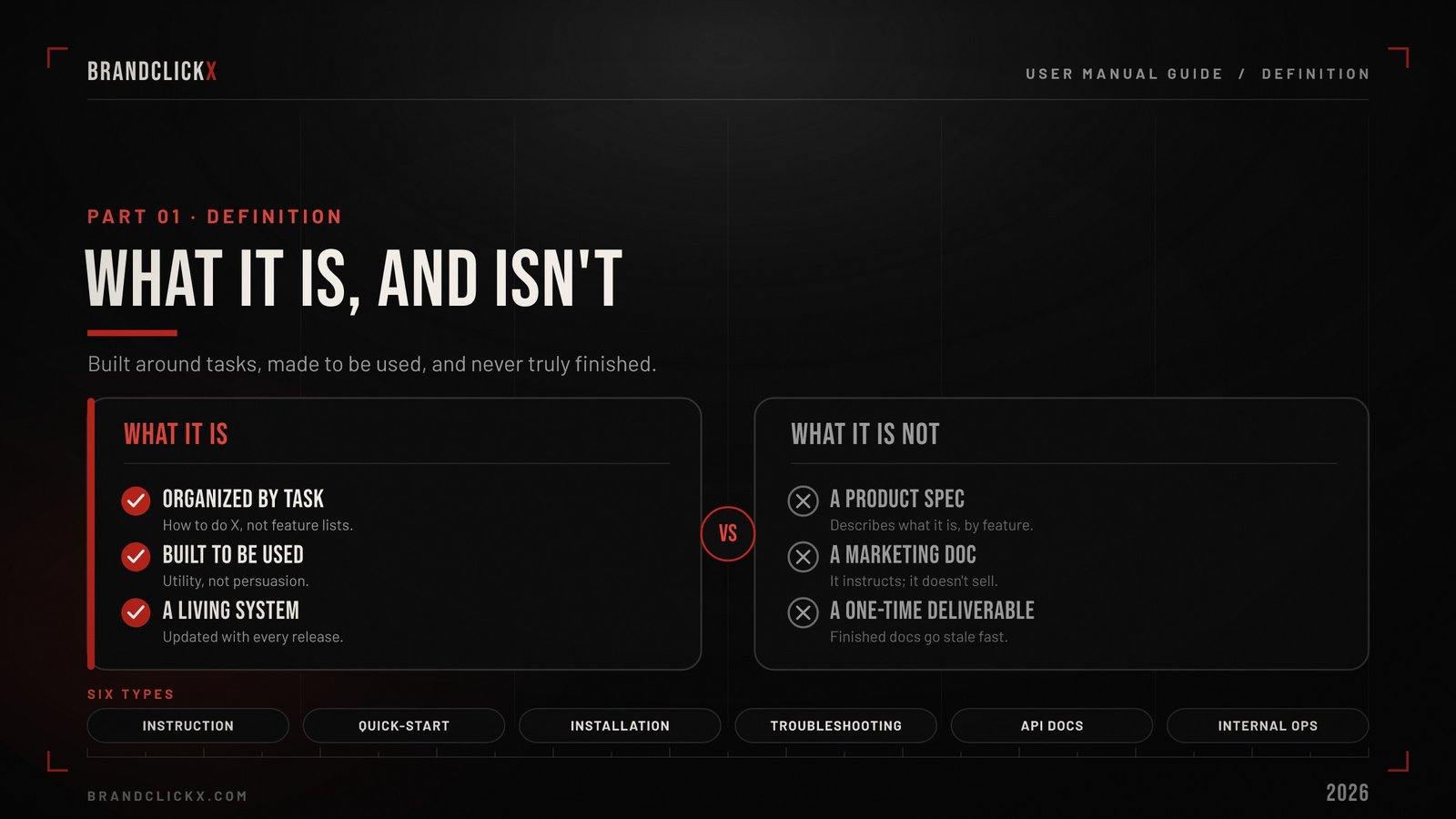
A user manual is a structured document physical or digital that provides instructions for using a product, service, or system.
They typically include setup instructions, safety guidelines, operating steps, maintenance details, troubleshooting tips, and technical specifications, often supported by diagrams or visuals.
That is the textbook definition. The operational definition is more useful.
A user manual is the first place a customer looks when something doesn’t work the way they expected and the last thing most product teams invest in before launch. That gap between customer dependency and internal priority is where most documentation quality problems originate.
What a User Manual Is Not
A user manual is not a product specification. Product specs describe what a product is. User manuals describe how to use it. The distinction matters because spec-oriented documentation is organized by feature, while user-oriented documentation is organized by task.
A user manual is not a marketing document. Its purpose is utility, not persuasion. The moment a user manual starts selling rather than instructing, it loses the trust that makes documentation useful.
A user manual is not a one-time deliverable. It is a living system. Treat it as finished and it will be out of date within a single product release cycle.
Types of User Manuals
Instruction manual – step-by-step procedures for operating a product. The most common type. Physical products, software applications, and consumer electronics all require instruction manuals.
Quick-start guide – a compressed version of the full manual covering only the essential steps to get a product working. Often a single page or card. Increasingly the first piece of documentation users engage with, because most users want to start using the product before understanding it completely.
Installation guide – focused specifically on setup, configuration, and first-use procedures. Separate from operating instructions because the audience may be a different person an IT administrator versus an end user, a contractor versus a homeowner.
Troubleshooting guide – organized by problem rather than by feature. “My device won’t turn on” rather than “Power button.” The most-consulted section of any user manual, and the one most directly correlated with support ticket deflection.
API documentation – the technical manual for software developers integrating with a product. Different audience, different language, different structure than consumer documentation. Increasingly auto-generated from code using tools like Swagger and Mintlify.
Internal operations manual – documentation for internal teams: onboarding procedures, workflow guides, standard operating procedures. The same principles apply, but the audience is employees rather than customers.
Part II: Why User Manuals Drive Business Results
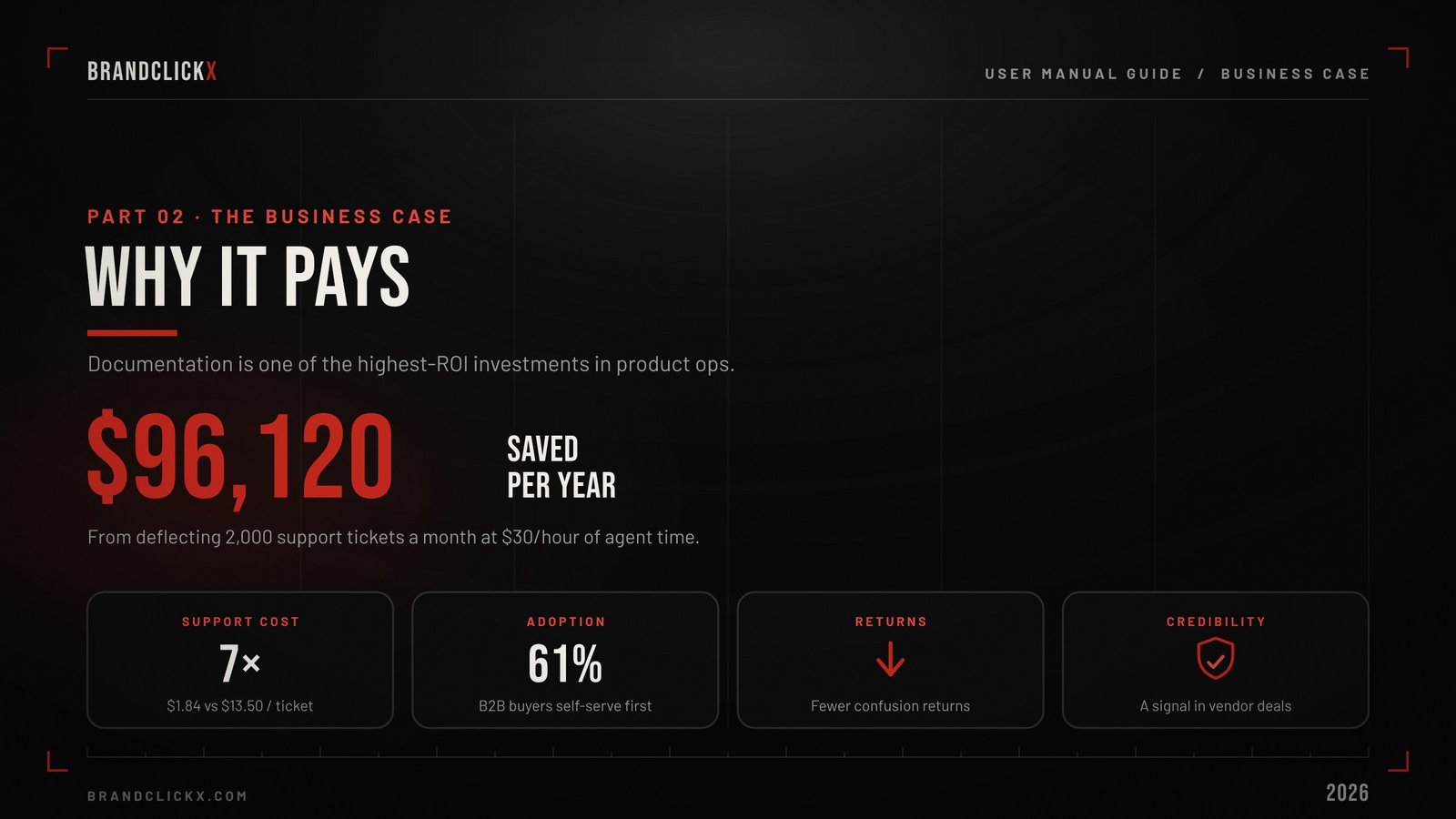
The business case for user manuals is not soft. It is measurable across four dimensions.
Support Cost Reduction
This is the most immediately quantifiable ROI.
The cost differential is dramatic. Self-service portals deliver resolution at $1–$4 per ticket, while phone support costs $17–$25, chat runs $10–$16, and email sits at $8–$15. Shifting 40% of volume to self-service represents a major cost optimization opportunity.
Consider a concrete example: a company’s FAQs and knowledge base resolve 2,000 inquiries monthly that would have taken 8 minutes each to handle. That saves 16,000 minutes (267 hours) per month. At $30/hour agent cost, that is $8,010 in monthly savings, or $96,120 annually from documentation alone.
Customer Onboarding and Adoption
A study by Gartner in 2025 found that 61% of B2B buyers prefer self-service when learning how to use a product making a well-built user manual the first place most users turn before contacting anyone at the company.
The quality of that first interaction with documentation directly predicts product adoption. Users who can set up and start using a product successfully through self-service documentation have higher activation rates, longer retention periods, and higher lifetime value than users who require human support during onboarding.
The inverse is equally true. Users who encounter confusing, incomplete, or outdated documentation during their first experience with a product form negative impressions that color every subsequent interaction even if the product itself is excellent.
Product Return Reduction
For physical products, user manuals that clearly explain setup and operation reduce returns driven by user confusion rather than product defects. The distinction matters commercially: a product returned because the customer couldn’t figure out how to use it is a documentation failure, not a product failure. The product worked. The manual didn’t.
Brand and Credibility
Documentation quality is a credibility signal. Polished, well-organized, up-to-date documentation communicates that a company takes its product and its customers seriously. Sloppy documentation communicates the opposite regardless of how sophisticated the product is.
For SaaS companies in competitive procurement evaluations, documentation quality is increasingly reviewed during the vendor assessment process. Enterprise buyers check whether a vendor’s documentation is current, comprehensive, and well-structured before making purchasing decisions.
Part III: How to Structure a User Manual
The Essential Sections
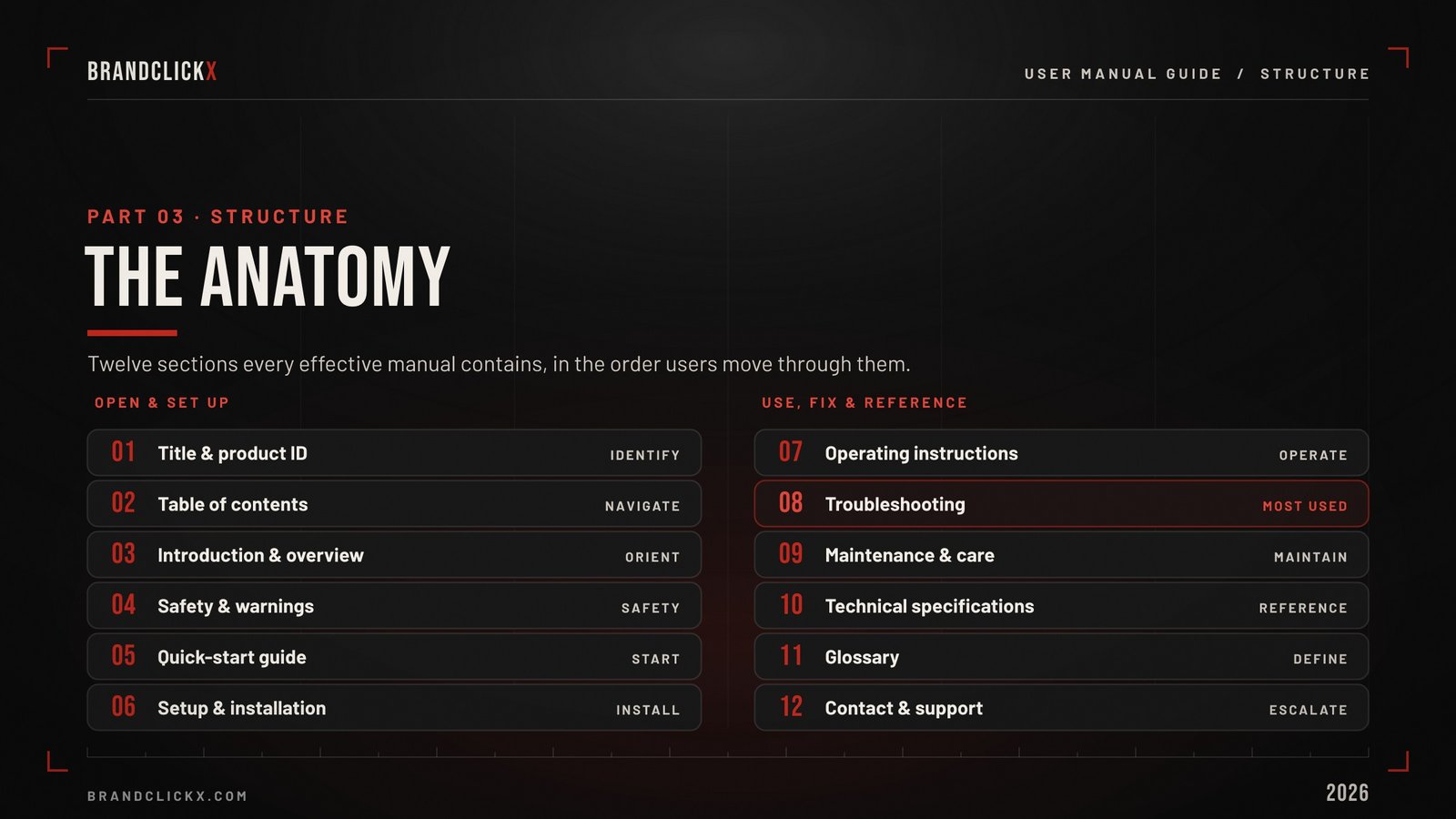
Every effective user manual contains these core sections adapted for the specific product type but structurally consistent.
- Title page and product identification
Product name, model number, version, revision date, and applicable certifications. This page establishes what specific product and version the manual applies to. As products evolve and multiple versions coexist in the market, unambiguous product identification prevents users from following instructions for the wrong version.
- Table of contents
For any manual exceeding 10 pages. Should be clickable/linked in digital formats. Organized by user task rather than product feature wherever possible.
- Introduction and product overview
A brief overview of what the product is and what it does. Not marketing copy factual description of the product’s purpose, capabilities, and intended use. This section answers the question: “What is this thing and what does it do?”
- Safety information and warnings
Regulatory and safety information that must appear before any operating instructions. For physical products, this includes electrical safety, choking hazards, operating temperature ranges, and required protective equipment. For software products, this includes data handling notices, backup recommendations, and account security guidance.
Special notices warnings, cautions, and alerts should follow a consistent visual treatment throughout the document, using standardized icons and color coding (typically red for danger, orange for warning, yellow for caution).
- Quick-start guide
The compressed path from unboxing to first successful use covering only the minimum steps required. This section serves the 70%+ of users who want to start using the product before reading the full manual.
Effective quick-start guides limit themselves to 5–10 steps. Every step should fit on one line. Screenshots or diagrams accompany each step.
- Setup and installation
Detailed setup procedures including prerequisites, system requirements (for software), physical installation steps (for hardware), configuration options, and first-run verification.
This section should include a clear statement of what “successful installation” looks like so users can verify their setup is complete before proceeding to use the product.
- Operating instructions
The core of the manual. Step-by-step procedures for every significant operation the user will perform.
Organize by task not by feature. “How to create a report” rather than “Report module features.” Users arrive at documentation with a task to complete, not a feature to explore.
Each procedure should include: the task heading, prerequisites, numbered steps, expected results, and what to do if the expected result doesn’t occur.
- Troubleshooting
The most-consulted section of any user manual.
Organize by symptom rather than cause: “Device won’t turn on,” “Error message appears during login,” “Print quality is poor.” Users know what they are experiencing. They do not know what is causing it.
Each troubleshooting entry should include: the symptom, the most likely cause, the resolution steps, and escalation instructions if the resolution doesn’t work.
- Maintenance and care
For physical products: cleaning procedures, storage requirements, consumable replacement schedules, inspection intervals.
For software: data backup procedures, account management, subscription management, data export.
- Technical specifications
Dimensions, weights, materials, power requirements, operating ranges, system requirements, compatibility matrices. The reference section users consult when they need a specific technical fact.
- Glossary
Define every technical term used in the manual. If a term appears in the manual that a reasonable user might not understand, it belongs in the glossary. Be consistent: if you call it a “workspace” in one section, do not call it a “project” in another.
- Contact and support information
How to reach support when the manual doesn’t solve the problem. Include every available channel: email, phone, chat, community forum, social media.
Part IV: How to Write a User Manual That Gets Read
The Writing Principles
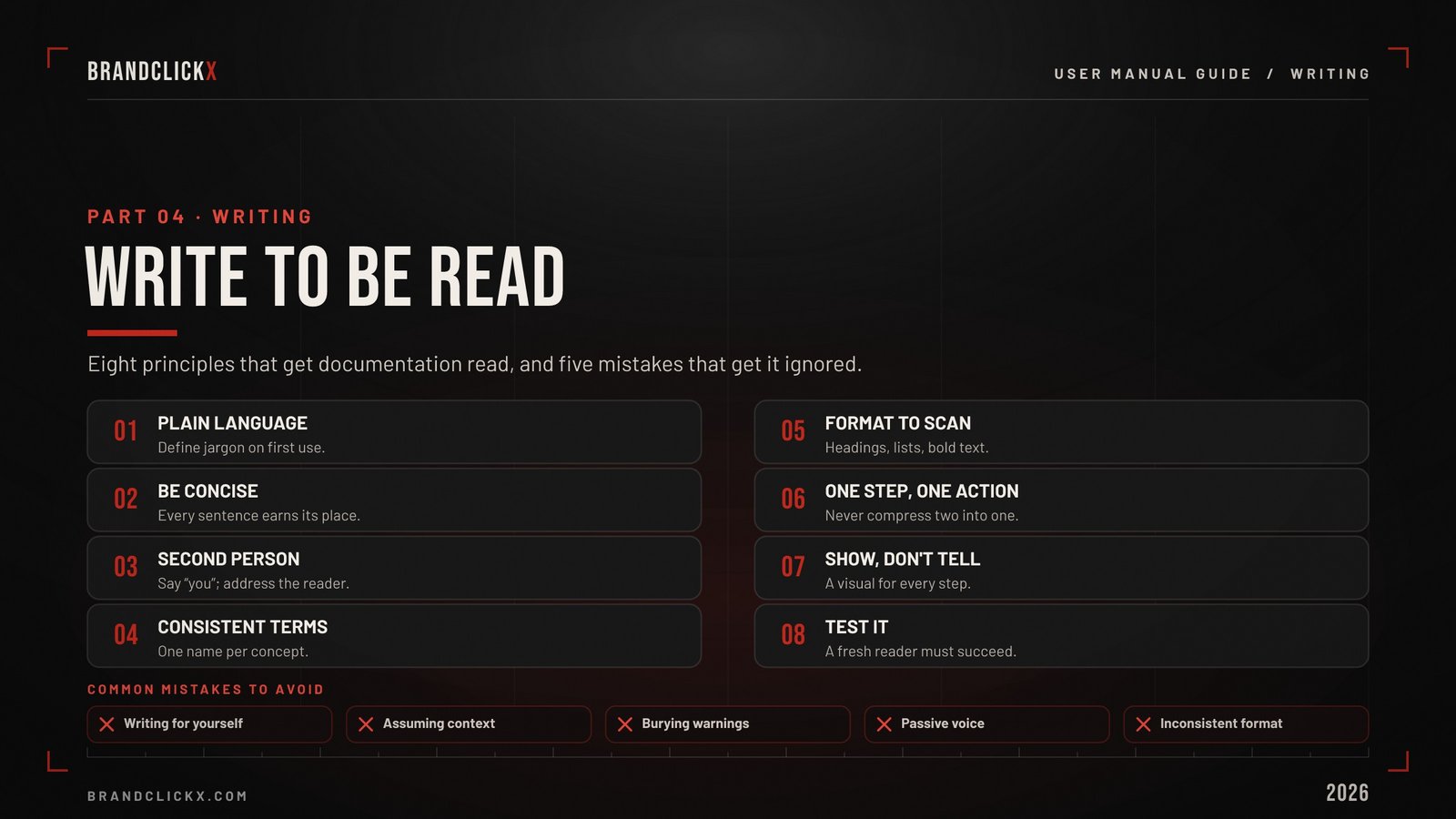
Use plain language. Avoid jargon unless your audience expects it. If you must use a technical term, define it on first use.
Be concise. Say what needs to be said and stop. Users are scanning for answers, not reading prose. Every sentence should earn its place.
Write in second person. Use “you” to address the reader directly. “Click the Settings icon” is clearer than “The user should click the Settings icon.”
Use consistent terminology. If you call it a “workspace” in one section, do not call it a “project” in another. Create a terminology glossary and stick to it.
Format for scanning. Users do not read user manuals cover to cover. They scan for the section relevant to their current task. Use clear headings, numbered lists for procedures, bullet points for options, and bold text for key terms.
One instruction per step. “Click Settings, then select Notifications, then toggle Email Alerts to On” is three steps compressed into one. Expand it. Each numbered step should contain exactly one action.
Show, don’t just tell. Include a screenshot, diagram, or illustration for every step that involves a visual interface. Users retain 65% of information from visual instruction after three days versus 10% from text-based instruction alone.
Test the instructions. Every procedure in a user manual should be tested by someone who was not involved in writing it. If a fresh reader cannot complete the task by following the written instructions without asking questions, the instructions are incomplete.
Common Writing Mistakes to Avoid
Writing for yourself instead of the user. Engineers and product managers understand their products intuitively. Users do not. The gap between builder knowledge and user knowledge is always larger than builders assume.
Assuming context the reader doesn’t have. “Navigate to the Advanced Settings panel” assumes the reader knows where that panel is. “Click your profile icon in the top-right corner, then click Settings, then click the Advanced tab” does not assume anything.
Burying critical information. Safety warnings, data loss risks, and irreversible actions should be visually prominent and positioned before the step that triggers them not after.
Using passive voice. “The button should be clicked” is weaker and less clear than “Click the button.” Active voice creates clearer, more actionable instructions.
Inconsistent formatting. Switching between different numbering styles, heading levels, or note formats within a single document makes the manual harder to scan and reduces reader trust.
Part V: Visual Design in User Manuals
Why Visual Design Matters
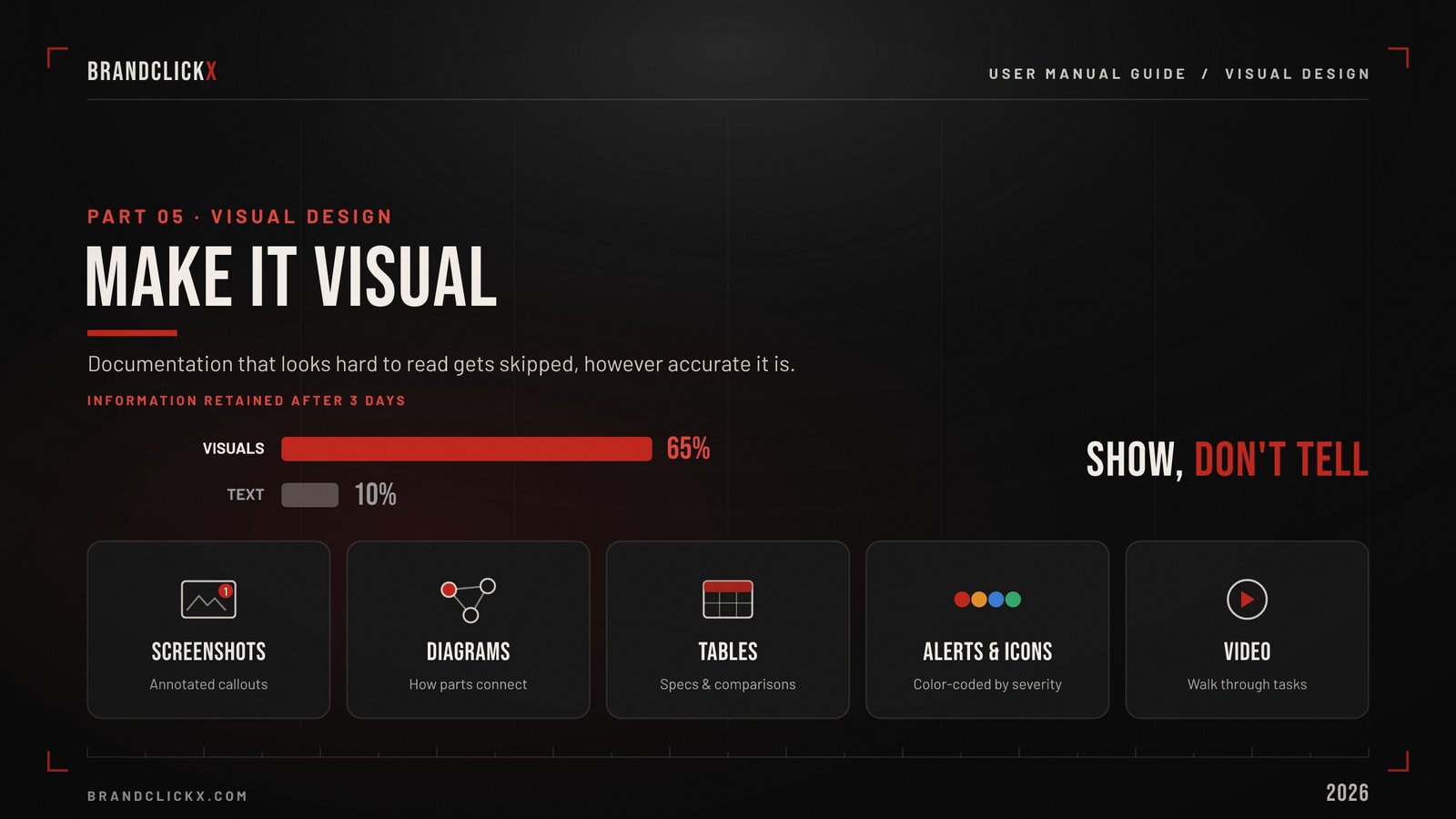
Documentation that looks difficult to read gets skipped regardless of how accurate its content is. Visual design is not decoration in a user manual. It is a usability factor.
Clean visual hierarchy clear headings, consistent spacing, adequate white space, readable font sizes — reduces the cognitive effort required to find and follow instructions.
Cluttered pages, walls of text, tiny fonts, and inconsistent layouts create friction that drives users away from documentation and toward the support queue.
The Visual Elements That Matter Most
Screenshots and annotated images. Every screen-based instruction should include a screenshot of what the user should see. Annotate screenshots with numbered callouts that correspond to the step being described. Red circles and arrows are the universal language of user documentation use them liberally.
Diagrams and illustrations. For physical products: labeled diagrams showing component locations, cable connections, and assembly sequences. For software: workflow diagrams showing how processes connect across screens.
Tables. Comparison tables (feature differences between product tiers), specification tables (technical details), and compatibility matrices (which accessories work with which models) present dense information more accessibly than prose.
Icons and visual alerts. Standardized icons for warnings, tips, notes, and cautions help users identify critical information while scanning. Consistent use of color red for danger, orange for warning, blue for information, green for success creates a visual language users learn quickly.
Video. Video documentation delivers superior learning outcomes, with users retaining 65% of information after three days versus 10% with text-based guides. The most effective approach combines both formats video for walkthrough demonstrations, text for reference and search.
Part VI: The Best User Manual Tools in 2026
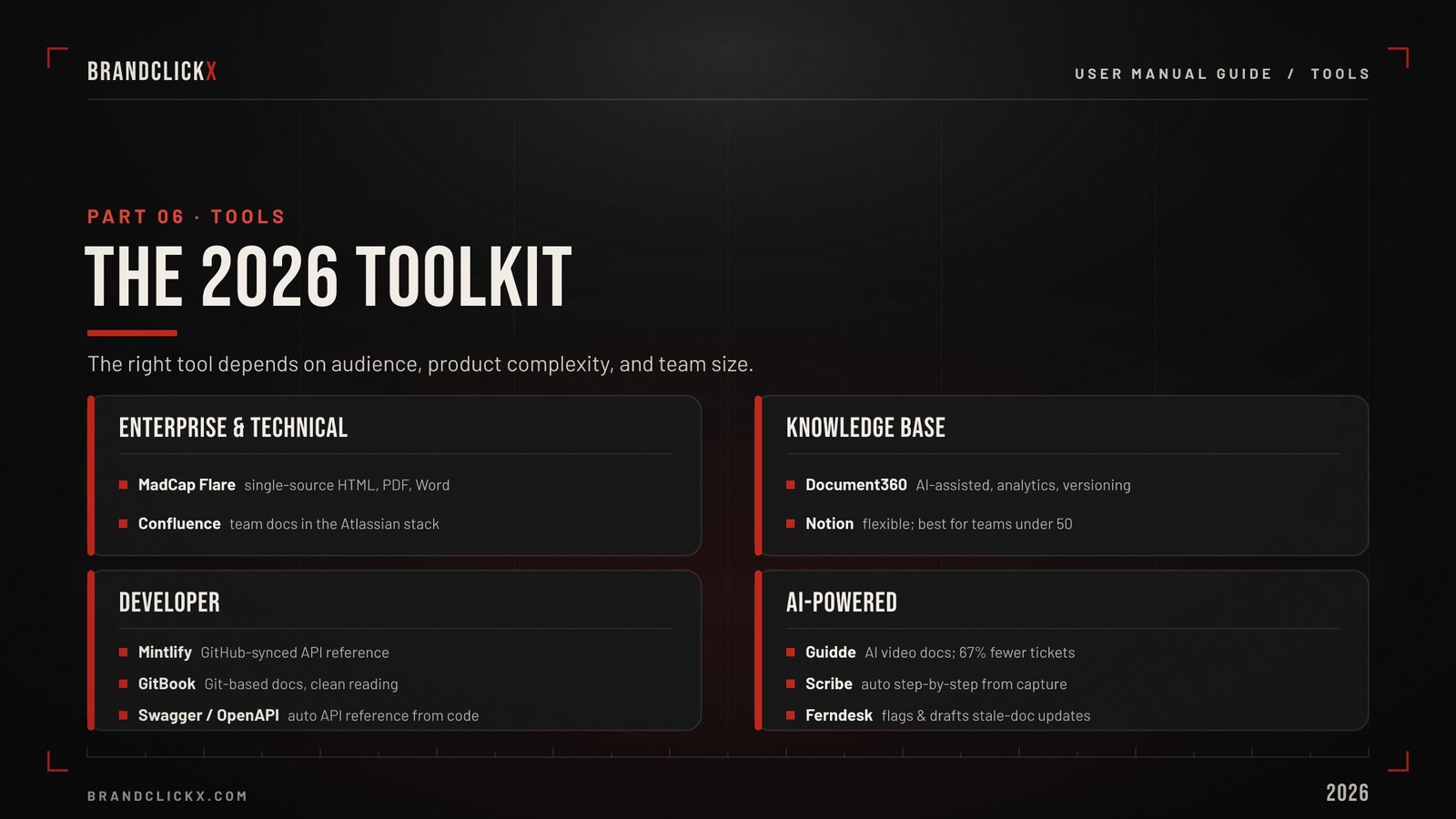
The right tool depends on your audience, product complexity, and team size. Here is the honest assessment.
Enterprise and Technical Documentation
MadCap Flare — the enterprise standard for technical documentation. Used by Microsoft, Amazon, and Boeing. Single-source publishing to HTML5, PDF, Word, and EPUB with conditional logic for different audiences, product tiers, and languages. The learning curve is measured in weeks, not hours. You need dedicated technical writers who can invest in mastering the platform.
Confluence (Atlassian) — the default documentation platform for teams already in the Atlassian ecosystem (Jira, Trello). Strong collaboration features. Adequate for internal documentation and knowledge bases. Less capable than Flare for polished customer-facing documentation.
Knowledge Base Platforms
Document360 — a solid middle-ground platform for teams that need more than a wiki but less than Flare’s enterprise complexity. AI-assisted writing, version control, analytics, and multi-language support. Strong for customer-facing knowledge bases.
Notion — increasingly used for both internal and customer-facing documentation. Its flexibility — databases, pages, toggles, embedded media — makes it the most versatile documentation tool for teams under 50 people. Not purpose-built for documentation, but adaptable enough to serve most needs well.
Developer Documentation
Mintlify — the documentation platform built specifically for developer-facing documentation. Syncs with GitHub repositories, auto-generates API reference from code, and maintains documentation currency as codebases change. If your user manual is an API reference, Mintlify is the most purpose-built option.
GitBook — developer documentation with GitHub integration, version control, and a clean reading experience. Strong for open-source project documentation and developer guides.
Swagger / OpenAPI — automatic API documentation generation from code annotations. Not a general user manual tool, but the standard for REST API reference documentation.
AI-Powered Documentation Tools
Guidde — AI-powered video documentation. Record yourself performing a task, and Guidde automatically generates step-by-step documentation with screenshots, narration, and written instructions. Companies using AI-powered video documentation see 67% fewer support tickets.
Scribe — similar to Guidde but focused on written step-by-step guides. Captures screen actions automatically and generates documented procedures with annotated screenshots. Particularly useful for internal operations manuals and training documentation.
Ferndesk — an AI agent that monitors your product and support tickets, identifies when documentation needs updating, and drafts changes for review. Addresses the maintenance problem that makes 80% of knowledge bases outdated.
Choosing the Right Tool
| Need | Best Tool | Why |
| Enterprise multi-format publishing | MadCap Flare | Single-source to HTML, PDF, Word, EPUB |
| Customer-facing knowledge base | Document360 | AI-assisted, analytics, versioning |
| Internal team documentation | Notion or Confluence | Flexible, collaborative, affordable |
| Developer API documentation | Mintlify or GitBook | Code-synced, auto-generated references |
| Video documentation | Guidde | AI-generated from screen recordings |
| Step-by-step guides from screen capture | Scribe | Automatic screenshot annotation |
| Documentation maintenance | Ferndesk | AI monitors for stale content |
Part VII: How to Keep a User Manual Current
This is where most documentation programs fail.
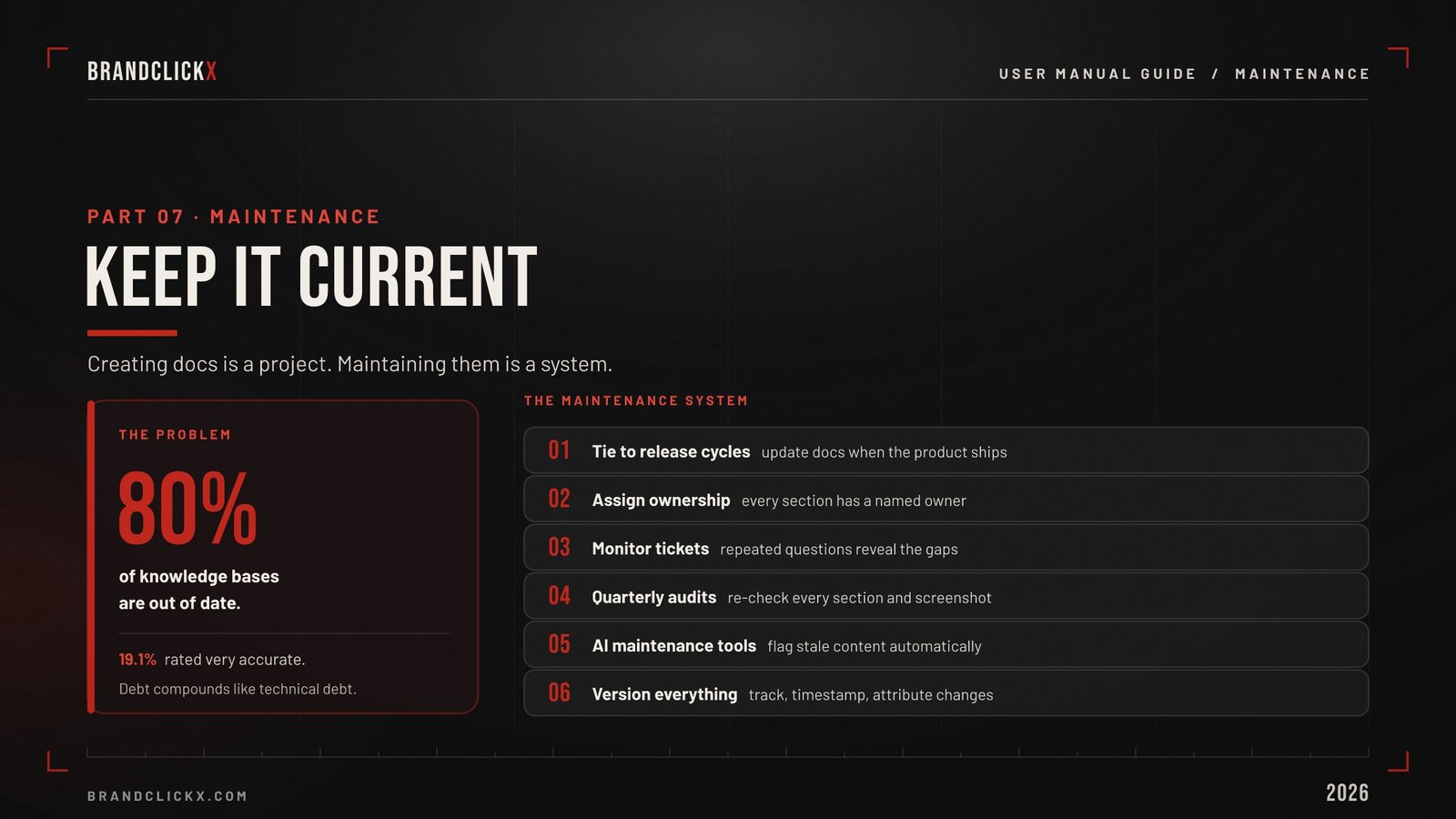
Creating documentation is a project. Maintaining documentation is a system. Teams that treat maintenance as an occasional project produce documentation that is accurate for three months and misleading for the remaining nine.
The Maintenance System
Tie documentation updates to product release cycles. Every feature release, UI change, or workflow modification should include a documentation update as a required deliverable not an optional follow-up. If documentation isn’t updated when the product ships, it won’t be updated at all.
Assign documentation ownership. Every section of the manual should have a named owner responsible for its accuracy. Unowned documentation decays fastest.
Monitor support ticket patterns. When the same question appears repeatedly in support tickets, the answer should be added to the manual. Support ticket analysis is the most reliable source of missing documentation topics.
Conduct quarterly documentation audits. Walk through every section of the manual and verify that it accurately reflects the current state of the product. Screenshot accuracy degrades fastest a single UI update can make dozens of screenshots inaccurate simultaneously.
Use AI-powered maintenance tools. Platforms like Ferndesk monitor product changes and support ticket trends, flagging stale documentation automatically. The maintenance problem is too large for manual monitoring at scale AI assistance is not a luxury but a necessity for any documentation library exceeding 100 articles.
Version control everything. Every documentation change should be tracked, timestamped, and attributable. When users report that documentation is inaccurate, version history shows whether the documentation was accurate when it was written and when it became stale.
The Documentation Debt Problem
Documentation debt works like technical debt. Small inaccuracies accumulate. Individual outdated screenshots seem insignificant. But the aggregate effect — a manual that describes a product the user cannot recognize destroys the credibility of the entire documentation system.
Once users learn that a manual is unreliable, they stop consulting it. Support ticket volume rises. The cost savings that documentation was supposed to deliver evaporate. And rebuilding user trust in documentation that has lost credibility takes far longer than maintaining it in the first place.
Prevention is dramatically cheaper than repair. Maintain continuously or accept the cost of rebuilding trust later.
Part VIII: Measuring User Manual Effectiveness
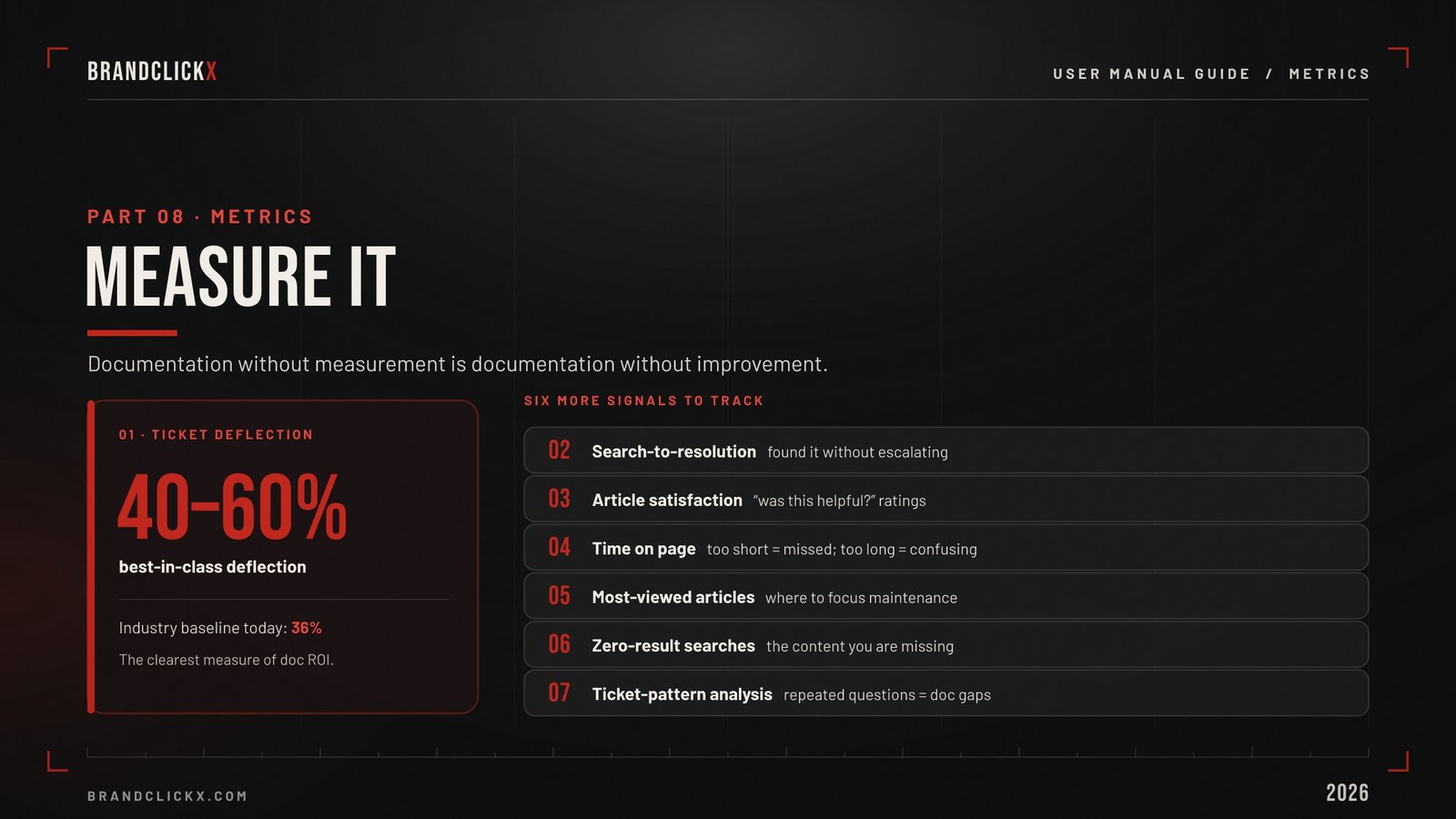
Documentation without measurement is documentation without improvement.
The Metrics That Matter
Ticket deflection rate. The percentage of support interactions resolved by self-service documentation rather than human agents. The most direct measure of documentation ROI. Industry baseline: 36% of tickets currently addressed by self-service. Best-in-class: 40–60% deflection.
Search-to-resolution rate. Of users who search the knowledge base, what percentage find an answer without escalating to human support? Low search-to-resolution rates indicate that content exists but doesn’t answer the actual question users are asking.
Article satisfaction ratings. “Was this article helpful?” feedback at the bottom of each documentation page. Simple to implement, directionally useful, and easy to trend over time.
Time on page. How long users spend reading a documentation article. Very short times (under 10 seconds) suggest the user didn’t find what they needed. Very long times (over 5 minutes on a simple how-to) suggest the content is confusing or poorly organized.
Most-viewed articles. Identifies the documentation pages that generate the most traffic and therefore deserve the most maintenance attention and quality investment.
Search terms with zero results. What are users searching for that the knowledge base doesn’t cover? This is the most direct source of missing content topics.
Support ticket analysis. What questions are appearing in support tickets that should have been answered by documentation? Every repeated support question that has no corresponding documentation article is a quantifiable documentation gap.
Part IX: AI and the Future of User Manuals
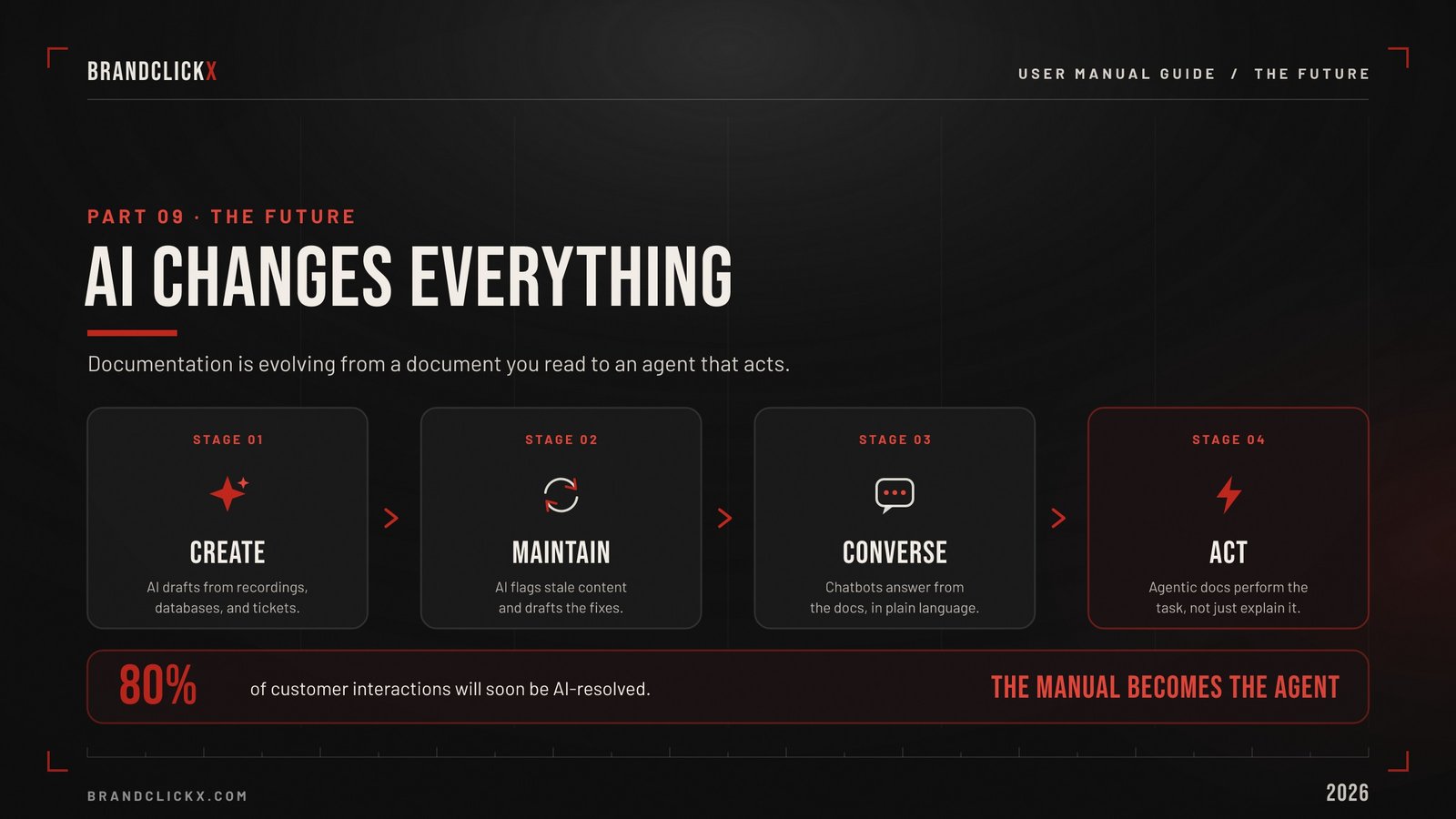
AI is reshaping user documentation from creation through maintenance.
AI-Assisted Documentation Creation
AI tools now generate first drafts of documentation from screen recordings, product databases, and support ticket archives. These drafts require human editing AI-generated documentation still needs accuracy verification, voice consistency, and context that only someone who understands the product can provide.
But the time savings are real. What previously took a technical writer a full day to produce from scratch can now be drafted in minutes and refined in hours.
AI-Powered Documentation Maintenance
The maintenance problem — the reason 80% of knowledge bases are outdated is the area where AI has the most impact.
AI agents that monitor product changes, scan support tickets for documentation gaps, and draft content updates for human review address the fundamental maintenance challenge: documentation goes stale because nobody is watching it continuously. AI can watch continuously. Humans can review and approve.
Conversational Documentation
The next evolution of user manuals is not a document at all it is a conversation.
AI-powered chatbots grounded in product documentation answering user questions in natural language, drawing answers from the documentation database, and escalating to human support only when the documentation cannot provide an answer represent the convergence of documentation and support.
According to Tom Eggemeier, CEO at Zendesk, 100% of customer interactions will soon involve AI tools. AI will be able to resolve 80% of those interactions independently.
For documentation teams, this means the user manual is increasingly consumed by an AI system rather than read directly by a human user. The documentation must be structured for machine readability as well as human readability clear section boundaries, consistent terminology, explicit relationships between concepts.
Agentic Documentation
The most advanced documentation systems in 2026 don’t just answer questions they perform actions. An agentic documentation system doesn’t just tell a user how to reset their password. It resets the password for them, with appropriate identity verification.
This collapses the distinction between documentation and support entirely. The manual becomes the agent. The instructions become the execution.
Key Takeaways
- User manuals are a business investment, not a cost center. Self-service documentation saves $1.84 per resolution versus $13.50 for assisted channels. A mid-size team can save $96,000+ annually through effective documentation.
- 80% of knowledge bases are out of date and it costs them. Documentation that describes a product that no longer exists destroys credibility and drives users to expensive human support channels. Maintenance is not optional.
- Structure by task, not by feature. Users arrive with a task to complete “How do I export my data?” not a feature to explore. Organize every section around what users are trying to do.
- Every step needs a visual. Users retain 65% of visual instruction after three days versus 10% of text instruction. Screenshots, diagrams, and video are not enhancements they are core components.
- Measure or you can’t improve. Ticket deflection rate, search-to-resolution rate, zero-result searches, and support ticket pattern analysis are the four metrics that tell you whether your documentation is actually working.
- . AI changes the creation and maintenance problem but not the quality standard. AI drafts faster. AI monitors for stale content. But the accuracy, voice consistency, and user empathy that make documentation trustworthy still require human judgment.
FAQ: User Manual Guide
What is a user manual?
A user manual is a structured document physical or digital that provides instructions for using a product, service, or system. It typically includes setup instructions, safety guidelines, operating steps, maintenance details, troubleshooting tips, and technical specifications, supported by diagrams and visuals.
Why are user manuals important for businesses?
User manuals reduce support costs dramatically self-service costs $1.84 per resolution versus $13.50 for assisted channels. They improve customer onboarding and retention, reduce product returns, and serve as the first resource 61% of B2B buyers turn to before contacting support.
What should a user manual include?
Essential sections: introduction, table of contents, quick-start guide, setup instructions, operating procedures with screenshots, safety warnings, troubleshooting section organized by symptom, maintenance guidelines, technical specifications, glossary, and support contact information.
What tools are used to create user manuals in 2026?
MadCap Flare for enterprise multi-format publishing, Document360 for customer-facing knowledge bases, Notion for flexible team documentation, Mintlify and GitBook for developer docs, Guidde for AI video documentation, and Scribe for automatic step-by-step guide creation.
How do you keep a user manual up to date?
Tie documentation updates to product releases, assign section ownership, monitor support ticket patterns for gaps, conduct quarterly audits, use AI tools that flag stale content, and treat documentation as a living system not a one-time project.
Conclusion: The Manual Nobody Reads Costs More Than the One Everyone Does
The most expensive user manual is the one nobody reads.
Not because creating it was a waste but because every question it could have answered, every support ticket it could have deflected, every onboarding confusion it could have prevented, every product return it could have avoided, now costs the business real money through channels that are 7x more expensive than documentation.
The second most expensive user manual is the one that was accurate six months ago and hasn’t been updated since. Users who consult it, follow instructions that no longer match the product, and contact support anyway have now consumed both the documentation investment and the support cost. The manual made things worse, not better.
The user manual that delivers genuine ROI is the one that is structured around user tasks, written in plain language, visually clear, tested by someone who didn’t write it, maintained as a system rather than treated as a project, and measured against the metrics that prove it is actually reducing support volume and improving customer outcomes.
That manual is not expensive to create. It is expensive to neglect.
Build it. Maintain it. Measure it. The $96,000 in annual savings is waiting for the team that takes documentation as seriously as it takes the product.