

What Are Platform Properties?
The Announcement
On July 7, 2026, Moshe Samet, Product Manager Lead for Google Search Console, announced a groundbreaking new feature in a Search Central blog post: platform properties a new Search Console property type designed specifically for social and video content.
“We’re thrilled to introduce platform properties, a new Search Console property type to help site owners and creators understand how their social and video posts perform on Google Search and Discover. Now, you can easily track which search terms lead people to your Instagram, TikTok, X and YouTube content on Search, and see exactly how your audience is interacting with your posts.”
— Google Search Central, July 7, 2026
What Makes This Different
For years, Google Search Console only tracked website performance. If a TikTok video ranked for a product query, or an Instagram Reel drove discovery traffic, creators had zero visibility into that performance. Social content drove real search discovery that never showed up in analytics.
Platform properties close that gap. They allow you to verify your social media accounts directly in Search Console and see how that content performs in Google Search and Discover including clicks, impressions, and the exact search queries that surfaced your posts.
Supported Platforms at Launch
Google is initially launching with four supported platforms:
| Platform | Content Type | Search Visibility |
|---|---|---|
| Photos, Reels, Stories | Search and Discover | |
| TikTok | Short-form videos | Search and Discover |
| X | Posts, threads, media | Search and Discover |
| YouTube | Long-form and Shorts videos | Search and Discover |
Facebook, LinkedIn, and other networks are not part of this initial release.
No Website Required
Perhaps the most significant aspect of platform properties is that they work for creators who don’t have their own websites. You can verify properties that are technically not your domain names a major shift from traditional Search Console verification, which required domain ownership.
This democratizes search analytics for the creator economy, giving influencers, video producers, and social media managers the same performance visibility that website owners have enjoyed for years.
The Three Reports You Get
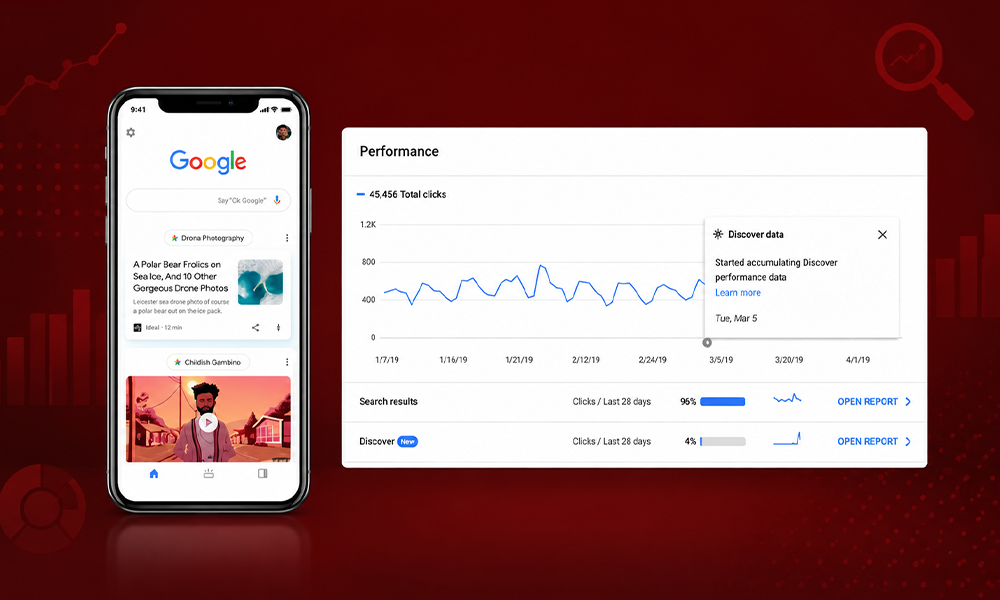
Once a platform property is connected and verified, the data appears in three core Search Console reports:
Performance Report
The Performance report is the analytical backbone. It displays:
- Total clicks how many times users clicked your social content in Google Search
- Total impressions how often your posts were displayed to searchers
- Search queries the exact terms that led people to your content
- Filter and sort capabilities to identify which posts and queries drive the most traffic
- Export functionality for analysis in other tools
“If a TikTok video ranks for a product question, you see the query, the impressions it earned, and the clicks it drove. That turns social effort into measurable search demand.”
— Launchcodex analysis
Insights Report
The Insights report provides a high-level overview:
- Recent traffic trends and patterns
- Your top-performing posts
- How people discover your account on Google
- Audience behavior summaries
This is the weekly pulse check view ideal for quick briefings and trend spotting without diving into raw query data.
Achievements
The Achievements section tracks growth milestones:
- Passing a new total click threshold from Google Search within a 28-day period
- Reaching impression milestones
- Celebrating engagement growth
This is a light motivational layer useful for reporting progress to stakeholders who respond better to clear wins than spreadsheets.
How to Add a Platform Property
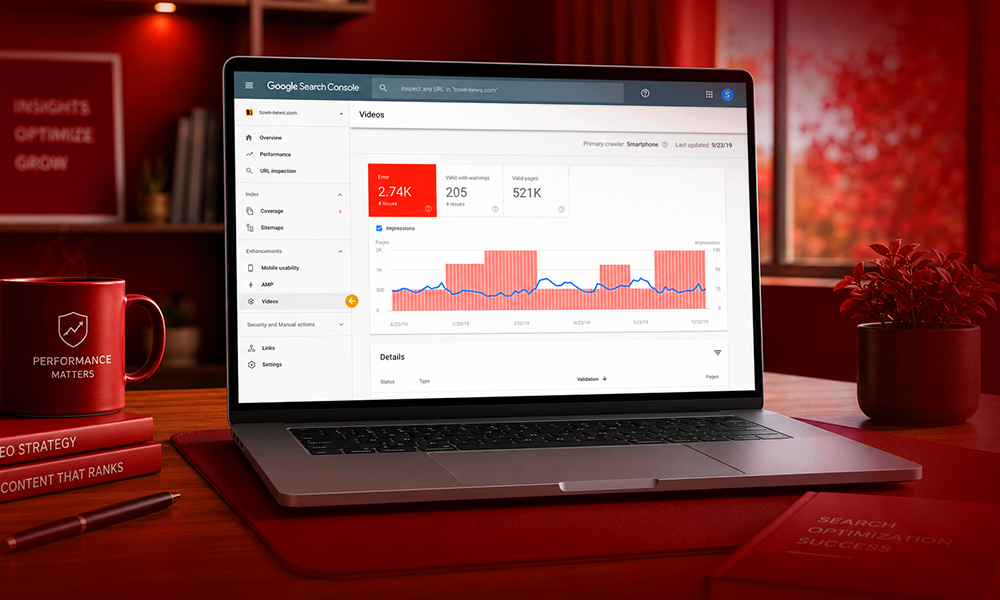
Setting up a platform property follows Search Console’s existing verification process:
Step-by-Step Setup
- Open Search Console and sign in with the Google account you use for your other properties
- Go to the verification page, or open the property selector dropdown anywhere in Search Console and click “Add property”
- Select one of the four available platforms: Instagram, TikTok, X, or YouTube
- Follow the on-screen verification steps to securely authorize the connection
- Wait for data to populate new properties collect data going forward, not retroactively
Setup Pitfalls to Avoid
| Pitfall | Solution |
|---|---|
| Feature not visible yet | The rollout is gradual over several weeks check back if the option is missing |
| Using multiple Google accounts | Use one account for all properties to simplify reporting |
| Connecting the wrong profile | Brands with multiple accounts on one platform should verify they’re authorizing the correct one |
| Expecting historical data | Platform properties collect data from the connection date forward no backfill |
How Platform Properties Differ From the 2025 Social Channels Experiment
Google tested a smaller version of this idea in December 2025 with social channels in Search Console Insights. The 2026 platform properties release is a fundamentally bigger step.
| Feature | 2025 Social Channels Experiment | 2026 Platform Properties |
|---|---|---|
| How channels appear | Auto-detected from your website | You add and verify each account manually |
| Ownership requirement | Tied to an associated website | Works for accounts without domain ownership |
| Where data shows | Insights report only | Performance report, Insights, and Achievements |
| Control | Passive, Google-selected | Active, you choose what to connect |
| Platforms | Limited detection | Instagram, TikTok, X, YouTube at launch |
“Being able to verify domains/properties that are technically not your domain names is pretty interesting.”
— Barry Schwartz, Search Engine Roundtable
Why This Matters for Creators and Marketers
The Search Behavior Shift
Search has moved to social platforms, and the data proves it:
- 41% of Gen Z turn to social platforms first when looking for information, ahead of traditional search engines at 32%
- 37% of consumers across all age groups now search social platforms first for product reviews and recommendations
- 76% of respondents said social content influenced a purchase in the past six months, rising to 90% among Gen Z
- 46% of Gen Z and 35% of Millennials only or primarily use social media for search roughly double the 24% overall average
- 40% of Gen Z have used TikTok to search, with Instagram and TikTok overtaking Google for product discovery
“Social is becoming the new search engine.”
— Scott Morris, CMO, Sprout Social
The Measurement Gap
Before platform properties, marketers faced a critical blind spot: they could measure website search performance but had zero visibility into social search performance. If buyers search on TikTok and Instagram before Google, reporting only website rankings undercounts discovery and misreads which content actually drives demand.
Google now treats a brand as a presence across many platforms, not just a domain. Platform properties give marketers something they have never had inside Search Console: a measured view of how social and video content performs in Google Search and Discover.
The Generational Search Shift
Gen Z vs. Baby Boomers
The generational divide in search behavior is stark:
| Generation | Primary Search Behavior |
|---|---|
| Gen Z | 46% only/primary social media search; 41% social first for information |
| Millennials | 35% only/primary social media search |
| Baby Boomers | 94% use search engines for brand discovery |
This data from Forbes Advisor and Hootsuite reveals that younger buyers rely on Google far less than older generations. For brands targeting Gen Z and Millennials, social search visibility is no longer optional it is the primary discovery channel.
What This Means for Content Strategy
The implication is clear: content strategy must be platform-agnostic. A piece of content that performs well on TikTok may also rank in Google Search for related queries. Without platform properties, that cross-channel performance was invisible. Now, creators can:
- See which social posts rank for high-value queries
- Identify gaps where social content outperforms website content
- Build unified content strategies across platforms
- Measure true ROI of social content creation
How to Turn Platform Property Data Into Growth
The Five-Step Framework
Platform property data is a content and demand signal, not a vanity dashboard. Here’s how to act on it:
- Export search terms export the queries from your Performance report for each connected platform
- Flag content gaps identify queries where a social post ranks but your website has no matching page
- Build or update website content create content that captures that demand using the same search intent
- Identify top-performing formats use Insights to find your best posts, then produce more content in that format
- Track clicks in Achievements confirm that your changes moved the traffic needle
Real-World Example
A skincare brand finds its TikTok videos rank for “vitamin C serum for beginners” with strong impressions but few website clicks for that term. The brand builds a website guide on that exact query, links it from the video description, and captures both social and search demand. One data point becomes two channels of traffic.
Cross-Channel Integration
“We pipe platform property data and website Search Console data into one report, so a client tracks clicks from both surfaces in a single view. Two separate dashboards means two blind spots.”
— Derick Do, Co-Founder and Chief Product Officer, Launchcodex
The most effective approach is combining platform property data with traditional website Search Console data in a single cross-channel view, rather than analyzing them in separate silos.
Common Pitfalls and How to Avoid Them
Watching Without Acting
Data with no content response changes nothing. The biggest mistake is treating platform properties as a report to admire rather than a to-do list to execute. When a TikTok post ranks for a query your website ignores, that gap is your next content brief.
Ignoring Format Signals
If short video wins on TikTok, produce more short video. If carousel posts drive Instagram search traffic, double down on carousels. Platform properties reveal format preferences that should directly inform content strategy.
Treating Social and Website as Separate
Social and website search are not separate reports they are two surfaces of the same discovery ecosystem. Combine them for the full picture. A query that drives TikTok impressions and website clicks is a double-win that deserves more investment.
Chasing Every Query
Not all queries deserve action. Prioritize terms with commercial intent and real volume. A query with 10 impressions and zero clicks is a curiosity, not a strategy.
Frequently Asked Questions
What are Google Search Console platform properties?
Platform properties are a new Search Console property type that lets you verify your Instagram, TikTok, X, or YouTube account and see how that content performs in Google Search and Discover, including clicks, impressions, and search terms.
How is this different from the 2025 social channels feature?
The 2025 version auto-detected channels tied to your website and showed them only in Insights. The 2026 platform properties type is one you add and verify yourself, works for accounts without domain ownership, and feeds three reports: Performance, Insights, and Achievements.
Which platforms can I connect?
Four at launch: Instagram, TikTok, X, and YouTube. Facebook, LinkedIn, and other networks are not supported yet.
Why can I not see the feature yet?
The rollout is gradual over several weeks. If the “Add property” option doesn’t show your platform choices, wait and check again. A missing option does not mean a setup error.
Does it show historical data?
No. Like website properties, a platform property collects data going forward from the time you connect it. Set it up early to build historical data.
Where does the data appear in Search Console?
In three places: the Performance report (clicks, impressions, queries), the Insights report (trends, top posts), and the Achievements section (growth milestones).
How do platform properties help creators?
Creators who have never owned a verified website can now see how their social posts gain visibility in Google Search. This democratizes search analytics for the creator economy, giving influencers the same performance visibility that website owners have enjoyed for years.
Is this related to Search profiles?
No. Platform properties are distinct from Search profiles, which Google introduced in June 2026 as public profile pages for qualified creators and publishers. A Search profile is a shareable page that consolidates content for followers. A platform property focuses on analytics showing how posts perform in Search rather than directly exposing them to an audience.
Can I verify accounts I don’t own the domain for?
Yes. This is the standout change. You can verify properties that are technically not your domain names a major shift from traditional Search Console verification.
How do I get started?
Add your platform properties this week, give the data time to populate, and run the five-step framework: export queries, flag gaps, build content, identify top formats, track clicks.


