Most websites do a decent job of presenting information. But only a few do a good job of guiding visitors toward actually doing something with it.
The difference between a website that people browse and one that drives real action usually comes down to design decisions, how it’s structured, where attention gets directed, and how easy you make it for someone to take the next step.
Here, we’ll break down the key design principles behind websites that both attract visitors and keep them moving. We’ll give you practical techniques for building clear visual hierarchies, integrating trust signals, reducing friction in the user journey, and using layout to support decision-making.
Whether you’re building from scratch or improving an existing site, these principles apply across industries and business sizes.
Win the First Few Seconds
A visitor decides whether to stay or leave your site within a few seconds of landing on it. That decision happens before they read a single line of copy. It’s based entirely on what they see and feel in that first glance.
That means your homepage has one job above everything else. It’s to make it immediately obvious who you are, what you offer, and why it’s worth a closer look.
How to apply it:
- Lead with a strong visual hierarchy.
- Put your most important message (a headline, a product shot, and a value statement) at the top of the page where it’s impossible to miss.
- Don’t make visitors hunt for context.
- Use contrast, scale, and negative space to direct attention, and keep the above-the-fold area clean and focused. Every element competing for attention weakens the overall impact.
- Your brand identity should also be unmistakable from the start.
- Consistent typography, colors, and imagery signal that you’re intentional, and intentional brands feel trustworthy.
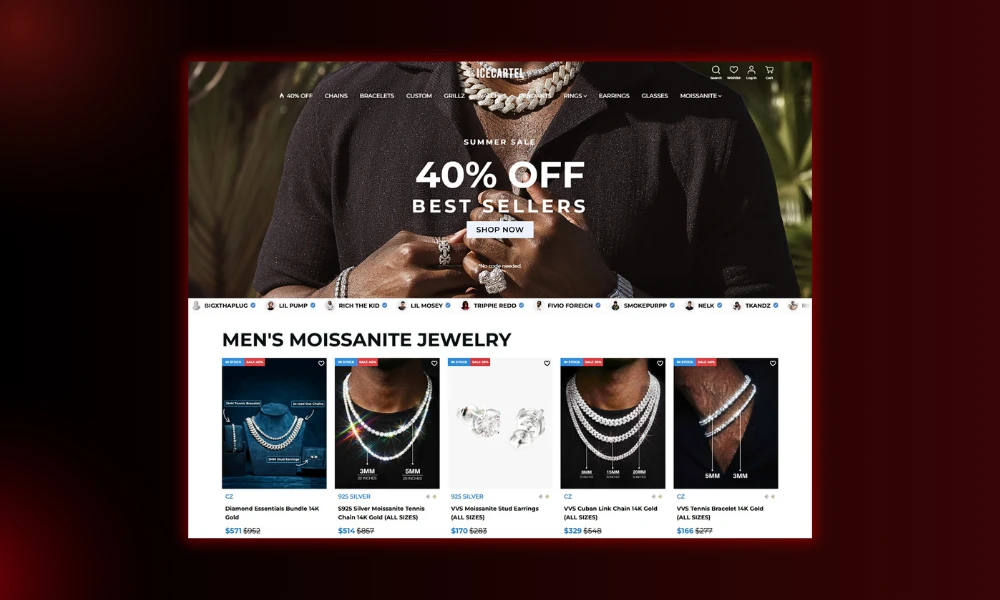
An example of a brand that nails this method is Icecartel, a company selling men’s moissanite jewelry. The site leads with bold visuals and a strong product focus that makes the brand’s aesthetic immediately clear. There’s no guessing what they sell or who they sell it to. The positioning hits you right away.
The product photography is sharp and prominent, the branding is consistent, and the overall experience feels polished without feeling cluttered. Visitors know within seconds that they’ve landed somewhere specific, curated, and confident.
That kind of first impression doesn’t happen by accident. It’s the result of deliberate, focused design choices.
Source: icecartel.com
Make Navigation Feel Effortless
When visitors can’t find what they’re looking for, they don’t ask for help. They just leave. Poor navigation quietly kills conversions, while a well-structured, intuitive menu keeps people engaged and moving through your site.
Studies show that optimizing navigation and menu structure can directly lift sales by reducing the friction between interest and purchase.
The logic is simple. The easier you make it to find something, the more likely someone is to buy it.
How to apply it:
- Organize your content around how visitors think, not how your internal team labels things.
- Use clear, familiar category names and keep your top-level navigation focused. Too many options create decision fatigue.
- Make your search bar prominent. Visitors with intent use search first, so placing it where eyes naturally land removes a step from their journey.
- Pair it with smart suggestions or categorized results to help people who aren’t sure exactly what to type.
- Also, test your navigation on mobile. Menus that work on desktop often collapse into frustrating experiences on smaller screens.
- Prioritize thumb-friendly tap targets and keep dropdown structures shallow.
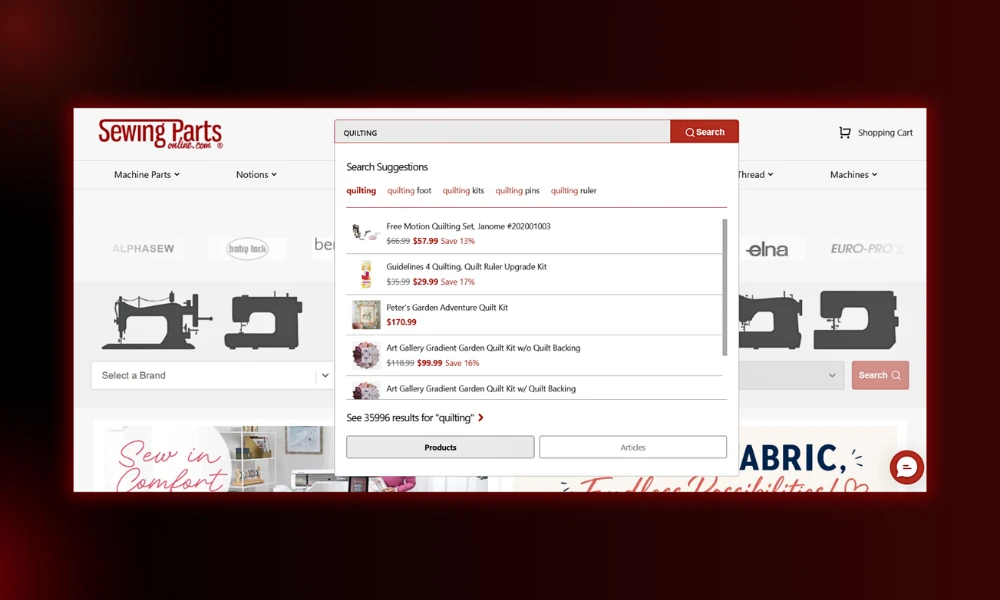
Sewing Parts Online, a retailer specializing in sewing machines, parts, and supplies, handles navigation well for a site carrying an enormous inventory. Their search bar sits centrally in the navigation, exactly where visitors look first.
Type “quilting” (or anything else), and before you finish the word, a dropdown appears with categorized suggestions, like quilting kits, pins, rulers, frames, etc. A customer who isn’t sure of the exact product name still lands in the right place.
That kind of search experience turns a potentially frustrating browse into a smooth, confident path to purchase.
Source: sewingpartsonline.com
Make Action Feel Like the Natural Next Step
Every extra click, unclear label, or moment of hesitation gives visitors a reason to stop.
The best-converting sites don’t rely on aggressive tactics to push people forward. They simply design each step so logically that continuing feels easier than leaving.
That’s the difference between a site that generates interest and one that generates revenue.
How to apply it:
- Keep your product pages focused.
- Lead with clear visuals, a concise description, and a prominent add-to-cart button.
- Avoid cluttering the page with too much information before the visitor has decided they’re interested. Details like specs and FAQs can live further down the page.
- Your homepage should do real work too. Use it to surface your most popular categories and bestselling products upfront, so visitors with purchase intent don’t have to dig.
- Fewer steps between arrival and decision means less opportunity for drop-off.
- Also, remove any friction at checkout. Hidden fees, forced account creation, and complicated forms all interrupt momentum right when it matters most.
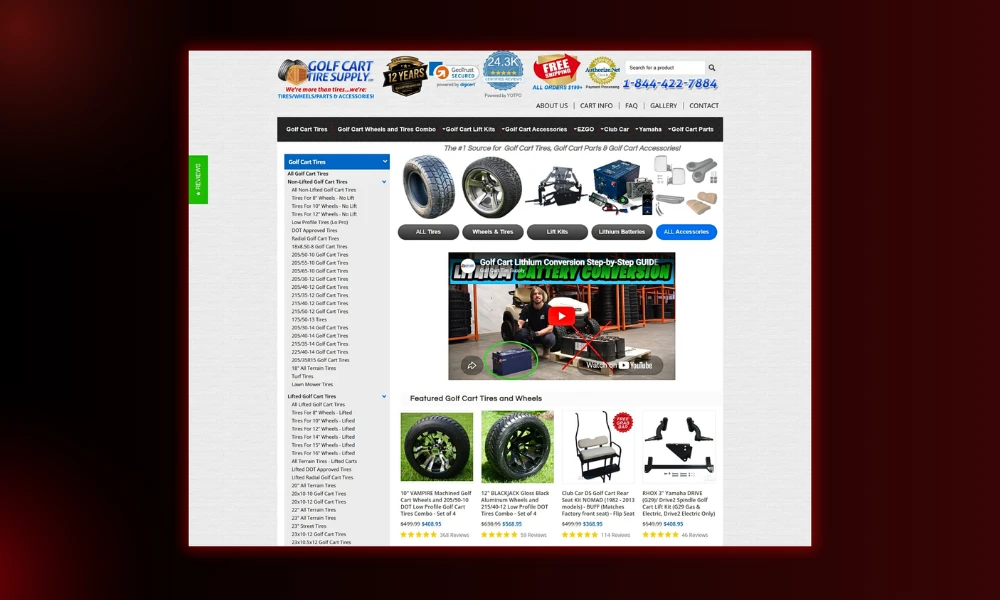
Golf Cart Tire Supply, a retailer focused on golf cart tires, wheels, and accessories, builds their site around a smooth path to purchase. Their homepage surfaces product categories and bestsellers immediately, so visitors with a clear need can move forward without unnecessary browsing.
Product pages are clean and direct. The site’s stated goal is to make the buying process easy, and the layout reflects that. You get a clear organization, a straightforward product presentation, and no unnecessary barriers between discovery and checkout.
For a niche product in a specific market, that kind of focused design removes hesitation and keeps buyers moving.
Source: golfcarttiresupply.com
Turn Engagement Into Intent
Getting someone to read your page is one thing. Getting them to think “I need this” is another. The gap between the two is where most sites lose people.
That happens not because the product is wrong, but because the site doesn’t do enough work connecting what the product does to why it matters to the visitor standing right in front of it.
Engagement becomes intent when your content answers the right questions in the right order.
How to apply it:
- Map every product feature or service capability to a concrete customer outcome.
- Don’t just list what your offer does. Show what the customer gains. If your platform saves time, quantify it. If it reduces risk, name the risk explicitly.
- Structure your pages so visitors encounter this logic flow without having to assemble it themselves.
- A feature block should sit alongside a benefit statement, followed by social proof that reinforces the claim.
- Use testimonials strategically. Place them near the features they illustrate.
- Add comparison tables that highlight what sets you apart, not to tear down competitors but to help visitors make confident choices.
- Include micro-commitments throughout the page, such as a free trial signup, a calculator tool, or a diagnostic quiz. Each small “yes” builds psychological momentum toward the larger “yes” of a purchase.
- Track where engaged users drop off. Those exit points often signal where your narrative thread breaks.
- Repair those gaps by adding clarity, proof, or a stronger link between a feature and its personal payoff for the reader.
Uproas, a provider of premium agency-level advertising accounts for platforms like Bing, Google, Meta, and TikTok, builds their site around a logical progression from awareness to action.
The site clearly addresses common advertiser frustrations (restrictions, bans, and slow approvals) and positions its accounts as a direct solution to each one.
Features connect directly to outcomes, objections get handled before they build, and the path to signing up stays clear throughout.
Source: uproas.io
Build Trust Along the Journey
People don’t make decisions in a vacuum. When they land on an unfamiliar site, they’re instinctively looking for signals that others have been here before and found it worthwhile.
Social proof reduces the cognitive burden of that decision. Instead of evaluating everything from scratch, visitors use existing evidence as a shortcut for trust.
Placing that evidence well does a lot of heavy lifting.
How to apply it:
- Spread trust signals throughout your page rather than grouping them all in one section. A client logo near your headline, a testimonial beside a key feature, and a review count near your CTA. Each of these catches visitors at different stages of consideration.
- Specificity matters too. Vague praise like “great service” moves no one. Testimonials that mention a concrete outcome, a specific problem solved, or a measurable result carry far more weight.
- Where possible, pair them with a name, a role, and a recognizable company.
- Also, let your numbers speak. Active user counts, retention rates, and client milestones all signal that real people have committed and stayed.
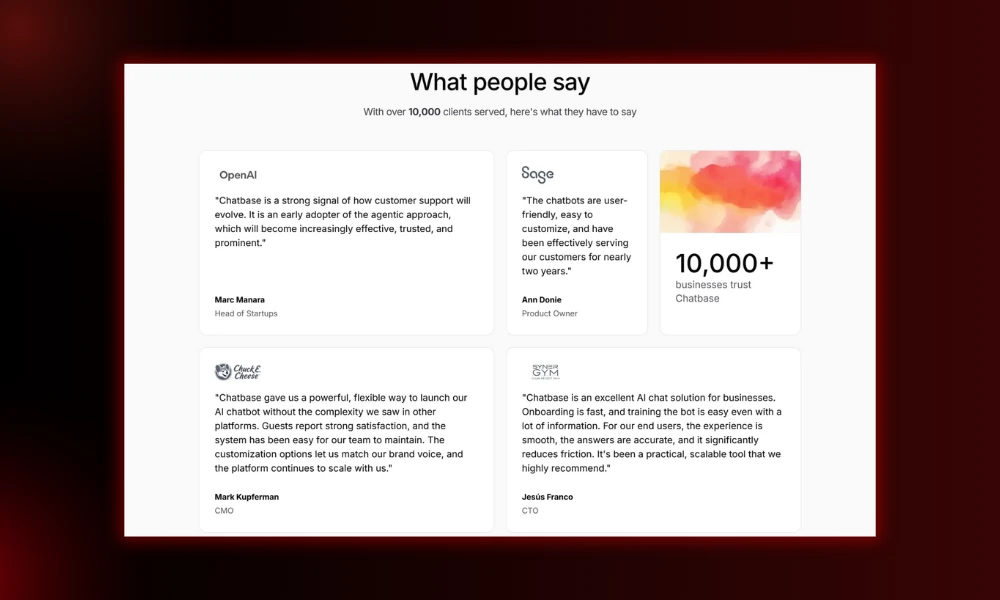
Chatbase, an AI-powered customer support platform trusted by over 10,000 businesses, uses social proof deliberately across their site. They display client counts and the logos of well-known companies to give newcomers an immediate sense of scale and credibility.
They also feature verbatim testimonials from high-profile clients. These are unedited, attributed quotes that carry the kind of authenticity a polished marketing claim simply can’t replicate.
Together, these elements give undecided visitors something concrete to lean on when they’re still making up their minds.
Source: chatbase.co
Final Thoughts
Designing a site that turns interest into momentum isn’t a one-time project. It’s a practice of watching how visitors move, where they stall, and what nudges them forward.
The principles stay consistent: win attention immediately, make navigation effortless, position action as the obvious next step, connect engagement to intent, and weave trust throughout the experience.
When you get these elements working together, your website stops being a static brochure and starts behaving like your best-performing asset, one that never sleeps, never misses a cue, and steadily turns curious strangers into committed customers.