In 2026, many sales teams still measure email finder accuracy by one simple question: how many emails did the tool find? But volume is no longer enough. An email address is only useful if it is verified, deliverable, relevant to the right buyer persona, and safe to use in outbound campaigns.
Inaccurate email data doesn’t just waste credits. It increases bounce rates, hurts sender reputation, slows down SDRs, and makes campaign results harder to trust. That’s why email finder accuracy should not be treated as a single percentage. For modern sales teams, it’s a workflow problem.
What sales teams should know about email finder accuracy in 2026
Email finder accuracy is not just about how many addresses a tool can return. The real value is in how many verified, relevant, and outreach-ready contacts your team can actually use.
| Mistake sales teams make | Why it hurts accuracy | What to do instead |
| Judging tools by database size | Large databases can still include outdated, invalid, or risky contacts. | Check the verification process and data freshness. |
| Treating “found” emails as “safe to send” | Found emails may still bounce, be unverified, or belong to catch-all domains. | Verify every email before outreach. |
| Ignoring role and company fit | A correct email address still wastes time if the person is not a relevant buyer. | Validate ICP match before adding contacts to a sequence. |
| Using one data source only | Single-source data can miss job changes, domain updates, or recent company moves. | Cross-check, enrich, and update prospect data. |
| Skipping list cleaning | B2B contact data decays quickly, especially in fast-moving markets. | Re-verify lists before every campaign. |
| Measuring accuracy only after sending | Bounce damage happens too late and can already affect sender reputation. | Measure list quality before launching outreach. |
What “email finder accuracy” really means in 2026
Email finder accuracy is often discussed as if it were one simple number. In reality, it has several layers. A tool may return an email address, but that does not automatically mean the contact is ready for outreach.
In 2026, accurate email data should mean that the tool finds the right person, connects that person to the right company, returns an email address that is likely to be deliverable, and helps your team decide whether the contact fits your ideal customer profile. The data also needs to be current enough to use safely inside a real sales workflow, not just look good in a spreadsheet.
That is why sales teams should look beyond “email found” rates. The better question is: how many of those contacts are verified, relevant, and safe to use in an outbound campaign?
Found vs. verified vs. deliverable emails
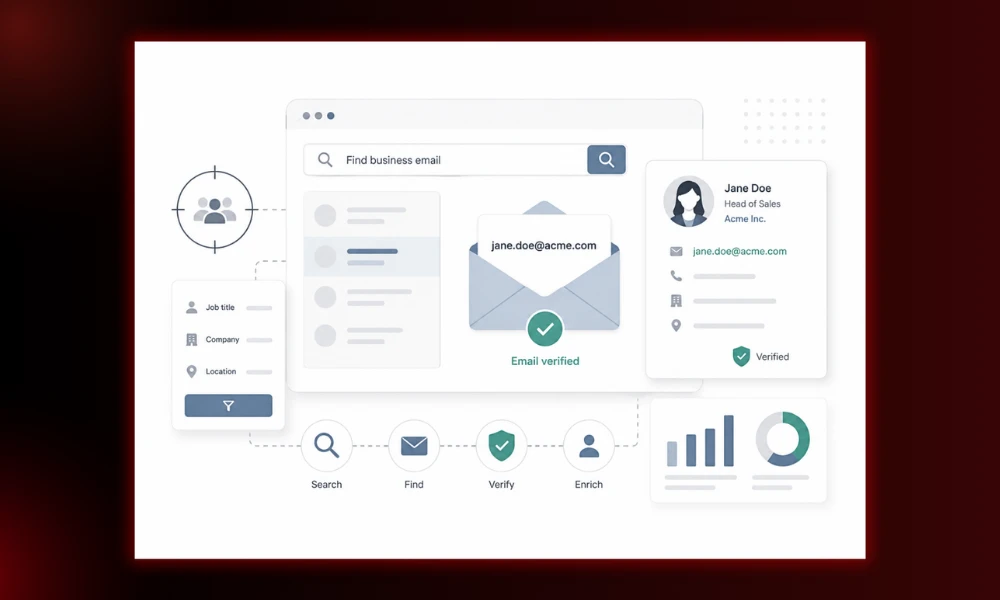
A found email is an address that a tool has discovered, generated, or inferred based on available data. It may follow a company’s email pattern, but it still needs to be checked before sending.
A verified email is an address that has gone through validation checks to confirm that it is likely to be valid. This reduces the risk of sending to outdated, incorrect, or inactive inboxes.
A deliverable email is the strongest outcome for sales teams. It means the address is not only found and verified, but also suitable for outreach with a lower bounce risk.
There are also risky or catch-all emails. These appear when a company’s domain accepts emails broadly, making it harder to confirm whether a specific inbox really exists. These addresses are not always useless, but they should be treated with more caution than fully verified contacts.
This distinction matters because the word “accurate” is often used too loosely. A tool that finds many possible addresses is not necessarily more accurate than one that returns fewer, better-verified contacts.
Why accuracy matters more now than in previous years
Cold outreach has become more competitive, and inbox providers are more careful about filtering unwanted or suspicious emails. When sales teams send messages to outdated or unverified lists, they risk more than a few bounced emails. They can damage sender reputation, reduce future deliverability, and make it harder for legitimate campaigns to reach the inbox.
Once domain reputation starts to decline, it is difficult to recover quickly. That is why email finder accuracy now has to be managed before outreach begins, not after a campaign has already produced bounce reports.
For sales teams, the goal is no longer to collect as many addresses as possible. The goal is to build a clean, verified, ICP-fit contact list that SDRs can use with confidence.
The biggest email finder accuracy mistakes sales teams make
Mistake 1: Believing database size equals accuracy
A large contact database can look impressive on a product page. Millions of companies, hundreds of millions of contacts, endless filters — it sounds like the perfect shortcut to more pipeline. But database size does not automatically mean better email finder accuracy.
The problem is that B2B data changes constantly. People leave companies, switch roles, move to different departments, change email domains, or stop using old inboxes. A huge database may still contain outdated, duplicated, incomplete, or risky contacts. For sales teams, that means a bigger export does not always turn into more usable leads.
For example, a team might export 5,000 contacts from a large database and assume they have enough prospects for a full outbound campaign. But if 20–30% of those contacts are no longer at the company, have unverified addresses, or belong to risky domains, the actual number of outreach-ready leads is much lower. The campaign looks strong in volume, but weak in quality.
Mistake 2: Sending emails right after finding them
Many sales teams stop too early. They assume that once a tool helps them find a valid email address, the contact is ready for a sequence. But a valid address is only the starting point, not the finish line. Before sending, teams still need to verify the email, enrich the contact data, segment the list, and personalize the message.
This is where tools like Snov.io can help, because they connect email finding, verification, and outreach in one workflow. Instead of moving data between disconnected tools, teams can check email quality before launching a campaign.
Mistake 3: Ignoring job changes and contact decay
Even accurate B2B data does not stay accurate forever. People change companies, switch roles, move to new departments, and companies update their domains or email patterns.
An email that was valid six months ago may no longer be safe to use today. Before launching a campaign with an older list, sales teams should re-verify contacts and remove invalid, risky, or outdated addresses.
Mistake 4: Treating catch-all emails as fully safe
Catch-all domains accept emails broadly, which can make an address look valid even when the individual inbox may not exist. This makes verification less certain.
Sales teams should separate catch-all emails from fully verified contacts and use them more cautiously, especially in large outbound campaigns.
Mistake 5: Measuring accuracy only by bounce rate
Bounce rate matters, but it is a late signal. By the time bounces appear, your sender reputation may already be affected.
Instead, teams should check list quality before sending. Useful pre-send metrics include the share of verified contacts, risky contacts, role-based emails, outdated domains, ICP-fit contacts, and enrichment completeness.
Mistake 6: Not checking whether the email belongs to the right buyer
A valid email address is not automatically a good lead. If the person does not match your target role, seniority, company size, industry, region, or buying context, the contact will still waste SDR time.
Email accuracy should include buyer relevance, not just deliverability.
Mistake 7: Using the same accuracy expectations for every market
Email finder accuracy can vary by region, industry, company size, and data availability. US B2B contacts may be easier to find than contacts in smaller or more privacy-sensitive markets, but that does not remove the need for verification.
Sales teams should test tools on their actual target market instead of relying on generic accuracy claims.
Recommended workflow for accurate email prospecting in 2026
Step 1: Define your ICP before searching
Accurate prospecting starts before you open an email finder. First, define who you actually want to reach: target country, industry, company size, job titles, seniority, technologies used, buying signals, and segments you want to exclude.
This prevents your team from collecting valid email addresses that do not belong to the right buyers.
Step 2: Find contacts from reliable sources
Once your ICP is clear, use reliable sources to find contacts. This may include domain search, LinkedIn or profile-based prospecting, company websites, B2B databases, and enrichment tools.
The goal is not just to collect more emails, but to build a list of contacts that are relevant, current, and worth verifying before outreach.
Step 3: Verify emails before sending
Before adding contacts to a sequence, verify their email addresses. This helps reduce bounces, protect sender reputation, and improve overall campaign quality.
Verification is especially important when working with older lists, large exports, or contacts from multiple sources.
Step 4: Segment contacts by confidence level
After verification, do not treat all contacts the same. Segment them by confidence level:
- verified and ICP-fit
- verified but low-priority
- risky or catch-all
- unverified
- invalid
Only verified, relevant contacts should enter normal outreach. Risky or unverified emails should be reviewed separately, and invalid contacts should be removed from the list.
Step 5: Personalize outreach based on enriched data
Tie accuracy to relevance. A verified email without context still leads to generic outreach.
Step 6: Monitor bounce rate, replies, and domain health
Accuracy is ongoing. Sales teams should keep reviewing bounce data, deliverability signals, reply rates, and list quality.
How to run a simple email finder accuracy test
The best way to judge an email finder is to test it on your real target market. Instead of relying only on accuracy claims, create a sample list of 200–500 prospects that reflects the contacts your sales team actually wants to reach.
Test setup
Build a balanced sample that includes:
- 50 known valid contacts
- 50 contacts from fast-changing companies
- 50 senior decision-makers
- 50 niche-industry contacts
- optional contacts from different company sizes
This makes the test more realistic than checking only easy-to-find prospects.
Metrics to record
Track both quantity and quality. Useful metrics include email found rate, verified email rate, invalid rate, risky or catch-all rate, bounce rate after the campaign, reply rate, cost per verified lead, and time saved per list.
How to interpret results
Do not choose a tool only because it finds the highest number of emails. A tool that returns fewer contacts but gives you more verified, usable, ICP-fit addresses may be more valuable than one that produces a large list of unverified emails.
Final takeaways
Email finder accuracy is not just about finding an address. For sales teams, the real value comes from contacts that are verified, usable, relevant to the ICP, and safe to add to an outbound campaign.
That means verification should happen before outreach, not after the first bounce reports arrive. Teams should also test email finder accuracy on their actual target market, because results can vary by region, industry, company size, and buyer role.
For teams that want to keep this process connected, Snov.io can be a practical all-in-one option for finding prospects, verifying email addresses, and running outreach from one workflow.
Before your next campaign, don’t ask how many emails your tool can find. Ask how many verified, relevant, and ready-to-send prospects it can give your sales team.