Self-service documentation resolves tickets at $1.84 each. Human agents cost $13.50. Yet 80% of knowledge bases are out of date. This is the guide that closes that gap covering every step from planning to publishing to measuring, with the tools, templates, and frameworks that make documentation a profit center instead of an afterthought.
Introduction: The Document That Pays for Itself If You Build It Right
There is a document inside every company that, when done well, generates more measurable ROI than most marketing campaigns.
It is not a sales deck. Not a landing page. Not a whitepaper.
It is the user manual.
Self-service documentation resolves support tickets at $1.84 per contact. A human agent handling the same question costs $13.50. That is a 7x cost differential — on every single customer interaction that documentation could have handled but didn’t.
And there are a lot of those interactions. Up to 60% of support tickets could be resolved through self-service knowledge bases and instruction manuals, yet only 36% currently are. The gap between what documentation could deflect and what it actually deflects is costing companies hundreds of thousands of dollars annually in avoidable support costs.
The obstacle is not that companies lack documentation. Most have it.
The obstacle is that the documentation is bad.
According to a 2026 Brainfish study, 80% of knowledge bases are out of date. Only 19.1% of support professionals rate their own documentation as “very accurate.” The manuals exist. They describe products that no longer match what users see on their screens. Users consult them, get confused, and contact support anyway consuming both the documentation investment and the support cost.
This guide is about building user manuals that actually work. Not the theory of documentation. The practice of it how to plan, structure, write, design, test, publish, maintain, and measure instruction manuals that reduce support costs, accelerate onboarding, and earn their keep as a genuine business asset.
Whether you are building a user instruction manual for a physical product, an online manual for a SaaS platform, or product manuals for an enterprise software suite, the principles are the same. The execution is what separates the manuals that save money from the ones that waste it.
Part I: Why User Manuals Are a Business Investment Not a Cost
Before the how, the why because most documentation projects fail not from bad writing but from insufficient organizational commitment. And insufficient commitment comes from not understanding the numbers.
The Cost Math
A mid-size SaaS company handles 2,000 support tickets per month at an average cost of $25–$35 per ticket. That is $50,000–$70,000 monthly on customer support.
If well-built documentation deflects 40% of those tickets the conservative end of the 40–60% deflection range that effective self-service implementations consistently achieve the company saves $20,000–$28,000 per month. That is $240,000–$336,000 in annual cost reduction.
From documentation.
The specific math: 2,000 FAQs and knowledge base articles resolving inquiries monthly that would otherwise take 8 minutes each of agent time. That saves 267 hours per month. At $30/hour agent cost, that is $96,120 annually from a self-service system that costs a fraction of that to build and maintain.
The Customer Experience Math
Gartner’s 2025 research found that 61% of B2B buyers prefer self-service when learning how to use a product making the user manual the first place most customers turn before contacting anyone at the company.
The quality of that first documentation interaction directly predicts product adoption.
Users who set up and start using a product successfully through self-service documentation have higher activation rates, longer retention, and higher lifetime value than users who require human support during onboarding.
The inverse is devastating. Users who encounter confusing, incomplete, or outdated instruction manuals during their first product experience form negative impressions that persist even if the product itself is excellent.
The Credibility Math
Documentation quality is a brand signal.
Polished, organized, current documentation communicates that a company takes its product and its customers seriously. Sloppy documentation communicates the opposite, regardless of how sophisticated the product is.
For SaaS companies in competitive enterprise procurement evaluations, documentation quality is reviewed during vendor assessment. Enterprise buyers check whether a vendor’s product manuals are current, comprehensive, and well-structured before making purchasing decisions. Poor documentation has lost enterprise deals that the product itself would have won.
Part II: Types of User Manuals Know What You Are Building
Not all documentation serves the same purpose. Choosing the right type before you start writing is the first structural decision.
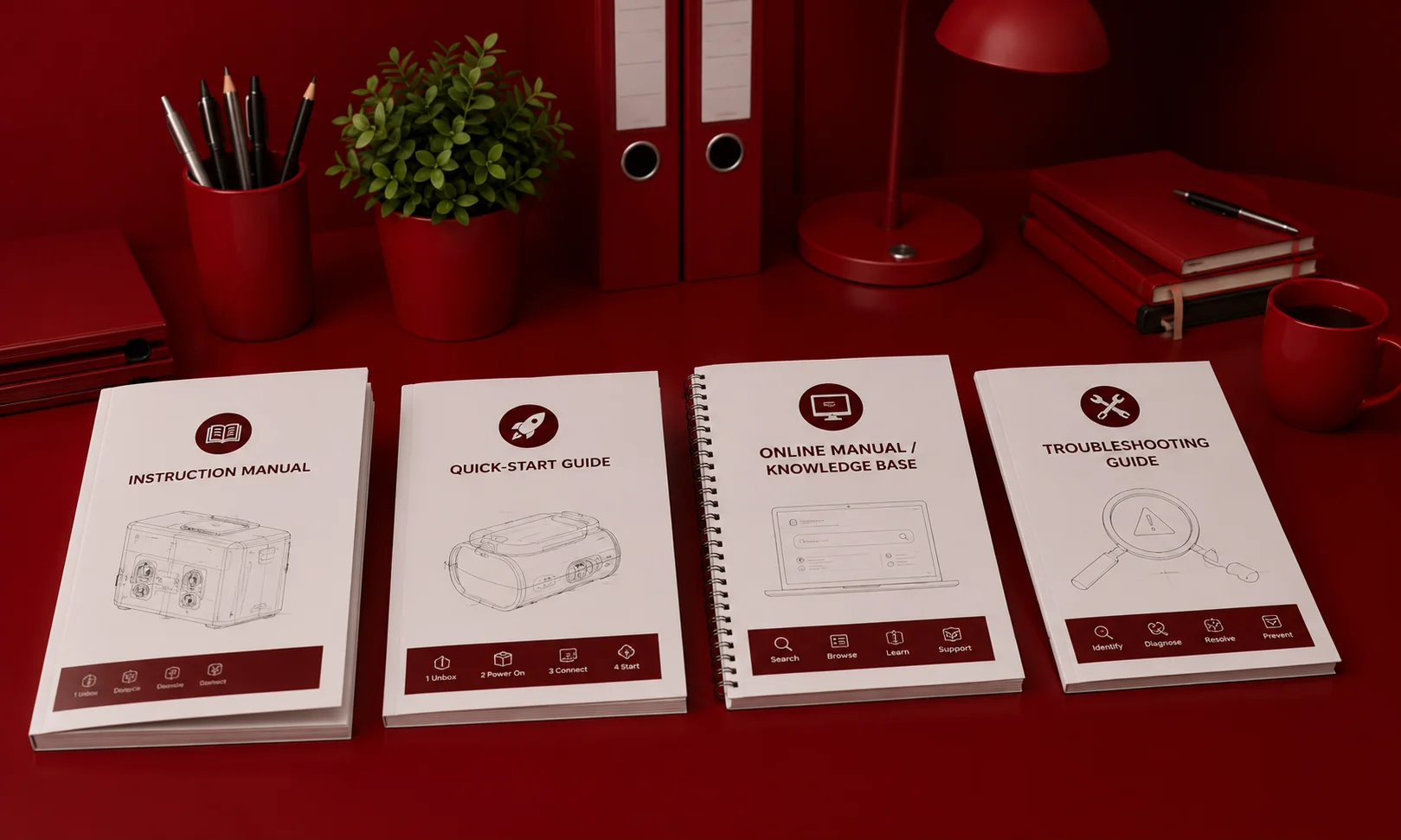
Instruction Manual
Step-by-step procedures for operating a product. The most common type. Physical products, software applications, and consumer electronics all require instruction manuals. Organized by task: “How to set up your device,” “How to connect to WiFi,” “How to export your data.”
Quick-Start Guide
The compressed path from unboxing to first successful use. Limited to 5–10 steps. Often a single page or card.
This is increasingly the most important piece of documentation you produce because most users want to start using the product before understanding it completely. A quick-start guide that gets users to their first successful outcome in under five minutes is worth more than a 200-page manual that sits unread.
Online Manual / Knowledge Base
A searchable, web-based documentation library organized by topic or user task. The dominant format for software products in 2026. Advantages over printed manuals: searchable, linkable, updateable without reprinting, accessible from any device.
The shift from print instruction manuals to online manuals has been decisive. For any software product, digital service, or connected device, an online knowledge base is now the expected format not a supplementary one.
Troubleshooting Guide
Organized by symptom rather than feature. “My device won’t turn on” rather than “Power button.” The most-consulted section of any user manual and the section most directly correlated with support ticket deflection.
If you have time to write only one section of your user manual exceptionally well, make it the troubleshooting guide. It is where the money is.
API Documentation
The technical manual for software developers integrating with your product. Different audience, different language, different structure than end-user documentation. Increasingly auto-generated from code using tools like Swagger, Mintlify, and Redoc.
Internal Operations Manual
Documentation for internal teams onboarding procedures, workflow guides, standard operating procedures. Same principles, different audience: employees rather than customers.
Part III: How to Create a User Manual The 7-Step Framework
This is the operational section. Every step has a specific output. Skip any step and the quality of the finished manual degrades measurably.
Step 1: Define Your Audience
The single most important decision in the entire process.
A user manual written for a first-time consumer has different vocabulary, different assumed knowledge, and different task complexity than one written for a system administrator or a field service engineer.
Before writing a single word of documentation, answer these questions:
Who is the primary reader their role, technical level, and context of use? What do they already know that you don’t need to explain? What do they not know that you must explain? In what situation will they consult this documentation at a desk, on a factory floor, on a phone while troubleshooting?
The answers define your vocabulary, your depth, your format, and your visual approach. Every subsequent decision flows from audience definition.
Output: A one-paragraph audience profile specifying who the reader is, what they know, and how they will access the documentation.
Step 2: Audit the Product
Walk through every task a user will need to perform from first unboxing or first login through advanced configuration.
Document each task in a simple list format: task name, prerequisite steps, complexity level (beginner/intermediate/advanced), and frequency (one-time setup, daily, weekly, rare).
This task audit becomes the structural skeleton of your manual. It tells you how many sections you need, how to sequence them, and where the documentation effort should be concentrated (high-frequency tasks deserve the most polish).
Output: A complete task inventory every user action, categorized by complexity and frequency.
Step 3: Create an Outline Organized by Task
This is where most documentation projects go wrong.
The natural instinct especially for engineers and product managers is to organize the manual by feature: “Chapter 3: The Dashboard Module.” This mirrors how the product was built. It does not mirror how users think.
Users arrive at documentation with a task to complete: “How do I export my data?” Not a feature to explore: “Dashboard Module Features.”
Organize every section around what users are trying to accomplish. “Getting Started,” “Connecting Your Account,” “Creating Your First Report,” “Exporting Data,” “Troubleshooting Common Issues.”
Output: A complete table of contents organized by user task, sequenced from setup through daily use through troubleshooting.
Step 4: Write in Plain Language
Here are the writing rules that produce clear instruction manuals:
Write in second person. “Click the Settings icon” is clearer than “The user should click the Settings icon.” Address the reader as “you.”
One action per step. “Click Settings, select Notifications, and toggle Email Alerts to On” is three steps compressed into one. Expand it. Each numbered step should contain exactly one action the user performs.
Be concise. Users scan for answers. They do not read documentation like a novel. Every sentence should earn its place. Say what needs to be said and stop.
Use consistent terminology. If you call it a “workspace” in one section, do not call it a “project” in another. Create a terminology glossary before you start writing and enforce it throughout.
Use active voice. “Click the button” not “The button should be clicked.” Active voice creates clearer, more direct instructions.
State the expected result after each step. “Click Save. A green confirmation banner appears at the top of the screen.” This tells users what success looks like so they know whether to continue or troubleshoot.
Output: Complete draft text for every section, written in plain language with one action per step.
Step 5: Add Screenshots, Diagrams, and Visual Aids
That statistic alone justifies the investment in visual documentation.
For every step that involves a screen interface, include a screenshot showing exactly what the user should see. Annotate screenshots with numbered callouts that correspond to the step being described. Red circles, arrows, and highlighted areas are the universal language of user documentation.
For physical products, include labeled diagrams showing component locations, cable connections, assembly sequences, and maintenance access points.
For complex workflows, include flowcharts showing decision points and branching paths.
The most common documentation mistake teams make is treating visuals as optional enhancements rather than core content. In instruction manuals, visuals are not supplementary. They are the primary content for most users the text supports the visuals, not the other way around.
Output: Annotated screenshots, labeled diagrams, and workflow visuals for every procedural section.
Step 6: Test Every Procedure
This step is where the quality gap between good documentation and great documentation is created.
Hand the draft manual to someone who was not involved in writing it ideally someone at the same technical level as the intended audience. Ask them to complete every procedure by following the written instructions alone, without asking questions.
Watch where they hesitate. Watch where they look confused. Watch where they succeed on the first try and where they fail. Every hesitation is an instruction that is unclear. Every failure is an instruction that is incomplete or wrong.
If the test reveals that users can complete every task by following the documentation without help, the documentation is ready. If not, revise and re-test.
Output: A tested, validated manual where every procedure has been confirmed to work by someone who did not write it.
Step 7: Publish and Establish a Maintenance System
Publishing is not the finish line. It is the starting line.
The product will change. The interface will update. Features will be added, removed, or redesigned. Every change creates documentation debt and if the documentation is not updated when the product ships, it won’t be updated at all.
Establish a maintenance system with four components:
Documentation ownership. Every section has a named owner responsible for its accuracy. Unowned documentation decays fastest.
Release-tied updates. Every product release includes a documentation update as a required deliverable not an optional follow-up task that gets deprioritized.
Support ticket monitoring. When the same question appears repeatedly in support tickets, the answer should be added to the manual. Support tickets are the most reliable source of missing documentation topics.
Quarterly audit. Walk through every section and verify it matches the current product. Screenshot accuracy degrades fastest a single UI update can make dozens of screenshots wrong simultaneously.
Output: A published manual with a documented maintenance system that keeps it current.
Part IV: User Manual Structure The Section-by-Section Template
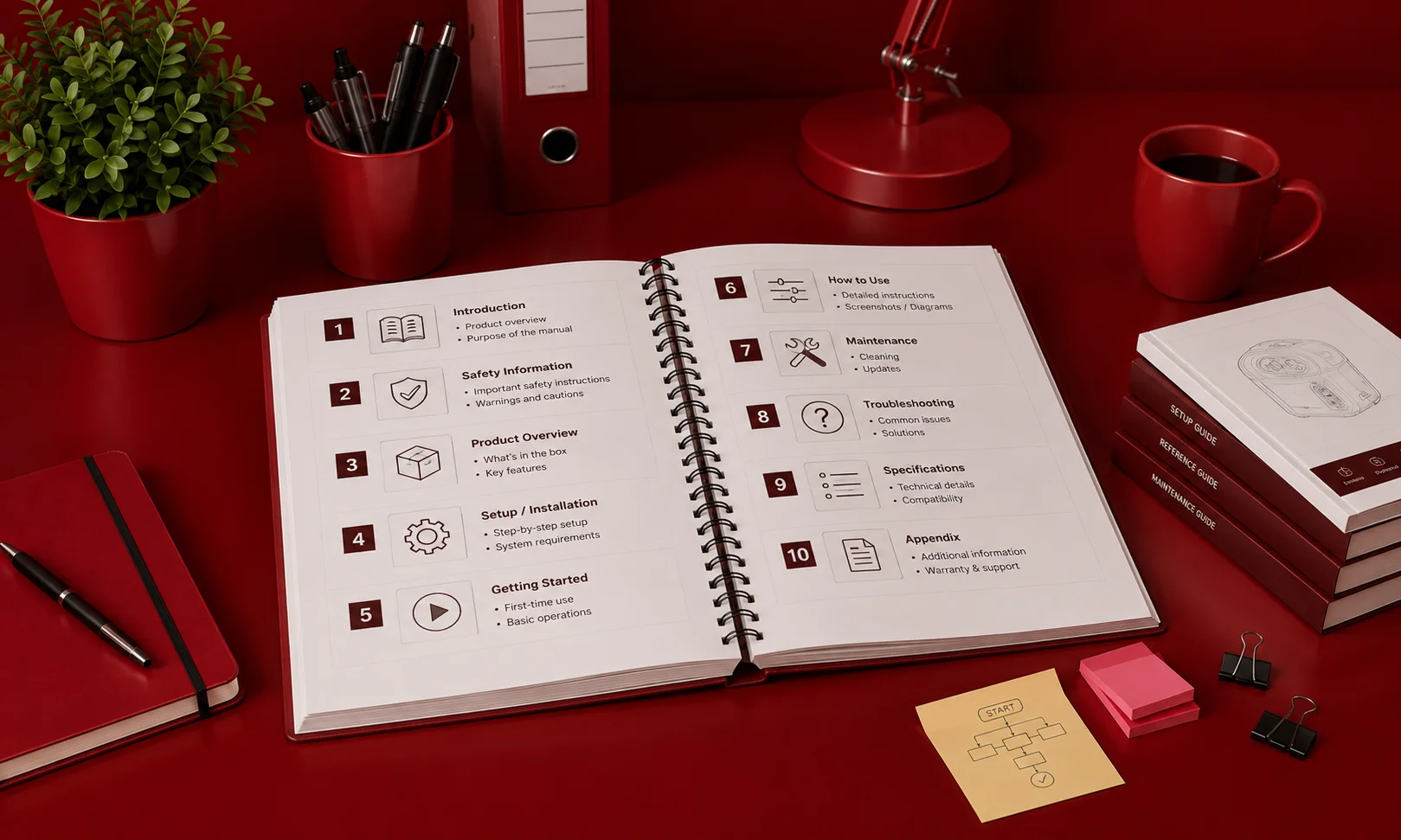
Here is the complete section template that covers every component an effective user manual needs.
| Section | Purpose | Priority |
| Title page + version ID | Identifies product, version, revision date | Required |
| Table of contents | Navigation linked/clickable in digital formats | Required |
| Introduction | What the product is and does factual, not marketing | Required |
| Quick-start guide | Compressed path to first success (5–10 steps) | Highly recommended |
| Safety warnings | Regulatory, electrical, data safety before operating instructions | Required (regulated products) |
| Setup / installation | Prerequisites, system requirements, first-run steps | Required |
| Operating procedures | Step-by-step task instructions with screenshots | Core — largest section |
| Troubleshooting | Organized by symptom, not cause | Required — highest-ROI section |
| FAQ | Common questions with direct answers | Highly recommended |
| Maintenance / care | Cleaning, storage, consumable replacement, backups | Required (physical products) |
| Technical specifications | Dimensions, power, system requirements, compatibility | Required |
| Glossary | Definitions of every technical term used | Recommended |
| Contact / support info | Every support channel available | Required |
| Index | For manuals exceeding 50 pages | Recommended for long manuals |
Part V: Writing Troubleshooting Sections That Actually Deflect Tickets
The troubleshooting section deserves its own treatment because it is the single most commercially valuable section of any user manual.
Organize by Symptom Never by Cause
Users know what they are experiencing. They do not know what is causing it.
“My device won’t connect to WiFi” not “WiFi module firmware incompatibility.”
“I get an error when trying to export” not “Export function null reference exception.”
Every troubleshooting entry should follow this structure:
Symptom what the user sees or experiences, written in the user’s own language.
Most likely cause one sentence explaining why this happens. This builds user trust and helps them understand the logic behind the fix.
Resolution steps numbered, one action per step, with expected results after each.
If this doesn’t work escalation path. “If the issue persists after following these steps, contact support at [channel] with error code [X].”
The 80/20 Rule of Troubleshooting
60% of support teams report increasing ticket volumes year over year. But the distribution of those tickets is not uniform.
In most support operations, 20% of issues generate 80% of ticket volume. Those top-20% issues should be the first entries in your troubleshooting section and they should be written, tested, and maintained with the most care.
Identify them by pulling the 90-day support ticket log, categorizing by issue type, and ranking by frequency. The top 10 issues are your priority troubleshooting entries. If you nail those ten, you will deflect more tickets than 100 entries covering rare edge cases.
Part VI: Online Manuals vs. Print Instruction Manuals When to Use Each
The format question is no longer print vs. digital. It is which digital format and whether print still has a role.
Online Manuals (Knowledge Bases)
Best for: Software products, SaaS platforms, connected devices, digital services, any product that updates frequently.
Advantages: Searchable, linkable, updateable without cost, trackable (you can see what users search for and read), accessible from any device, embeddable in the product itself.
Required infrastructure: A knowledge base platform (Document360, Notion, GitBook, Confluence), a content management workflow, and a maintenance system tied to product releases.
For any product that releases updates more than once per quarter, an online manual is the only viable primary format. Printed manuals for frequently updated products are obsolete the day the next update ships.
Print Instruction Manuals
Best for: Physical products with regulatory documentation requirements, products used in environments without internet access (field equipment, industrial machinery), consumer electronics that ship with in-box documentation.
Advantages: No internet required, physically present when the product is being used, can be required by industry regulation (medical devices, industrial equipment, consumer safety).
Limitations: Cannot be updated without reprinting and redistributing, not searchable, cannot include video or interactive elements, higher production and distribution cost.
The Hybrid Approach
The majority of products in 2026 use both: a printed quick-start guide in the box or packaging, plus a comprehensive online manual or knowledge base accessible via URL or QR code.
The print component gets users to first success. The online component handles everything else — operating procedures, troubleshooting, advanced configuration, and ongoing reference.
This hybrid approach optimizes for both the unboxing moment (print) and the ongoing usage lifecycle (online).
Part VII: The Best User Manual Software and Tools in 2026
Choosing the right tool matters but less than most teams think. The quality of the content matters more than the platform it is published on. That said, the right tool reduces friction in creation, collaboration, and maintenance.
For Enterprise Multi-Format Publishing
MadCap Flare the enterprise standard for technical documentation. Used by Microsoft, Amazon, and Boeing. Single-source publishing: write content once, publish to HTML5, PDF, Word, and EPUB with conditional logic for different audiences, product tiers, and languages. The learning curve is measured in weeks, not hours. Requires dedicated technical writers.
Best for: Large enterprises with complex product portfolios, multiple output formats, and dedicated documentation teams.
For Customer-Facing Knowledge Bases
Document360 AI-assisted knowledge base platform with version control, analytics, and multi-language support. Strong for customer-facing product manuals online. The analytics layer tells you what users search for, which articles are most viewed, and where users drop off.
Best for: SaaS companies and product teams that need a standalone, analytics-rich knowledge base without enterprise complexity.
For Team Documentation
Notion the most flexible documentation tool for teams under 100 people. Not purpose-built for documentation, but adaptable enough to serve most needs. Databases, toggles, embedded media, and real-time collaboration make it particularly strong for internal operations manuals.
Confluence (Atlassian) the default for teams already using Jira and Trello. Adequate for internal knowledge bases. Less capable than Flare or Document360 for polished customer-facing documentation.
For Developer Documentation
Mintlify auto-syncs documentation from GitHub repositories. When code changes, documentation flags update. The most purpose-built tool for keeping technical documentation current.
GitBook developer documentation with version control and clean reading experience. Strong for open-source projects and public-facing developer guides.
For AI-Powered Documentation
Guidde AI-powered video documentation. Record yourself performing a task, and Guidde generates step-by-step documentation with screenshots, narration, and written instructions. Companies using AI-powered video documentation see 67% fewer support tickets.
Scribe captures screen actions automatically and generates documented procedures with annotated screenshots. The fastest way to turn any workflow into a step-by-step instruction manual.
Ferndesk an AI agent that monitors your product and support tickets, identifies when documentation needs updating, and drafts changes for review. The maintenance problem is the reason 80% of knowledge bases are outdated. Ferndesk solves it.
Tool Comparison
| Tool | Best For | Output Formats | AI Features | Price Range |
| MadCap Flare | Enterprise multi-format | HTML, PDF, Word, EPUB | Limited | $$$$ |
| Document360 | Customer knowledge bases | Web, PDF | AI writing + search | $$–$$$ |
| Notion | Flexible team docs | Web, PDF export | AI writing assist | $–$$ |
| Confluence | Atlassian ecosystem | Web, PDF export | Basic AI | $$ |
| Mintlify | Developer API docs | Web | Code-synced updates | $$–$$$ |
| GitBook | Developer docs | Web | Basic | $–$$ |
| Guidde | AI video docs | Video + text | Full AI generation | $$ |
| Scribe | Auto step-by-step guides | Web, PDF, embed | Screenshot AI | $–$$ |
| Ferndesk | Doc maintenance | Drafts for review | AI content monitoring | $$$ |
Part VIII: User Manual Design That Drives Readability
Documentation that looks difficult to read gets skipped regardless of how accurate the content is. Visual design in a user manual is not decoration. It is a usability factor.
The Five Design Principles
- Clear visual hierarchy. Headings, subheadings, and body text should be immediately distinguishable by size, weight, and spacing. A user scanning the page should find the relevant section in under three seconds.
- Consistent formatting. Same heading styles throughout. Same numbering convention throughout. Same callout box design throughout. Formatting inconsistency forces users to relearn the document’s visual language on every page.
- Generous white space. Dense pages discourage reading. White space between sections, around images, and between steps gives users visual breathing room and makes scanning easier.
- Annotated screenshots. Every screen-based instruction needs a screenshot showing what the user should see. Annotate with numbered callouts, red circles, and arrows that correspond to step numbers. This is the single highest-impact visual investment in any instruction manual.
- Standardized alert design. Warnings, cautions, tips, and notes should each have a distinct visual treatment — icon, color, and border — that users learn to recognize instantly. Red for danger. Orange for warning. Blue for information. Green for tips.
The Mobile-First Documentation Problem
More than 60% of knowledge base traffic now comes from mobile devices. Instruction manuals designed for desktop reading with wide screenshots, complex tables, and multi-column layouts fail on mobile screens.
Effective online manuals use responsive design: single-column layouts, images that resize to viewport width, collapsible sections for long content, and touch-friendly navigation. If your documentation platform doesn’t support responsive design natively, your mobile users are getting a degraded experience.
Part IX: Measuring Whether Your User Manual Is Working
Documentation without measurement is documentation without improvement.
The Metrics That Matter
Ticket deflection rate. The percentage of support interactions resolved by self-service documentation rather than human agents. Industry baseline: 36%. Best-in-class: 40–60%. This is the single most important metric for documentation ROI.
Search-to-resolution rate. Of users who search the knowledge base, what percentage find an answer without escalating to support? Low rates mean content exists but doesn’t answer the actual question.
Zero-result searches. What are users searching for that the knowledge base doesn’t cover? This is the most direct source of missing content topics.
Article feedback scores. “Was this helpful?” ratings on individual articles. Simple to implement, directionally useful, easy to trend over time.
Most-viewed articles. Identifies pages receiving the most traffic — these deserve the most quality investment and maintenance attention.
Support ticket pattern analysis. Which questions appearing in support tickets have no corresponding documentation? Every repeated question without a documentation answer is a quantifiable gap.
Time-to-resolution. For users who consult documentation and then contact support: how long did they spend in documentation before escalating? Long times indicate confusing documentation. Very short times indicate users couldn’t find relevant content at all.
The Measurement Stack
For online manuals: Google Analytics or Plausible for traffic data. Knowledge base platform analytics (Document360, Zendesk, Intercom) for search behavior. Support platform data (Zendesk, Freshdesk, Intercom) for ticket deflection correlation.
For print manuals: QR code tracking on print materials to measure digital follow-through. Support ticket analysis to identify which questions the print manual should have answered.
Part X: AI and the Future of User Documentation
AI is transforming documentation across three dimensions.
AI-Assisted Creation
AI tools now generate first drafts of documentation from screen recordings, product databases, and support ticket archives.
Guidde records a screen workflow and produces a complete step-by-step guide with screenshots, narration, and written text in minutes. Scribe captures screen actions and generates annotated procedure documents automatically. Claude and ChatGPT can draft user manual sections from product specifications and user stories.
These drafts require human editing. AI-generated documentation needs accuracy verification, voice consistency, and contextual judgment. But the time compression is real what took a technical writer a full day to produce from scratch now reaches first-draft stage in minutes.
AI-Powered Maintenance
This is where AI solves the hardest documentation problem.
The reason 80% of knowledge bases are outdated is not laziness. It is that no human team can continuously monitor every documentation page against every product change at scale. The monitoring task exceeds human bandwidth.
AI agents that watch product changes, scan incoming support tickets for documentation gaps, and draft content updates for human review address this directly. The AI monitors continuously. Humans review and approve on a manageable schedule.
Ferndesk, Brainfish, and similar platforms represent this approach. The documentation stays current not because humans remembered to update it, but because an AI agent flagged that it needed updating before a customer noticed the discrepancy.
Conversational Documentation
The next evolution of user manuals is not a document. It is a conversation.
AI chatbots grounded in product documentation answering user questions in natural language, drawing answers from the knowledge base, and escalating to human support only when documentation cannot provide an answer represent the convergence of documentation and support.
For documentation teams, this means user manuals are increasingly consumed by AI systems rather than read directly by humans. The documentation must be structured for machine readability as well as human readability clear section boundaries, consistent terminology, explicit relationships between topics.
The manual that is readable by both humans and machines is more useful than the one that is readable by either alone.
Part XI: Common User Manual Mistakes And How to Avoid Every One
| Mistake | Why It Happens | How to Fix It |
| Organized by feature, not task | Mirrors how the product was built | Restructure around user tasks |
| No screenshots | “We’ll add visuals later” | Add visuals at the writing stage — not after |
| Never tested with real users | Assumed to be correct | Test every procedure before publishing |
| No maintenance system | Documentation treated as a one-time project | Tie updates to product release cycle |
| Too much jargon | Written by engineers for engineers | Define technical terms; write for the stated audience |
| Safety info buried after instructions | Placed where it made sense in the document, not for the user | Safety information always before the relevant procedure |
| No troubleshooting section | “Support can handle those questions” | Build symptom-first troubleshooting as a priority section |
| No version tracking | Only one version of the manual exists | Version-control every change, timestamp every update |
| Missing quick-start guide | Full manual was considered sufficient | Add a compressed 5–10 step quick-start as the first section |
| No measurement | “We published it, that’s done” | Implement ticket deflection, search analytics, and feedback tracking |
Key Takeaways
- User manuals are a profit center, not a cost center. $1.84 per self-service resolution versus $13.50 for human-assisted. A mid-size team saves $96,000+ annually through effective documentation.
- Organize by task, not by feature. Users arrive with a job to do “How do I export my data?” not a feature to explore. Every section should answer a task-based question.
- The troubleshooting section is the highest-ROI section. The top 20% of support issues generate 80% of ticket volume. Solve those ten problems in documentation and you deflect more tickets than 100 entries on edge cases.
- Screenshots are not optional. Users retain 65% of visual instruction after three days versus 10% of text. Visuals are core content, not enhancements.
- Test before publishing. Five test participants identify 85% of critical documentation problems. If users can’t complete procedures from the documentation alone, the documentation isn’t ready.
- Maintenance is the hard part and the most important part. 80% of knowledge bases are outdated. Tie documentation updates to product releases, assign section ownership, and use AI maintenance tools to monitor for stale content.
- Measure or you’re guessing. Ticket deflection rate, zero-result searches, and support ticket pattern analysis tell you whether documentation is working or just existing.
FAQ: User Manual Guide
What is a user manual?
A user manual also called an instruction manual, user guide, or product manual is a document that explains how to use a product, service, or system. It includes setup instructions, operating procedures, troubleshooting steps, safety information, and maintenance guidelines, supported by screenshots and diagrams.
How do you create a user manual step by step?
Seven steps: (1) Define your audience, (2) Audit every user task, (3) Create a task-organized outline, (4) Write in plain language with one action per step, (5) Add screenshots and visual aids, (6) Test every procedure with a real user, (7) Publish and establish a maintenance system tied to product releases.
What sections should a user manual include?
Essential sections: title page, table of contents, introduction, quick-start guide, safety information, setup instructions, operating procedures with screenshots, troubleshooting by symptom, FAQ, maintenance guidelines, technical specifications, glossary, and support contact information.
What are the best tools for creating user manuals in 2026?
MadCap Flare for enterprise publishing, Document360 for knowledge bases, Notion for team docs, Mintlify for developer API docs, Guidde for AI video documentation, Scribe for automatic step-by-step guides, and Ferndesk for AI-powered documentation maintenance.
How much money does a good user manual save?
Self-service resolves tickets at $1.84 versus $13.50 for human agents a 7x differential. Companies with effective documentation achieve 40–60% ticket deflection. A mid-size company saves approximately $96,000 annually from documentation-driven self-service alone.
Conclusion: The Manual Saves More Money Than Most Marketing Campaigns
Here is the uncomfortable truth about user manuals.
Most companies spend six figures on marketing campaigns that generate leads. They spend five figures on sales tools that convert leads. And they spend almost nothing on documentation that retains the customers of those campaigns and tools acquired.
Then they spend six figures again on the support team that handles the questions documentation should have answered.
The user manual the instruction manual, the online manual, the product documentation, whatever you call it is the single most cost-efficient customer experience investment available to any product company. It costs a fraction of what it saves. It works 24 hours a day. It scales without a headcount. And when it is maintained properly, it compounds: every article added, every screenshot updated, every troubleshooting entry improved, permanently reduces the probability that a customer with that question will cost the company $13.50 instead of $1.84.
The companies that understand this that invest in documentation the way they invest in product and marketing build a compounding operational advantage. Their support costs are lower. Their customers are happier. Their product adoption is faster. And their NPS scores are higher not because their products are better, but because their customers understand how to use them.
Build the manual. Test it. Maintain it. Measure it.
It will pay for itself before the quarter is over.