Updated: Tuesday, August 11, 2026
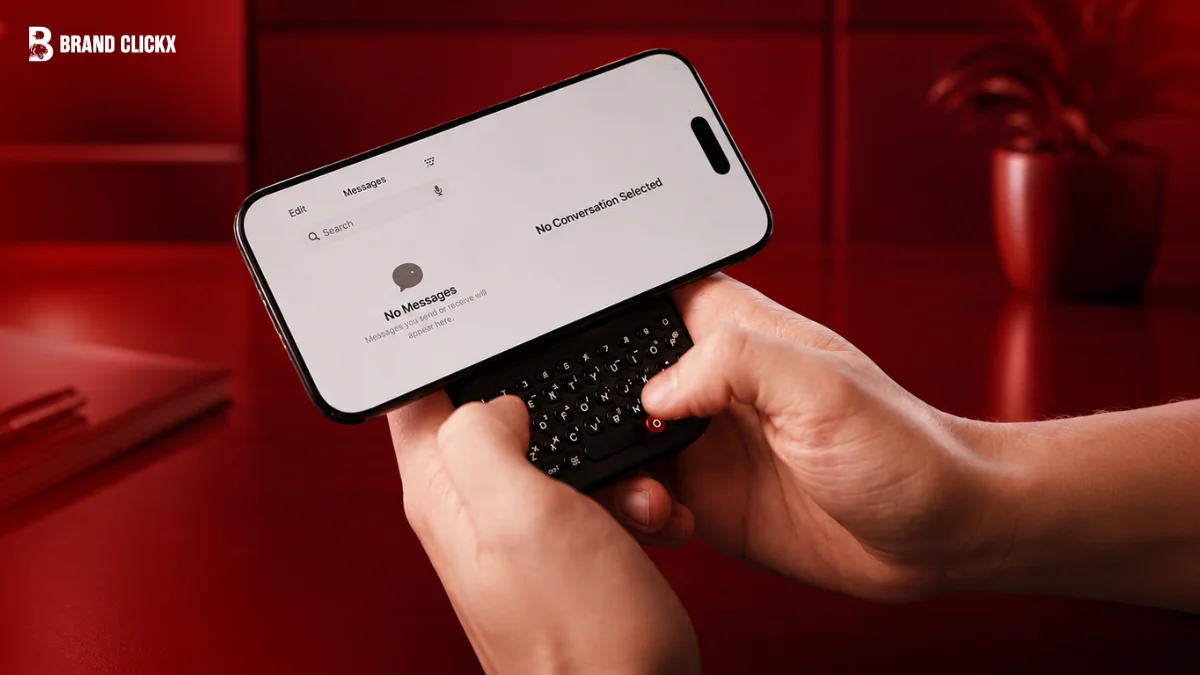
Clicks Technology has started shipping its $99 Power Keyboard, a slide-out physical keyboard that magnetically attaches to any phone supporting MagSafe or Qi2. TechCrunch published a hands-on review on August 10 finding solid key feel and deep customization, but noted the accessory makes large phones top-heavy. Roughly 75% of first-batch preorders have reached customers. The device is a stopgap before the company’s own BlackBerry-style smartphone arrives later this year.
What happened?
Direct answer: The Power Keyboard reached customers this summer after delays, and the first detailed review landed on August 10.
Clicks Technology, the startup working to bring physical keyboards back to smartphones, began shipping the now-$99 MagSafe-compatible Power Keyboard this summer. As of last week, 75% of first-batch preorders had shipped.
The slide-out keyboard accommodates different phone sizes and works in portrait or landscape, the company says, giving any phone a BlackBerry-like feel.
TechCrunch consumer news editor Sarah Perez conducted the hands-on test. TechCrunch notes that review units are returned or donated after testing a disclosure that matters for assessing independence.
Key specs at a glance
- Price: $99 (originally $79 early-bird, $109 planned retail)
- Attachment: MagSafe or Qi2 magnets
- Connection: Bluetooth
- Battery: 2,150 mAh built-in (Clicks’ own product page lists 2,300 mAh)
- Dimensions: 119.7 × 76.6 × 15.2 mm
- Weight: 180 grams
- Multi-pairing: up to three devices simultaneously
How does the Power Keyboard work?
Direct answer: It snaps to the back of your phone magnetically, then slides out sideways when you want to type.
Setup runs through Bluetooth: press and hold the power button, then slide out the keyboard to pair. If your phone lacks MagSafe or Qi2, an adhesive ring or a magnetic case works instead.
Once connected, the keyboard pulls out when needed and adjusts to different phone sizes, locking into place at various slider positions with an audible click. An adjustable LED backlight allows typing in the dark.
It can also spin to the side for landscape use.
What is Qi2? It is a wireless charging standard that adds a magnetic ring, similar to Apple’s MagSafe. Phones supporting either can hold the keyboard without a special case.
What are the compromises?
Direct answer: Weight distribution, pocketability, and a fiddly pairing process.
The reviewer found the accessory can make a phone feel top-heavy and awkward to hold in portrait mode, particularly on larger handsets such as the iPhone 17 Pro Max and Pixel 10 XL.
Pockets are a problem too. TechCrunch noted the combined device would not fit well in a woman’s trouser pocket, and warned the keyboard can catch or slide open when pushed into a back pocket.
Cases add friction. Typing proved difficult with a thick protective case attached; removing it helped, though a large phone remained hard to use.
Pairing tripped up the review too. Switching from Android to iPhone failed until the tester followed instructions requiring a number key pressed alongside the power button to add a second Bluetooth device. Removing a paired device is only possible through the Clicks mobile app.
Battery expectations should stay modest. TechRadar calculated a roughly 50–60% phone recharge depending on capacity, concluding it is not really a power bank.
What can you customize?
Direct answer: Extensively this is the accessory’s strongest selling point for power users.
Users can set the Clicks key to act as Tab, or enable Cursor Mode via Sym + CMD so certain letter keys move the on-screen cursor like directional keys.
Settings cover idle timeout, battery reserves for wireless charging, LED backlight, and whether Return behaves as a hard or soft return. Custom Number Row shortcuts can trigger Esc, volume, play/pause and page up/down.
Apple Shortcuts can be mapped to keys to start a call, fetch a weather forecast, turn on the flashlight, receive an AirDrop or send texts, with several popular shortcuts bundled in the Clicks app.
These are power-user features that only pay off once typing feels natural, which takes time.
Which phones does it support?
Direct answer: Any phone with MagSafe or Qi2 magnets, though the experience varies sharply with size.
Clicks says it has tested the keyboard with the iPhone Air, iPhone 17 Pro, 17 Pro Max, 16 Pro, Pixel 9, Galaxy Fold and other Android devices.
TechCrunch found smaller, standard phones and lightweight options such as the iPhone Air more comfortable, and recommended starting in landscape mode on larger devices.
The keyboard also works beyond phones. Because it pairs with anything accepting an external Bluetooth keyboard, it can drive tablets, smart TVs like Apple TV, or headsets such as Apple Vision Pro useful when typing email addresses and passwords through a remote control.
How is this different from earlier Clicks keyboards?
Direct answer: Earlier products were phone-specific cases wired through USB-C. This one is a universal magnetic accessory with its own battery.
The previous Clicks keyboard case drew power from the phone over USB-C; the Power Keyboard carries its own cell instead.
Older cases were designed for specific phone models and made devices noticeably bulky. The magnetic design works with any MagSafe, Qi or Qi2 device and tucks away more easily.
TechCrunch judged the learning curve less steep than on the earlier case, crediting visible iteration between generations.
Clicks previously expanded its keyboard case to select Android phones including Motorola’s Razr 2024 series.
Timeline: from CES to shipping
| Date | Event |
| 2024 | Clicks launches its first keyboard case for iPhone |
| Jan 2, 2026 | Power Keyboard and Communicator announced ahead of CES |
| Jan 2026 | Preorders open at $79; CES prototypes shown |
| Spring 2026 | Original ship window; delays follow |
| Jul 31, 2026 | Company posts a shipping update |
| Summer 2026 | Power Keyboard begins shipping at $99 |
| Aug 10, 2026 | TechCrunch publishes its hands-on review |
| Late 2026 | Clicks Communicator smartphone expected |
What about the Clicks Communicator?
Direct answer: The keyboard is a preview of the company’s own phone, which reviewers found easier to use.
The Power Keyboard functions as a teaser for the Clicks Communicator, a BlackBerry-like smartphone with a physical keyboard due later this year.
Forbes reported the Communicator at $499, positioned as a distraction-free secondary device for handling Gmail, Telegram, WhatsApp, Slack and Discord, with a dedicated Prompt Key for surfacing group chats.
TechCrunch reported an early-bird price of $399 for buyers placing a $199 deposit before February 27. The phone includes a touch-sensitive keyboard for scrolling, a 3.5mm headphone jack, a physical SIM tray alongside eSIM, microSD expansion up to 2TB, a tactile airplane-mode switch and a swappable back cover in Smoke, Clover and Onyx.
Clicks is fronted by YouTuber Michael Fisher, known as MrMobile.
Expert verdict
Direct answer: Well-built and genuinely useful, but the physics of bolting a keyboard onto someone else’s phone still bite.
TechCrunch described the device as crafted with care and appealing to people who miss their BlackBerry, while concluding that for comfort and portability the reviewer would rather wait for the Communicator.
The review also made the structural point plainly: it is easier to build a comfortable device when a company controls all the specifications, rather than designing for phones of varying weights and sizes.
Prototypes of the Communicator were easier to use at CES in January.
Independent reviewers reached similar conclusions earlier in the year. XDA praised the firm magnetic attachment on an iPhone 16 Pro and the satisfying pop of keys inspired by classic BlackBerry QWERTY layouts.
Latest updates
- Roughly 75% of first-batch preorders had shipped as of early August
- Clicks says it is still processing deliveries as manufacturing ramps up, and offers an order-status lookup by Order ID
- The retail price now sits at $99, between the $79 preorder rate and the originally announced $109
- The Communicator smartphone remains scheduled for later in 2026
Who should buy it?
Consider it if you type long messages on your phone daily, use a smaller or mid-size handset, and already carry a slim case or none at all.
Skip it if you use a Pro Max-class phone in portrait, need a real power bank, or want something that disappears into a front pocket.
Key takeaways
- The Power Keyboard costs $99 and attaches via MagSafe or Qi2
- It connects over Bluetooth and carries its own 2,150 mAh battery
- Key feel and customization drew praise; balance and pocketability did not
- Large phones feel top-heavy; landscape mode helps
- It doubles as a Bluetooth keyboard for tablets, TVs and headsets
- Clicks’ own smartphone, the Communicator, is still to come
FAQ
Can it charge my phone?
Partly. The built-in battery supports wireless charging for MagSafe and Qi2 devices, but TechRadar estimated only a 50–60% recharge depending on phone capacity, so it is not a full power bank.
What are the main drawbacks?
Added weight makes large phones top-heavy in portrait mode, the combined device is awkward to pocket, thick cases interfere with typing, and switching Bluetooth pairing between devices requires a specific key combination.
Can I use it with devices other than phones?
Yes. It pairs with anything accepting an external Bluetooth keyboard, including tablets, smart TVs such as Apple TV, and headsets like Apple Vision Pro, and supports up to three simultaneous connections.
How customizable is the keyboard?
Considerably. Users can remap the Clicks key, enable Cursor Mode, build Number Row shortcuts for Esc and media controls, adjust backlighting and battery reserves, and assign Apple Shortcuts to keys.
Should I wait for the Clicks Communicator?
Possibly. TechCrunch preferred the Communicator prototype for comfort. The phone is expected later in 2026, priced at $499, with an early-bird rate of $399 offered to deposit holders.
Conclusion
Clicks has built the best version yet of a hard idea: giving any phone a real keyboard without redesigning the phone. The engineering shows in the key feel and the software.
The limits show everywhere else. Until the Communicator arrives, this remains a device for people who miss physical keys enough to accept a heavier, bulkier phone in exchange.