Key Takeaways
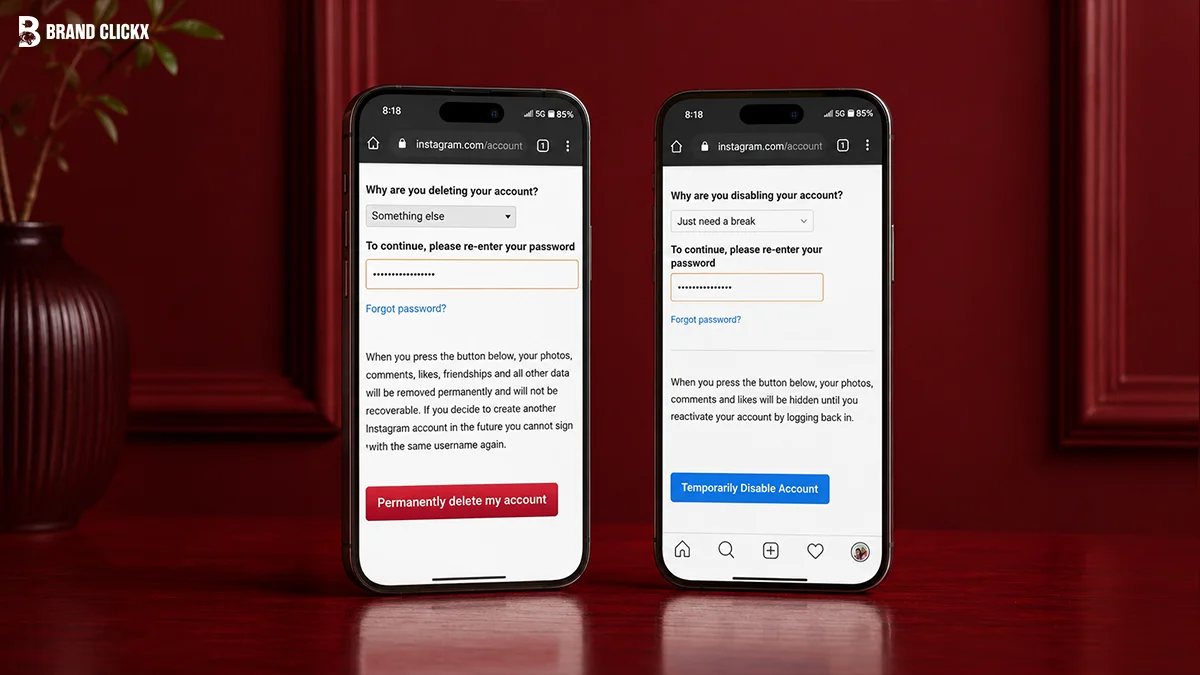
- You can permanently delete an Instagram account or temporarily deactivate an Instagram account.
- Deactivation hides your account, while deletion eventually removes it.
- Download your Instagram data before deleting your account.
- Check apps and services linked to your Instagram login.
- You can usually cancel a deletion request before the scheduled deletion date.
- Once your account is permanently deleted, it generally cannot be recovered.
Quick Answer
To delete your Instagram account:
- Open Instagram and sign in.
- Go to Accounts Center.
- Select Personal details.
- Choose Account ownership and control.
- Tap Deactivation or deletion.
- Select the Instagram account you want to remove.
- Choose Delete account.
- Follow the on-screen instructions and confirm your password.
If you only want a break, choose Deactivate account instead. This hides your profile until you log back in.
Instagram is one of the world’s most popular social media platforms. Millions of people use it every day to share photos, videos, Stories, and messages. However, there are times when you may decide it’s time to leave the platform.
You might want a break from social media, have privacy concerns, spend less time online, or simply no longer need your account. Whatever your reason, deleting an Instagram account is straightforward once you know where to look.
This guide explains every step in simple language. You’ll also learn the difference between deleting and deactivating your account, what happens to your information after deletion, and the important things you should do before making your final decision.
Should You Delete or Deactivate Your Instagram Account?
Before you continue, it’s important to understand that deleting and deactivating are not the same thing.
| Delete Account | Deactivate Account |
|---|---|
| Permanent option | Temporary option |
| Removes your profile and content | Hides your profile temporarily |
| Photos and videos are scheduled for deletion | Photos and videos remain safe |
| Followers lose access to your profile | Followers cannot see your account until you return |
| Requires creating a new account if you come back later | Simply log in again to reactivate |
If you’re unsure whether you’ll return to Instagram, deactivating your account is usually the safer choice.
Things to Know Before Deleting Your Instagram Account
Deleting an account is a major decision. Taking a few minutes to prepare can help you avoid losing important memories or information.
Download Your Instagram Data
Instagram allows you to download your account information before deleting it. This archive may include:
- Photos
- Videos
- Reels
- Stories
- Messages
- Comments
- Profile information
- Account settings
Saving a backup ensures you still have your memories even after your account is gone.
Understand the Deletion Waiting Period
Instagram does not remove your account instantly.
After you request deletion, your account enters a waiting period. During this time, your account is hidden from other users. If you change your mind before the deletion is completed, you can usually cancel the request by logging back into your account.
Once the deletion is complete, your account and its content generally cannot be recovered.
Check Connected Apps
Many people use Instagram to sign in to other apps or websites.
Before deleting your account, make sure you update those logins. Otherwise, you may lose access to services connected to your Instagram account.
Inform Important Contacts
If friends, customers, or family members usually contact you through Instagram, let them know how they can reach you after your account is gone.
This simple step helps avoid confusion later.
How to Delete an Instagram Account Permanently on Mobile
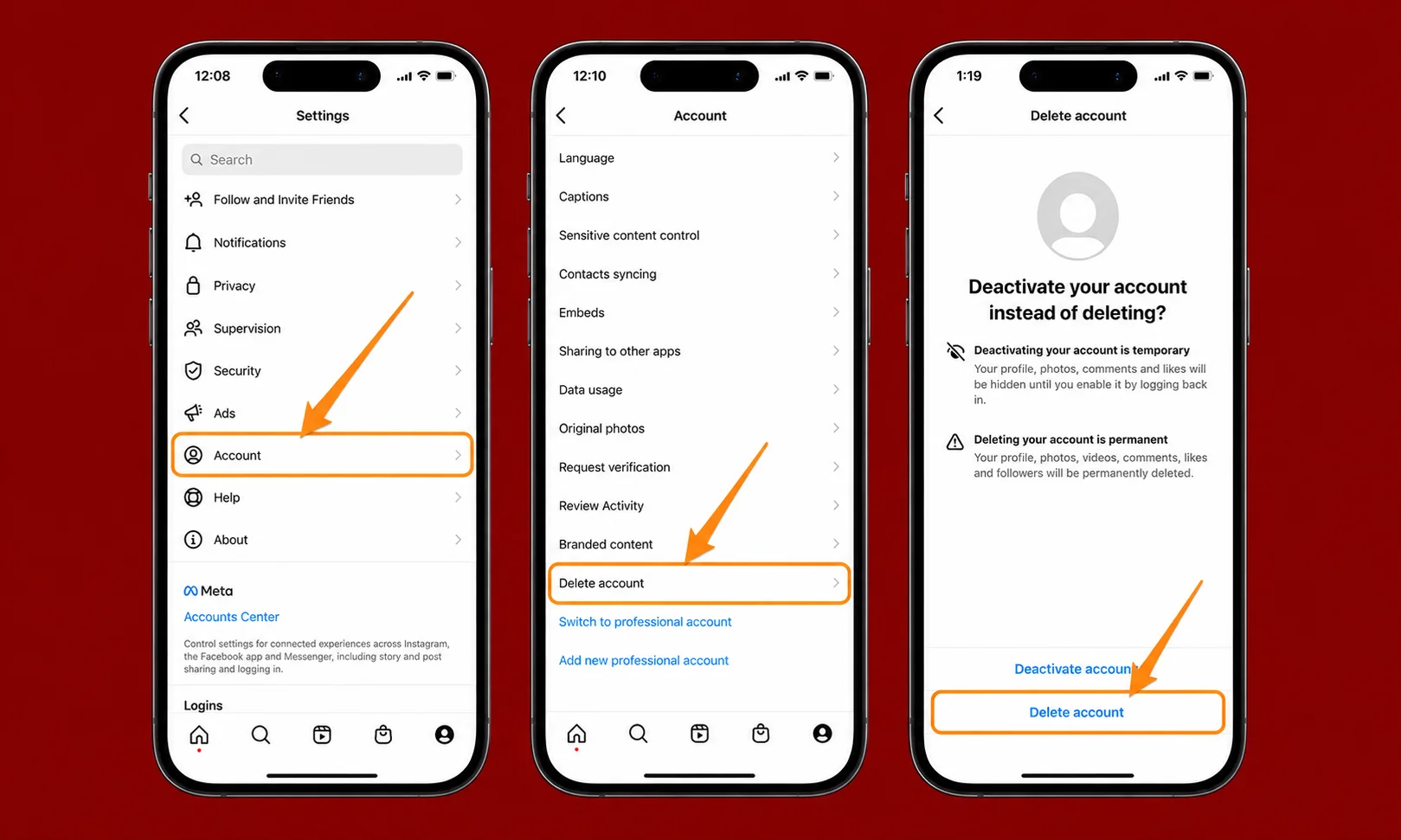
Deleting your Instagram account on Android or iPhone takes only a few minutes.
Step 1: Open Instagram
Launch the Instagram app and sign in to the account you want to delete.
Step 2: Open Your Profile
Tap your profile picture in the bottom-right corner.
Then tap the menu icon in the upper-right corner.
Step 3: Open Accounts Center
Scroll until you see Accounts Center.
Tap it to access account settings.
Step 4: Go to Personal Details
Inside Accounts Center, select Personal details.
Next, tap Account ownership and control.
Step 5: Choose Deactivation or Deletion
You’ll now see the option called Deactivation or deletion.
Select the Instagram account you want to manage if multiple accounts are connected.
Step 6: Select Delete Account
Choose Delete account instead of Deactivate account.
Instagram will ask why you’re leaving. Select the reason that best matches your situation.
Step 7: Confirm Your Password
Enter your password to verify your identity.
Finally, tap the confirmation button.
Instagram will display the scheduled deletion date for your account.
How to Delete an Instagram Account Permanently on a Computer
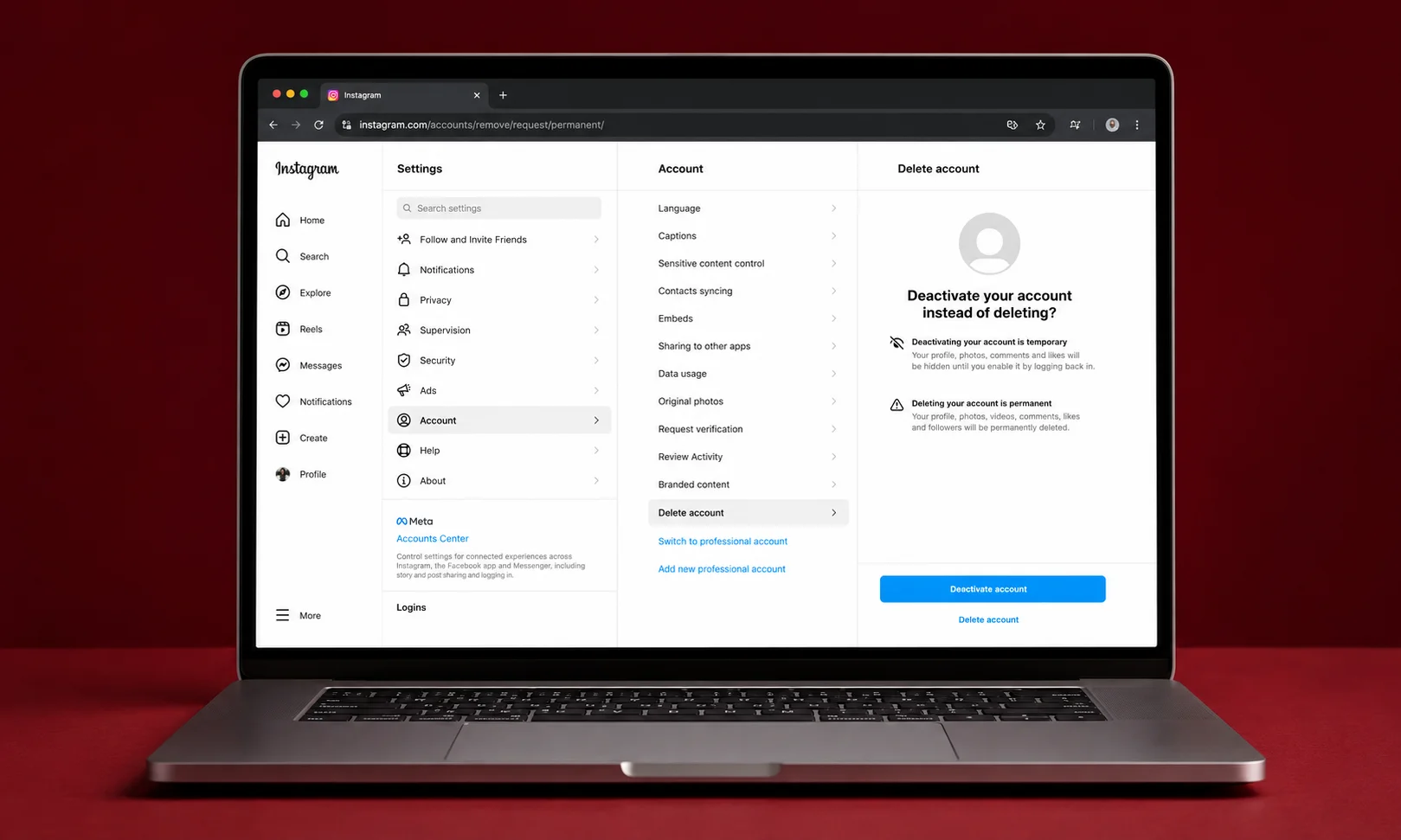
If you prefer using a desktop or laptop, the process is very similar.
Sign In
Open Instagram in your web browser and log in.
Access Settings
Click your profile picture and open Settings.
Navigate to Accounts Center.
Choose Account Ownership
Select Personal details.
Then choose Account ownership and control.
Delete Your Account
Open Deactivation or deletion.
Select your Instagram account.
Choose Delete account, enter your password, and confirm your request.
The deletion request will then be submitted.
How to Temporarily Deactivate an Instagram Account
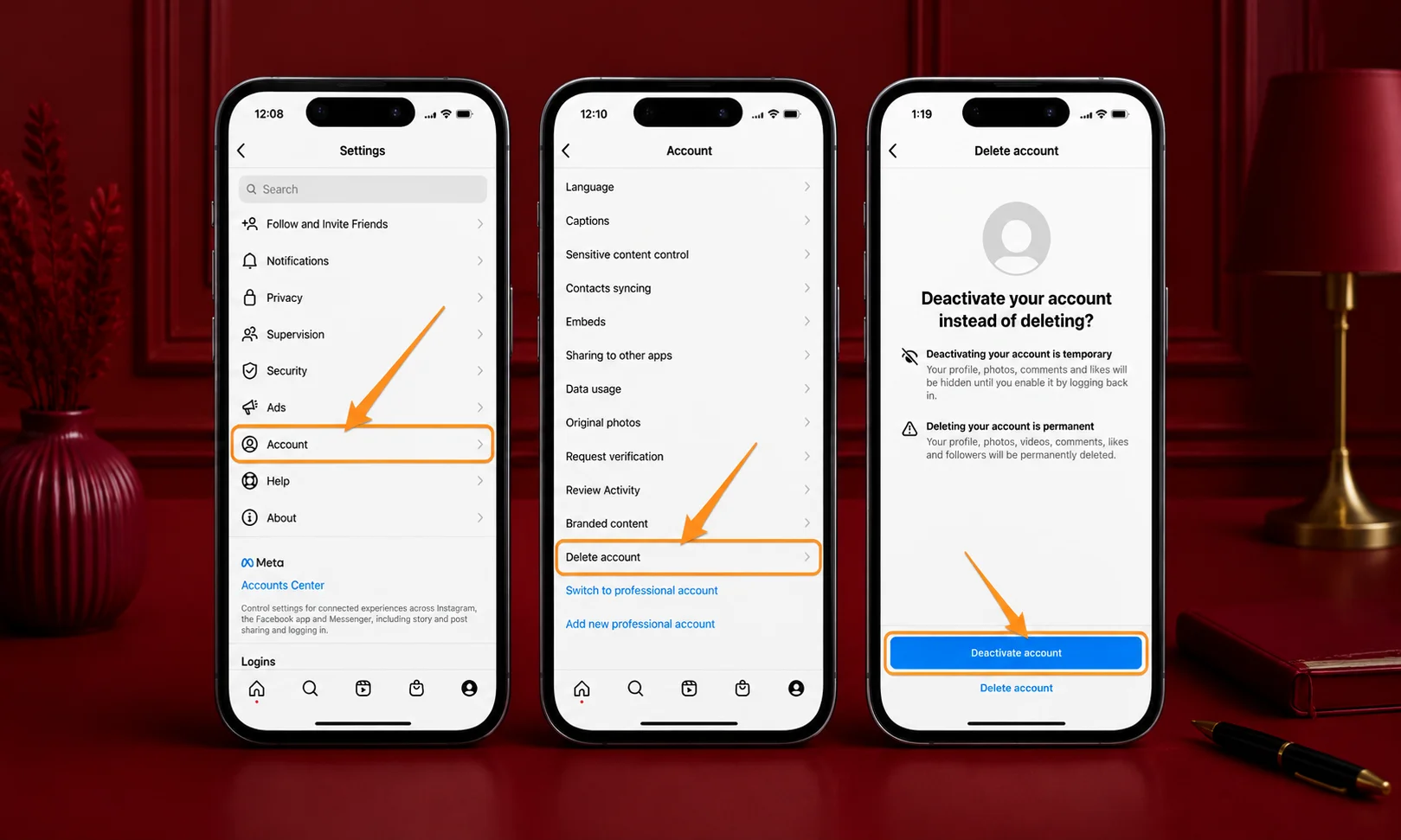
If you’re not ready to leave Instagram for good, deactivating your account is a better option. It hides your profile, photos, comments, likes, and followers until you sign back in.
Unlike permanent deletion, deactivation keeps your data safe. You can return whenever you want by logging in again.
Steps to Deactivate Your Account
Follow these simple steps:
- Open Instagram and sign in.
- Go to your Profile.
- Tap the Menu and open Accounts Center.
- Select Personal details.
- Tap Account ownership and control.
- Choose Deactivation or deletion.
- Select your Instagram account.
- Choose Deactivate account.
- Enter your password and confirm.
Your account will disappear from Instagram until you log back in.
What Happens After You Delete Your Instagram Account?
Many people wonder what changes after requesting account deletion. Here’s what you should expect.
Your Profile Becomes Unavailable
Your profile, posts, Stories, Reels, comments, and likes are no longer visible to other users during the deletion process.
Messages
People you’ve chatted with may still see past conversations in their inbox. However, your profile will no longer be active.
Account Recovery Period
Instagram provides a limited period before permanently removing your account. If you sign back in before the deletion date shown in your account, you can usually cancel the deletion request.
Once the deletion is complete, your account and content generally cannot be restored.
Username Availability
Deleting your account does not guarantee that your username will immediately become available. In some cases, Instagram may keep it unavailable for a period of time.
Can You Recover a Deleted Instagram Account?
It depends on when you try.
| Situation | Can You Recover It? |
|---|---|
| Before the scheduled deletion date | Yes, in most cases by logging back in |
| After permanent deletion | No |
| After temporary deactivation | Yes, simply sign in again |
If your account has already been permanently deleted, you’ll need to create a new account if you want to use Instagram again.
Benefits of Deleting Your Instagram Account
Deleting Instagram can have several advantages depending on your goals.
More Free Time
Without constant notifications and scrolling, many people find they have more time for work, hobbies, family, or study.
Better Privacy
Removing your account reduces the amount of personal information available on the platform.
Fewer Distractions
Taking Instagram out of your daily routine can help you focus on important tasks and reduce unnecessary screen time.
Fresh Start
Some users delete old accounts to create a new profile that better reflects their current interests.
Drawbacks of Deleting Your Instagram Account
There are also a few disadvantages to consider.
- You’ll lose access to your posts, Reels, and Stories after permanent deletion.
- Followers cannot interact with your profile anymore.
- Any links or business promotions connected to your account will stop working.
- You may lose memories if you forget to download your data first.
Thinking through these points can help you make the right decision.
Common Mistakes to Avoid
Many users make avoidable mistakes before deleting their accounts.
| Mistake | Better Approach |
|---|---|
| Deleting instead of deactivating | Choose deactivation if you only want a break |
| Not downloading account data | Request a copy of your information first |
| Forgetting connected apps | Update login methods before deleting |
| Ignoring the waiting period | Know you can usually cancel before the final deletion date |
| Not informing contacts | Share another way to stay in touch if needed |
Expert Tips
- Download your Instagram data before making any changes.
- Remove payment details if your account is linked to business features.
- Check whether you use Instagram to sign in to other apps.
- Consider deactivation if you’re only taking a short break.
- Review your privacy settings if your main concern is online privacy rather than leaving Instagram completely.
Before You Delete Your Instagram Account Checklist
Use this checklist before confirming your decision.
| Task | Done |
|---|---|
| Downloaded Instagram data | ☐ |
| Saved important photos and videos | ☐ |
| Checked connected apps and websites | ☐ |
| Told important contacts | ☐ |
| Decided between deletion and deactivation | ☐ |
| Confirmed the correct account | ☐ |
Frequently Asked Questions
How do I permanently delete my Instagram account?
Open Accounts Center, go to Personal details, select Account ownership and control, choose Deactivation or deletion, select your account, and choose Delete account.
Can I delete my Instagram account from the mobile app?
Yes. Both Android and iPhone users can delete their accounts through Accounts Center in the Instagram app.
Is deleting Instagram the same as deactivating it?
No. Deleting permanently removes your account after the waiting period, while deactivation only hides it until you sign in again.
Will my followers know if I delete my account?
Instagram does not send notifications when you delete your account. People will simply notice that your profile is no longer available.
Should I download my Instagram data before deleting my account?
Yes. Downloading your data helps you keep your photos, videos, messages, and other information before your account is permanently removed.
Can I use the same email address again?
In many cases, yes. However, account availability and username reuse may depend on Instagram’s current policies.
Conclusion
Deleting an Instagram account is a simple process once you know where to find the right settings. Whether you’re leaving because of privacy concerns, reducing screen time, or simply moving on, it’s worth taking a few minutes to back up your data first.
If you’re still undecided, temporarily deactivating your account gives you time to step away without losing your photos, messages, and other content. When you’re certain about your decision, follow the steps carefully and confirm the correct account before completing the process.