The first time I searched Amazon for a heavily discounted product, I made the same mistake many shoppers make: I focused on the percentage before checking the actual price.
A product showing 70% off looked like an obvious bargain. But after checking its pricing history and comparing similar products, the deal was not nearly as impressive as the discount label suggested.
That experience changed how I shop online. An Amazon discount finder can help you discover discounted products quickly, but finding a discount and finding a genuinely good deal are two different things.
This guide explains how Amazon discount finders work, where to find Amazon deals and coupons, and how to check whether a discount is actually worth your money.
How to Find Real Amazon Discounts
An Amazon discount finder helps shoppers discover products that meet specific discount or price criteria.
Depending on the tool, you may be able to filter products by discount percentage, category, keyword, or price range.
But the biggest discount is not always the best deal.
A better approach is to use a discount finder to create a shortlist, then check the product’s current price, price history, seller, reviews, shipping costs, and final checkout price before buying.
A simple process looks like this:
- Find potential deals using Amazon’s deal sections, coupons, or a discount-finding tool.
- Filter the results by category, price, and discount percentage.
- Check price history to see whether the current price is genuinely competitive.
- Compare sellers and similar products before deciding.
- Check the final price after coupons, shipping, and other applicable savings.
- Buy only when the product and price both make sense.
The important distinction is simple: a discount percentage tells you how much the displayed price has been reduced, while price history and comparison help you determine whether the reduced price is actually good.
Key Takeaways
- An Amazon discount finder makes it easier to discover discounted products.
- You can search for deals using discount percentages, categories, keywords, and price ranges.
- Amazon also provides its own ways to discover deals and coupons.
- A high discount percentage does not automatically mean a good deal.
- Price history can help you determine whether today’s price is genuinely low.
- Seller reputation, reviews, shipping, and the final checkout price also matter.
- The best strategy is to find the discount first, then verify the deal.
What Is an Amazon Discount Finder?
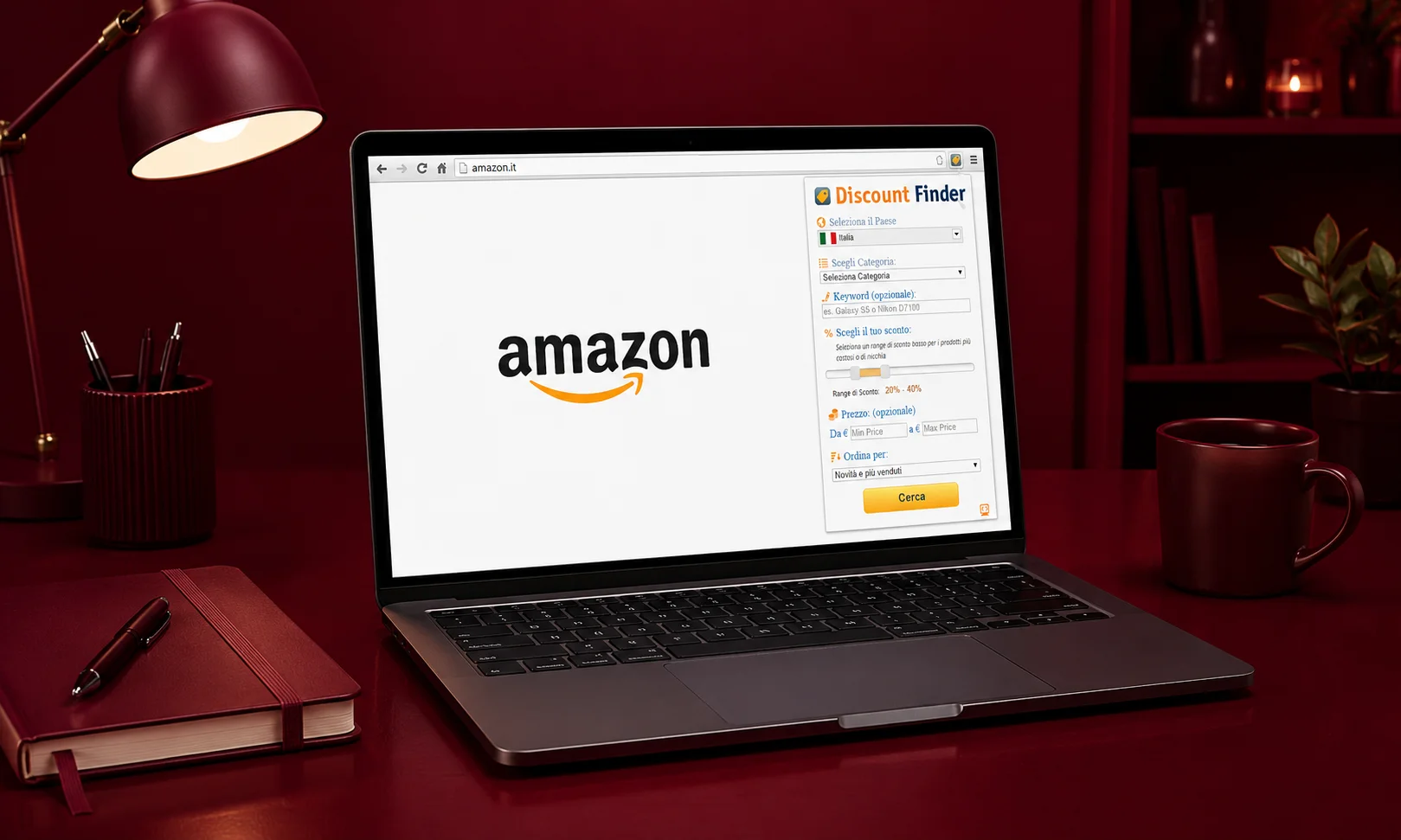
An Amazon discount finder is a tool or service designed to help shoppers locate Amazon products that meet particular discount or price criteria.
Instead of opening product pages one by one and searching for sale prices, a discount finder can narrow thousands of products down to results that match your requirements.
For example, you might want to find:
- Products discounted by at least 50%
- Items below a specific price
- Deals within a particular category
- Products matching a keyword
- Heavily discounted products with strong customer ratings
The exact features depend on the tool. The current Amazon Discount Finder browser extension, for example, provides filters for discount percentage, category, keyword, and price range, along with sorting options.
What an Amazon Discount Finder Can Search
The most useful filters are usually the ones that reduce thousands of products to a manageable shortlist.
Discount percentage lets you look for products meeting a minimum or specific discount range.
Price range helps prevent a large percentage discount from pushing you outside your budget.
Category filters are useful when you already know what type of product you want.
Keyword searches narrow results to products related to a particular need.
Some tools also provide sorting options, making it easier to prioritize products using available signals such as price, popularity, or ratings.
The important point is that these filters are for discovery. They do not replace your judgment about whether a product is actually worth buying.
Discount Finder vs. Deal Finder vs. Coupon Finder
These terms sound similar, but they serve different purposes.
| Tool | Main purpose |
|---|---|
| Discount finder | Finds products based on discount or price criteria |
| Deal finder | Helps discover current promotions and deals |
| Coupon finder | Looks for available coupons or promotional savings |
| Price tracker | Monitors a product’s price over time |
| Price-history tool | Shows previous pricing to help evaluate a deal |
You may use more than one method during the same purchase.
For example, a discount finder can help you discover a product, while a price-history tool can help you verify whether the displayed discount is genuinely attractive.
Who Should Use an Amazon Discount Finder?
An Amazon discount finder can be useful if you regularly shop on Amazon and do not want to manually search through hundreds of products.
It can help bargain hunters find discounted products faster, help budget-conscious shoppers stay within a price range, and help deal seekers locate products with specific discount percentages.
It is also useful when you know the category you want but are flexible about the exact product.
If you already know the exact product you want, however, a price tracker or price-history tool may be more useful than a broad discount finder.
The goal isn’t simply to find the biggest discount. It’s to find a product you actually need at a price that stands up to closer inspection.
How to Find Amazon Discounts Without an Extension
You do not necessarily need a browser extension to find Amazon discounts.
Amazon has its own shopping features for discovering deals, coupons, and promotions. Using these native options can be a good starting point because you are searching directly within Amazon’s marketplace.
Use Amazon’s Deal Sections
Amazon provides dedicated areas for deal discovery, including Today’s Deals and limited-time promotions such as Lightning Deals.
These pages can be useful when you are flexible about what you buy and want to browse current offers.
The advantage is convenience: instead of searching for a particular discount percentage, you can start with products Amazon is already promoting.
However, deal availability can change quickly. A product that appears attractive today may return to a different price later.
Find and Apply Amazon Coupons
Amazon coupons are another way to reduce the price of eligible products.
A coupon may provide a percentage or dollar amount off when the shopper meets its conditions.
The important step is to check the product page and final price after applying the coupon.
A product may show a coupon as an additional saving opportunity, but the amount that matters to your budget is the final price you actually pay.
Use Amazon Search and Filters
Regular Amazon search can also help you narrow down products.
Start with the product or category you need, then use available filters for factors such as:
- Price
- Category
- Customer ratings
- Brand
- Prime eligibility
- Other product attributes
This approach is particularly useful when your priority is finding a specific product rather than simply finding the largest possible discount.
Check the Final Price Before Buying
Do not stop at the product-page discount label.
Before purchasing, check whether a coupon applies, whether shipping changes the total, and whether the final checkout price matches what you expected.
That final number is more important than a large percentage displayed beside the product.
How to Find Hidden Amazon Discounts With a Discount Finder
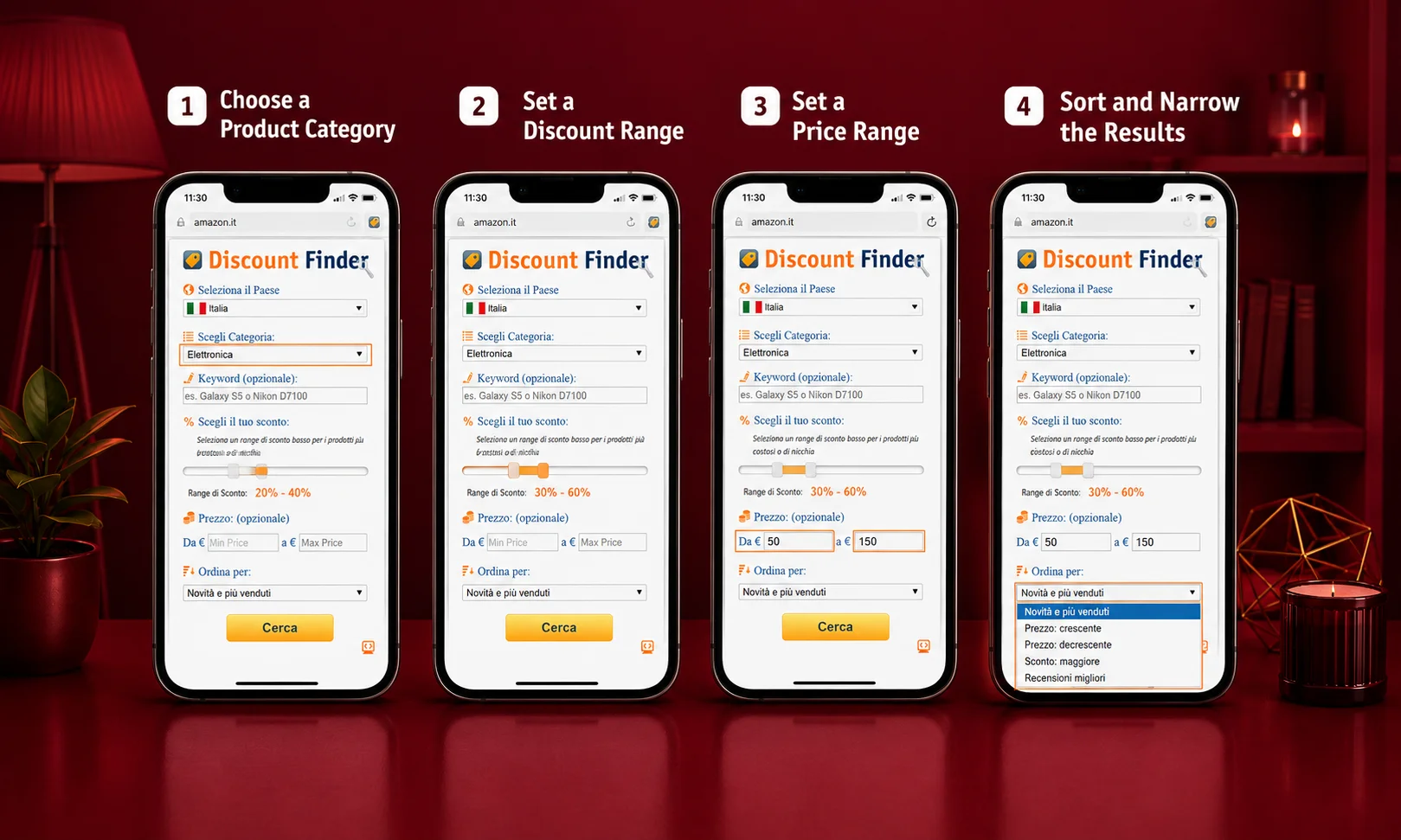
A discount finder becomes more useful when you know how to filter the results instead of simply searching for the highest percentage.
The current Amazon Discount Finder extension, for example, allows shoppers to combine discount, category, keyword, and price-related filters.
Choose a Product Category
Start with something you actually need.
You could search within categories such as electronics, home products, tools, beauty products, accessories, or everyday essentials.
This removes irrelevant results before you start comparing prices.
Set a Discount Range
Choose a discount threshold that makes sense for the type of product you are searching for.
Do not automatically set the filter to 80% or 90% off.
Very large discounts can produce products that are inexpensive but have little practical value.
The current Amazon Discount Finder itself cautions that a high discount percentage does not automatically mean a good bargain.
Set a Price Range
Price filtering works alongside the discount percentage.
For example, if your budget is $100, finding a product with a large discount does not help if the final price is still above your limit.
A useful search therefore combines discount + price + product relevance.
Sort and Narrow the Results
Once you have a shortlist, compare the products rather than choosing the first item with the largest percentage.
Look at ratings, reviews, seller information, shipping, and price history where available.
The discount finder gets you closer to potential deals. Your evaluation determines which ones deserve further attention.
How Do You Know If an Amazon Discount Is a Real Deal?
A product can display a large discount without being the best value available.
To judge whether an Amazon discount is genuinely attractive, look beyond the percentage.
Check the Current Price Against Price History
A product’s previous prices provide useful context.
If a product is advertised as 60% off but has regularly sold around today’s price, the discount may not represent an unusually good opportunity.
Price history can help answer a more useful question:
Is today’s price actually low compared with what shoppers normally pay?
Compare Similar Products and Sellers
Do not evaluate one product in isolation.
Compare similar products based on:
- Price
- Specifications
- Brand
- Reviews
- Seller
- Warranty
- Shipping
A 40% discount on a strong product may be a better purchase than an 80% discount on a poorly reviewed alternative.
Check Reviews, Ratings and Product Quality
A discount does not make a bad product good.
Before purchasing, look at the overall rating and read recent reviews, particularly reviews that discuss quality, durability, sizing, compatibility, or performance.
Pay attention to whether the discounted product is actually the version you want.
Consider Shipping and the Final Checkout Price
A product’s advertised price is only part of the purchase decision.
Check shipping costs, taxes where applicable, coupon requirements, and other charges before deciding.
Two products with the same displayed price may have different final costs.
Calculate the Actual Savings
Suppose a product is displayed as:
Regular price: $100 Current price: $70 Displayed discount: 30%
The mathematical saving is $30.
But the more important question is whether the product normally sells for around $100.
If comparable products regularly sell for $70, the displayed 30% discount may not represent exceptional value.
That is why discount percentage should be treated as a starting signal, not proof of a bargain.
Why Amazon Price History Matters
Price history is one of the most useful additions to a discount-finding process because it provides context that a current discount label cannot provide by itself.
What Price History Shows
A price-history tool can help you understand how a product’s price has changed over time.
Depending on the service, you may be able to see previous prices, price drops, historical highs and lows, or longer-term price trends.
This makes it easier to recognize whether the current price is unusual.
Discount Percentage vs. Historical Price
Consider two products:
Product A: 70% off, currently $30 Product B: 25% off, currently $40
At first glance, Product A looks better.
But suppose Product A has stayed near $30 for months, while Product B has just reached its lowest recent price of $40.
The percentage alone does not tell you which purchase represents better value.
Why a Smaller Discount Can Be the Better Deal
A smaller discount can be more meaningful when the current price is genuinely lower than usual.
The question should not be:
“Which product has the biggest percentage?”
Instead, ask:
“Which product gives me the best combination of price, quality and actual savings?”
That shift makes discount hunting much more useful.
Price Tracking vs. Finding a Deal
These two tools solve different problems.
A discount finder helps you discover products that are discounted now.
A price tracker helps you monitor a particular product and potentially identify future price changes.
If you already know exactly what you want, tracking may be more useful.
If you are flexible and want to discover bargains, a discount finder can be more useful.
Amazon Coupons, Deals and Promotions Explained

Amazon savings can appear in several forms, and they should not all be treated as the same thing.
Amazon’s seller documentation distinguishes promotional mechanisms such as deals, coupons and discounts.
Amazon Coupons
Coupons can provide an additional saving on eligible products.
When available, check the coupon’s conditions and confirm that the saving is reflected in the final price.
Lightning Deals
Lightning Deals are time-sensitive promotions.
They can be useful for shoppers who are ready to buy, but availability and timing can change quickly.
Because of that, do not purchase something simply because a countdown or limited-time message creates urgency.
Today’s Deals
Today’s Deals can be useful for browsing a broad selection of current promotions.
They are particularly helpful when you are looking for general bargains rather than a specific product.
Prime-Related Discounts
Some Amazon promotions may be associated with Prime membership or specific eligibility requirements.
If you see a Prime-related saving, check whether you qualify and what the final price will be under your account.
Promotional Discounts and Codes
Promotions can have different conditions.
Some may apply automatically, while others require a coupon, code, quantity, membership, or specific purchase conditions.
Always check the terms instead of assuming that every advertised saving can be combined with every other promotion.
Best Amazon Discount-Finding Methods Compared
Different methods work better for different shopping situations.
| Method | Best for | Main advantage | Main limitation |
|---|---|---|---|
| Amazon discount finder | Finding products by discount criteria | Fast filtering | A discount alone doesn’t prove value |
| Amazon Deals | Current promotions | Native Amazon discovery | Deals can change |
| Amazon Coupons | Additional product savings | Easy to use when available | Not available on every product |
| Price tracker | Monitoring a specific product | Helps track price changes | Requires you to know what to track |
| Price history | Verifying deal quality | Provides historical context | Requires interpretation |
| Browser extension | Convenient deal discovery | Automates some searching | Permissions and privacy should be checked |
| Deal websites | Curated deal discovery | Can save research time | Quality varies by source |
Which Method Fits Your Shopping Goal?
Use an Amazon discount finder when you are flexible about the product and want to search based on discount or price criteria.
Use Amazon Deals when you want to browse current promotions directly from Amazon.
Use coupons when you have already found a product and want to see whether additional savings are available.
Use a price tracker when you already know the product you want and are willing to wait for a better price.
Use price history when your main question is whether the current price is genuinely attractive.
In many cases, the best approach is not choosing one tool.
It is combining them.
How to Choose the Right Amazon Discount Percentage
Searching for a minimum discount can be useful, but there is no universal percentage that makes every Amazon product a good deal.
Don’t Automatically Search for 80% or 90% Off
Extreme discounts can be tempting.
But a very high percentage may not matter if the product is poor quality, irrelevant to you, or normally sells near the current price.
A useful discount is one attached to something you actually want at a price that makes sense.
Match the Discount to the Product and Price
A discount threshold should depend on the product.
For an inexpensive accessory, a small dollar saving may be enough to make a purchase worthwhile.
For an expensive product, even a modest percentage can represent a significant dollar saving.
Look at Dollar Savings, Not Just Percentage Off
Consider:
70% off $20 = $6 price 20% off $500 = $400 price
The first product has the larger percentage discount.
The second has the larger dollar saving.
Neither is automatically the better purchase because the products, prices, and needs are different.
A Practical 5-Minute Amazon Deal-Finding Workflow
You can turn the ideas above into a simple process.
Step 1 — Set Your Product and Budget
Start with what you need rather than starting with the discount.
Define the product category, important features, and maximum budget.
This prevents you from buying something simply because the discount looks impressive.
Step 2 — Find Potential Discounts
Search Amazon’s deal areas, coupons, or use an Amazon discount finder.
If you use a tool, begin with broad filters and narrow the results as you learn what is available.
Step 3 — Filter the Results
Remove products that do not meet your basic requirements.
Check:
- Price
- Discount
- Category
- Reviews
- Product specifications
- Seller
The goal is to create a shortlist rather than make an immediate purchase.
Step 4 — Verify the Price History
Check whether the current price is actually competitive with previous pricing.
If the product has been available at a similar price for months, a large displayed discount may be less meaningful.
If the current price is unusually low compared with its normal range, the deal becomes more interesting.
Step 5 — Check the Seller and Final Price
Before buying, verify:
- Seller
- Product condition
- Shipping
- Returns
- Coupon requirements
- Final checkout price
This is where many apparently attractive deals can change.
Step 6 — Decide Whether the Deal Is Worth Buying
Use a simple rule:
Good product + credible price + meaningful savings + trustworthy seller = stronger deal
If one of those factors is missing, there is no need to rush.
Another deal will eventually appear.
Are Amazon Discount Finder Extensions Safe?
Browser extensions can be convenient, but shoppers should evaluate them before installing them.
The issue is not whether every discount extension is unsafe. The issue is whether you understand what you are installing and what access it requests.
Check the Official Browser Store
Whenever possible, install extensions through the official browser extension marketplace rather than downloading unknown files from random websites.
The current Amazon Discount Finder listing, for example, provides information about the developer, version, update history, rating and privacy practices.
Review Extension Permissions
Read the permissions before installing.
Ask whether the requested access makes sense for what the extension claims to do.
If an extension requests broad access that seems unrelated to its purpose, investigate further before installing it.
Check the Developer and Update History
Look for:
- Developer information
- Recent updates
- User reviews
- Number of users where shown
- Privacy information
- Support information
These signals do not guarantee that an extension is perfect, but they can help you make a more informed decision.
Avoid Untrusted Downloads
Be cautious with unofficial extension files, unknown APKs, and websites promising impossible discounts.
A legitimate deal-finding tool should not require you to ignore normal security precautions.
Common Amazon Discount-Finding Mistakes
Chasing the Highest Discount Percentage
A 90% discount is not automatically better than a 20% discount.
Always consider the product and actual price.
Ignoring Price History
A displayed “sale” price tells only part of the story.
Historical pricing can provide much-needed context.
Buying Only Because Something Is on Sale
A product you do not need is not a saving just because it is discounted.
The money you do not spend is often the bigger saving.
Ignoring Seller, Shipping and Returns
A low product price can become less attractive after shipping or other purchase conditions are considered.
Always evaluate the complete offer.
Ignoring Product Reviews
A discount cannot compensate for poor quality.
Check ratings and reviews before buying, especially when the discount is unusually large.
Trusting Every Displayed Original Price
Treat the reference or previous price as one piece of information rather than automatic proof of savings.
Compare the current price with historical and competing prices whenever possible.
Installing Random Deal Extensions
Avoid choosing a browser extension solely because its advertised discount percentage sounds impressive.
Check its source, permissions, developer information, privacy details and update history first.
How We Evaluate Amazon Discount-Finding Methods
A useful Amazon discount finder should be judged on more than how many products it displays.
Discount Discovery
Can it help users locate products that meet specific discount or price requirements?
Price Verification
Does the overall process help users understand whether the current price is actually competitive?
Deal and Coupon Coverage
Can the method help users discover different types of Amazon savings without confusing coupons, promotions and discounts?
Usability
Can an ordinary shopper understand the filters and results without spending excessive time learning the tool?
Privacy and Trust Signals
For browser extensions and third-party services, shoppers should be able to identify the developer and understand relevant permissions and privacy practices.
These criteria provide a more useful way to evaluate discount-finding methods than simply asking which one displays the largest percentage.
Frequently Asked Questions About Amazon Discount Finders
What is an Amazon discount finder?
An Amazon discount finder is a tool or service that helps shoppers locate Amazon products based on discount, price, category, keyword, or other available filters. It can speed up deal discovery, but shoppers should still verify price history, product quality, seller information, and the final price before buying.
How do I find discounts on Amazon?
You can find Amazon discounts through Amazon’s deal sections, product coupons, search filters, promotions, and third-party discount-finding tools. For better results, narrow products by price and category, then compare the current price with historical pricing before purchasing.
How do I find hidden Amazon discounts?
Use a discount finder or Amazon search filters to look beyond the products prominently displayed on Amazon’s main pages. Set a useful price and discount range, select a relevant category, and then verify promising products using reviews, seller information and price history.
How do I know if an Amazon discount is real?
Check the product’s current price against its historical pricing and compare it with similar products and sellers. Also consider reviews, shipping, product condition and the final checkout price. A large percentage-off label alone does not prove that a deal represents exceptional value.
How do I check Amazon price history?
You can use a price-history or price-tracking service that supports Amazon products. These tools can show historical pricing or price changes, helping you compare today’s price with previous prices and determine whether the current offer is unusually low.
Is there an Amazon discount finder extension?
Yes. Browser extensions exist that are designed to help shoppers discover Amazon products using discount, category, keyword and price filters. Features vary by extension, so check the current browser-store listing, developer information, permissions and privacy details before installing one.
Are Amazon discount finder extensions safe?
Safety depends on the individual extension and how it handles permissions and data. Install extensions from trusted browser stores when possible, review requested permissions, check the developer and update history, and read the available privacy information before granting access.
How do I find Amazon coupons?
Look for coupon offers on eligible Amazon product pages and deal areas. When a coupon is available, check its conditions and make sure the saving is reflected in the final purchase price. Coupons are separate from simply seeing a product marked as discounted.
Is a 90% Amazon discount always a good deal?
No. A 90% discount can look impressive without representing exceptional value. Check the product’s historical price, quality, seller, reviews and current market alternatives. The best deal is not necessarily the product with the largest percentage reduction.
What is the best way to find Amazon deals?
The most reliable approach is to combine deal discovery with verification. Find potential offers through Amazon’s deal pages, coupons or a discount finder, then check price history, product quality, seller information, shipping and the final price before deciding.
Find the Discount, Then Verify the Deal
An Amazon discount finder can make deal discovery much faster. Instead of manually searching through countless products, you can use filters to find items that match your category, budget, keywords, and desired discount.
But the real value comes from what you do after finding the discount.
Check the price history. Compare similar products. Review the seller and product quality. Look at shipping and the final checkout price.
Most importantly, do not let a large percentage make the decision for you.
The best Amazon shopping strategy is simple:
Find the discount first. Verify the deal second. Buy only when the numbers and the product both make sense.