Introduction
There is a specific kind of frustration that comes with sketching. You get something on paper fast , proportions feel right, the idea is clear , and then you spend the next two hours trying to rebuild it digitally from scratch. By the time you finish, something about it is slightly off and you cannot always explain why.
These tools do not fix everything. But they close that gap in a way that actually changes how the work feels day to day. Conversion happens in seconds rather than hours, and the intent of the original sketch stays mostly intact instead of getting flattened out by the redrawing process.
Nine platforms made this list. They range from well-funded platforms used by enterprise design teams to single-feature browser tools that cost nothing. The evaluation looked at output quality, how forgiving each tool is with rough input, and whether the results are genuinely usable or just impressive in demos.
What Does Sketch to Design Software Actually Do?
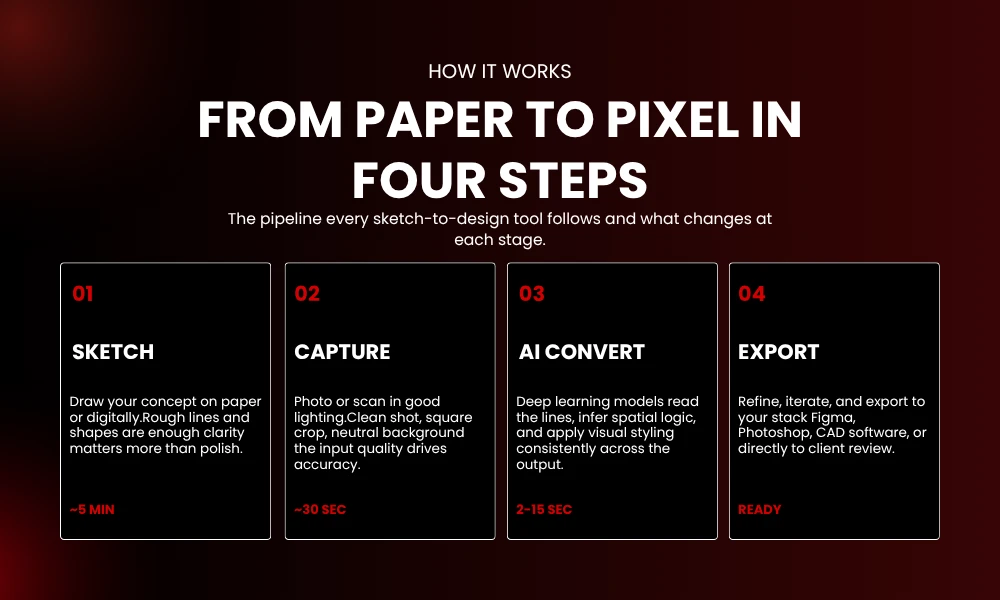
The short version: you give it a drawing and it gives you something finished. The longer version involves deep learning models trained on massive image libraries that have learned to read lines as objects, guess spatial relationships, and apply visual style consistently.
Speed is the obvious pitch. But the more interesting thing these tools do is preserve intent. A good conversion keeps your proportions. It respects the spatial logic of what you drew. You are not handed a generic version of your concept , you get your concept, rendered.
Not every tool on this list does that equally well. Some are better with clean linework. Others handle rough, gestural sketches surprisingly well. That variation is worth paying attention to when you are deciding which one to actually use.
Why These Tools Have Caught On
Speed gets mentioned first in every conversation about this category, and fair enough , shaving hours off a single project adds up fast across a month of work.
Consistency is the one that gets underappreciated. Keeping a uniform visual style across twenty assets by hand is genuinely hard. Having a tool handle that matching automatically is not glamorous but it matters.
There is also the client communication angle. A rough sketch means something different to the person who drew it than to someone seeing it cold. A rendered version removes that gap. Clients make better decisions when they can actually see what they are approving.
Iteration speed is where things get interesting from a creative standpoint. Testing three directions used to mean three times the manual labor. Now it is three uploads. That changes how willing you are to explore.
1. Uizard
Uizard built its reputation on one specific workflow: photograph a paper wireframe and get back an editable digital prototype. It does that well. The conversion is fast, the output is clean, and the built-in component library means you are not stuck looking at a static image when you are done.
The clickable prototype feature is what separates it from tools that just produce visuals. You can actually navigate through the converted design, which makes it useful for stakeholder reviews, not just internal iteration.
Mobile and desktop layouts both work. The free plan covers basic usage. Pro is $12 per month, which is reasonable given what you get.
Best for: UI and app designers.
2. Sketch2Code by Microsoft
Most tools on this list produce images. Sketch2Code produces code. Draw a wireframe on paper, photograph it, upload it, and you get HTML markup back. That is a fundamentally different kind of output, and for developers it changes the value proposition significantly.
The generated code is not always clean enough to ship without touching it. But starting from a rough HTML structure is faster than starting from nothing, and the Azure-based processing means you are not waiting around for results.
It is open-source, so there are no licensing fees and no usage limits to worry about.
Best for: Developers building web interfaces.
Pricing: Free.
3. NVIDIA Canvas
Canvas does one thing. You paint rough brushstrokes , sky, water, stone, grass, snow , and it renders them into photorealistic landscape imagery in real time. That is the entire feature set.
For concept artists and environment designers, that narrow focus is actually the point. You are not managing settings or adjusting sliders. You paint, it renders, you see immediately whether the composition is working. The feedback loop is fast enough that it changes how you explore ideas.
Export goes directly into Photoshop, which means the output slots naturally into an existing production workflow rather than requiring extra steps.
Requires NVIDIA RTX hardware. Free if you have it.
4. VanceAI Sketch Converter
VanceAI is worth knowing about if you do character work or illustration. The converter takes a sketch , portrait, full figure, landscape , and produces either a colored illustration output or something more photorealistic depending on the settings you choose.
Batch processing is the feature that makes this worth using on larger projects. Running fifteen character sketches through one at a time is tedious. Running them as a batch is not.
The credit-based pricing is a bit fiddly compared to a flat subscription, but usage costs are reasonable for the output quality.
Best for: Digital artists and illustrators.
5. PromeAI
PromeAI sits in its own category on this list because the gap it bridges is unusually large. Hand-drawn floor plan goes in. Photorealistic interior render comes out. That jump , from rough lines to something a client can emotionally respond to , is what makes this genuinely useful in architectural practice rather than just interesting.
Style options give you direction control. You pick modern, minimalist, industrial, or a few others, and the tool applies that aesthetic consistently across the render. Both 2D and 3D outputs are supported depending on what the presentation requires.
Best for: Architects and interior designers.
Pricing: Free trial available. Paid plans start at $19 per month.
6. Scribble Diffusion
No installation. No account required in most cases. Draw something rough in the browser, type a short description of what you want it to become, and get a generated image back. That is the whole product.
Results are inconsistent in a way that can be either useful or annoying depending on your patience. For brainstorming and quick reference generation it works well. For anything that needs to look a specific way reliably, you will hit the limits fast.
But it is free, it runs anywhere, and the barrier to trying it is basically zero. That counts for something.
Best for: Hobbyists and early ideation.
7. Autodesk Forma
Forma is not for individual designers working alone. It is built for the early stages of large architectural and urban planning projects, where the question is not what does this look like but whether this concept even works environmentally before more resources get committed to it.
Sketch a massing concept, upload it, and Forma overlays real data , sunlight exposure, wind patterns, view corridors , on top of your design. That kind of feasibility analysis used to require either expensive consultants or significant time investment. Getting it in near-real-time against a rough sketch changes the decision-making process at the concept stage.
Cloud collaboration is built in, which matters when teams are distributed across offices or cities.
Best for: Urban planners and large architectural firms.
Pricing: Included with Autodesk subscriptions.
8. Draw3D
Draw3D is in beta, which means the output has rough edges and the feature set will change. Worth knowing about anyway, particularly for product designers and engineers.
The core function is depth estimation from a single 2D sketch. Upload a drawing of a product concept and the tool produces a 3D model you can export as STL or OBJ. That output can go directly into CAD software or a slicer without intermediate steps.
Accuracy on complex forms is inconsistent right now. Plan to clean up the model rather than treating it as finished. But as a starting point, especially for early prototyping conversations, it gets you further faster than rebuilding the geometry manually.
Best for: Product designers and engineers.
Pricing: Free beta. Commercial pricing not announced yet.
9. Doodle to Masterpiece by Canva
Canva added sketch conversion directly into its existing platform, which means the output goes straight into a workflow most marketers and small business owners are already using. Draw something rough, convert it, and the result automatically adapts to your brand colors and template style.
It is not the most powerful converter on this list. If you need high accuracy or complex output, look elsewhere. But if you are already in Canva and you need to turn a quick sketch into something you can post or present without switching platforms, it removes a step that would otherwise require exporting, editing, and reimporting.
Best for: Marketers and small teams.
Pricing: Free with Canva. Some conversion features need a Pro subscription.
Picking the Right Tool
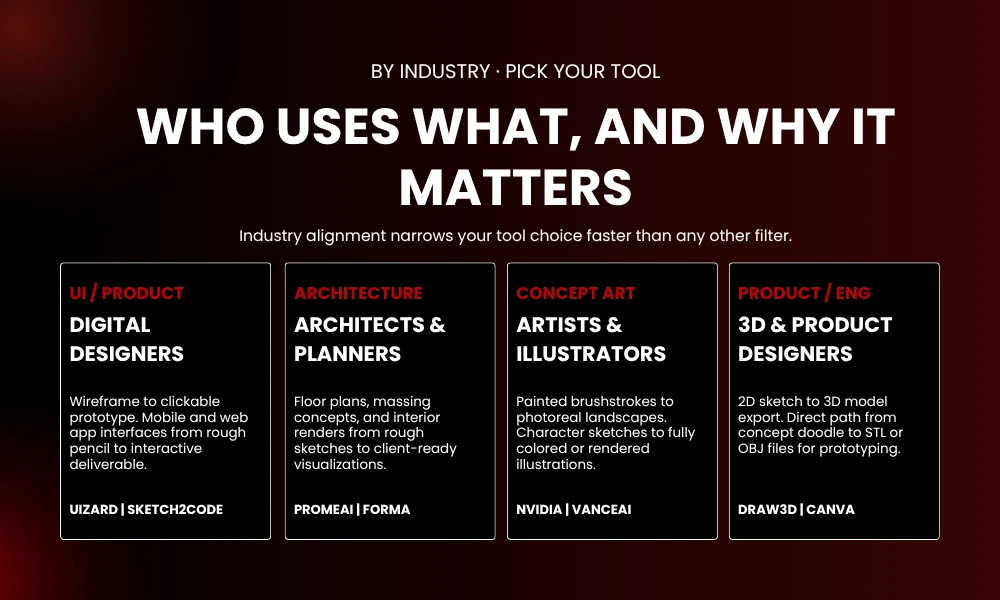
Start with your industry. The feature set that makes PromeAI genuinely useful in architectural practice would be completely irrelevant to someone designing mobile interfaces. Industry alignment narrows the list faster than any other filter.
Think about output format before you compare features. If you need code, that is Sketch2Code and the list basically ends there for that use case. If you need a 3D model, Draw3D is the only real option in this category right now. Image output is where most of the tools compete.
Software integration is easy to overlook until a tool produces output that does not play nicely with the rest of your stack. Check export formats against what your downstream software expects.
Paid plans generally outperform free tiers on accuracy and processing capacity. But several strong options here are fully free. Test them with real project sketches before paying for anything , demo results are not always representative of how a tool handles your specific type of input.
Getting Better Output
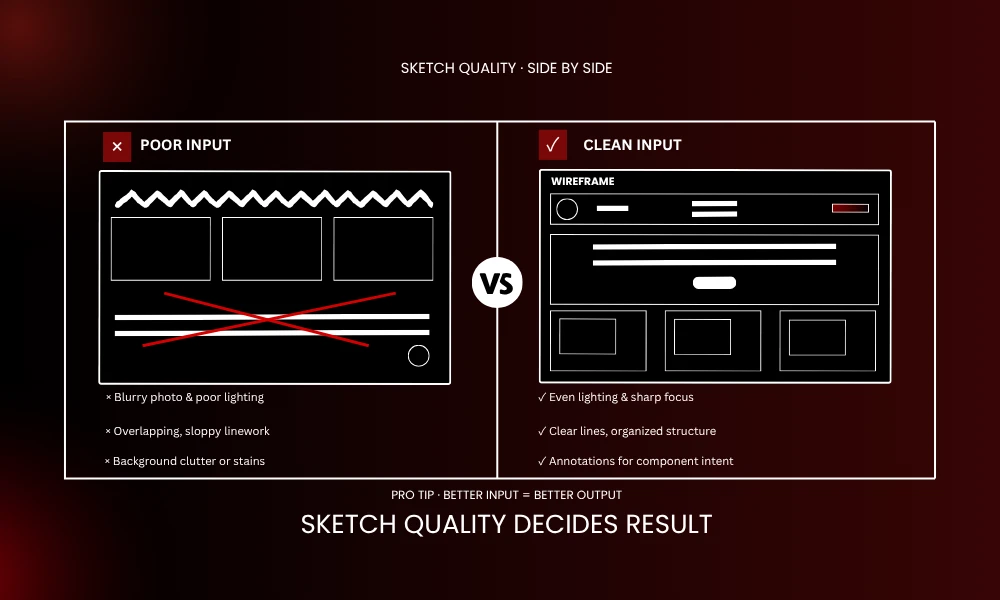
Sketch quality has a direct impact on conversion accuracy. Clean linework with clear edges and minimal clutter produces better results than loose, overlapping marks. The tools can handle rough input but they do better with organized rough input.
Lighting and photo quality matter more than people expect. A dark or blurry photo of a sketch introduces ambiguity that hurts the conversion. A clean scan or a well-lit, steady shot makes a measurable difference.
Text prompts are available in several tools alongside sketch input. Use them. Describing the intended output gives the model additional context and usually improves accuracy in a way that adjusting settings alone does not.
Run the conversion multiple times with small variations before settling on a result. First outputs are rarely the best ones. The second or third attempt, with minor adjustments to the sketch or the prompt, often produces significantly cleaner results.
Combining tools is an underused approach. One platform for initial conversion, a second for refinement. Uizard into Figma is common. VanceAI into Photoshop works well for illustration. The tools do not have to be used in isolation.
Where the Category Is Going
Current tools already do useful work. What is developing now is more context-aware conversion , software that reads not just the shapes in a sketch but the functional intent behind them. A door is not just a rectangle. A call-to-action button is not just a rounded shape. Models that understand purpose rather than just form are starting to appear.
Brand guideline integration is moving from experimental to practical. Outputs that automatically conform to a client’s visual system without manual adjustment are already possible in limited form and getting more reliable.
Napkin sketch to interactive prototype is not theoretical anymore. Early versions exist. The accuracy is uneven but improving faster than most people realize.
Designers who build these tools into standard practice now gain a compounding advantage. It is less about any single time saving and more about what becomes possible when conversion is no longer the bottleneck.
Conclusion
The nine tools above cover a wide spread of use cases. Uizard for interfaces. PromeAI for spatial design. Draw3D for product concepts. Scribble Diffusion for zero-cost idea exploration. Each has a specific strength and a specific audience.
Pick one that matches the kind of work you actually do. Test it with a real project sketch , not something clean you prepared as a demo, but something from your actual workflow. The learning curve is short on most of these. You will know within a session whether it is worth building into your process.
BrandClickX covers design tools and workflow resources regularly if you want to keep up with what is changing in this space.
Frequently Asked Questions
What is the best free option?
Scribble Diffusion if you want zero friction and do not mind inconsistent results. Sketch2Code if you are a developer and need code output rather than images. Both are completely free with no usage limits.
Do these tools replace designers?
No, and that framing misses the point of what they actually do. They handle conversion. The decisions about what to design, how to respond to client feedback, what direction to take a concept , none of that changes. The tool is faster hands, not a replacement for judgment.
How much drawing skill do I need?
Less than you probably think. Most of these tools work with rough input. Some handle stick figures and basic shapes without any issue. Cleaner sketches produce better output, but the minimum bar is low.
Can I use the output commercially?
Usually yes, but check the terms for each platform individually. Free tiers sometimes have restrictions that paid plans remove. Do not assume , read the terms before using generated output in client work.
Which tool is best for architecture?
PromeAI for interior rendering and spatial visualization. Autodesk Forma for early-stage feasibility and environmental analysis on larger projects. They serve different parts of the architectural workflow rather than competing directly.