There’s a specific kind of tired that comes from cleaning up product photos at midnight, and if you sell anything online, you probably know it. You shot a batch of fifty earrings on Sunday afternoon thinking you’d be done by dinner, and now it’s Wednesday and you’re still picking lint off white backgrounds instead of going for the use of AI background remover in Photoshop, wondering how this is the part of running a store that nobody warned you about.
The whole point of an AI background remover is supposed to be that you don’t have to do this anymore, and most of them in 2026 are genuinely up to the job. The trouble is, they’re not all good in the same way, and every marketing page reads like it was written by the same person who’s never sold a product in their life, so trying to pick the right one ends up being its own afternoon-long project.
The Stuff That Actually Matters
Before getting into the list, it’s worth being honest about what separates a good background remover from a tool you’ll regret paying for, because the answer changes a lot depending on volume.
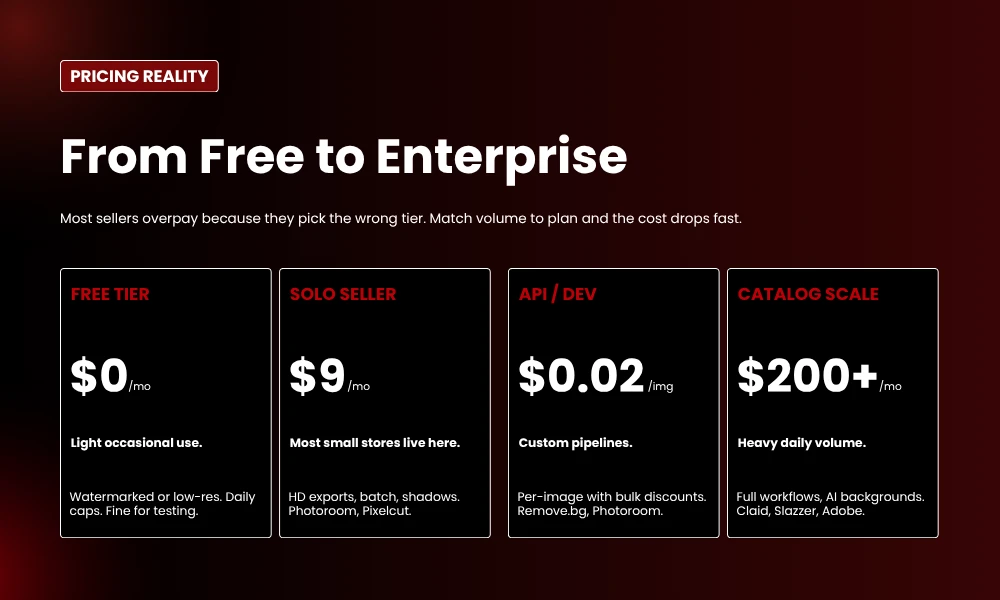
Someone selling twenty handmade items a month on Etsy doesn’t need the same tool as a Shopify brand pushing three hundred SKUs a week, and confusing those two situations is how people end up either paying $79 a month for software they barely open, or trying to scale a free tool that quietly falls apart the moment you load it with anything serious.
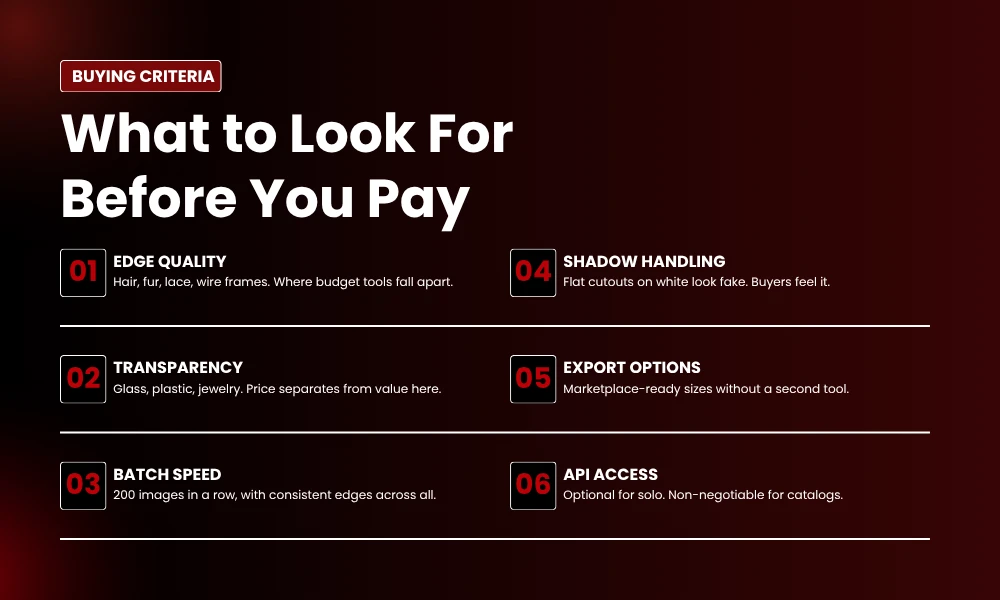
When I’m assessing an AI background remover, I’m mostly looking at edge quality on the difficult stuff, which means hair, fur, lace, and anything with wire frames or fine detail.
The cheap tools all handle a coffee mug perfectly, that’s not a real test, but the moment you give them a fluffy jumper or a pet on a couch, half of them just give up and leave you with a halo that takes longer to fix than it would have to do the whole thing manually.
Then there’s transparent and reflective stuff, which is where price separates from value pretty quickly. Glass perfume bottles, watches with chrome bracelets, anything with a polished metal surface, all of these cause the budget tools to struggle in different and creative ways.
Batch processing is the next thing, and it’s the one most people underestimate. Doing one image is easy, every tool can do that.
Doing two hundred in a row, with consistent edges and identical shadow treatment across the whole catalog, is the part where most of them break down and start producing inconsistent results that you only notice when you upload everything to your store and realize half your products look slightly different from the other half.
Shadow handling matters too, more than people give it credit for, because a flat cutout sitting on white looks fake even when buyers can’t articulate why, and that subconscious ‘off’ feeling is enough to make people click away.
The last things on the checklist are output options that match marketplace requirements without needing a second tool to clean up after the first, and API access if you ever plan to automate. Most small sellers don’t need an API. Catalog teams definitely do.
That covers the criteria. Now the actual list.
1. Photoroom
Most small sellers eventually end up on Photoroom, and honestly, in most cases that’s the correct call. The tool started life as a phone app focused on background removal and has slowly grown into a full product photography toolkit, and the thing that comes through when you use it is that whoever built this has actually run a Shopify store at two in the morning trying to get listings live before bed.
You upload a photo, the background disappears, the product lands cleanly on white, a soft realistic shadow appears underneath without you asking, you resize for whichever marketplace you’re targeting, and you’re done with that image.
The whole listing prep happens in a single tool, which sounds like a small thing until you’ve spent six months bouncing between four different apps to do the same job.
The cutout quality holds up across most product categories, with the usual caveat that hair and fur are slightly weaker here than on a couple of the more specialized tools further down the list. Their API pricing also deserves a mention because it’s actually reasonable, sitting at two cents per image on the basic plan, which makes it a genuine option if you ever want to script bulk jobs.
What I keep coming back to with Photoroom isn’t even the cutout itself. It’s the fact that the entire interface is built around what an actual seller does next, rather than treating background removal as a self-contained problem.
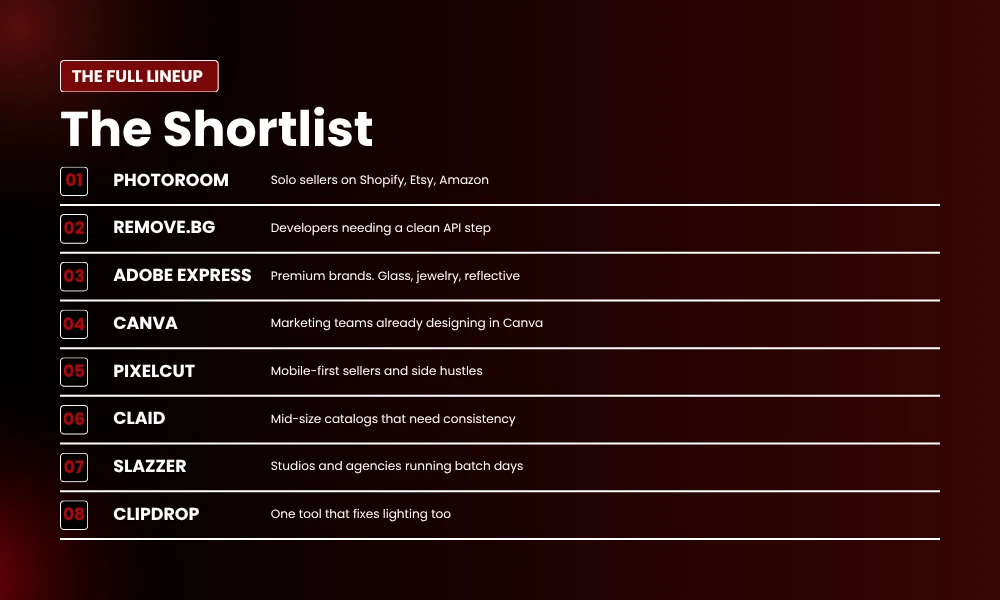
Best for: solo sellers and small teams running Shopify, Etsy, or Amazon stores.
2. Remove.bg
Remove.bg has been around since AI background removal was barely a recognized category, and the reason it still earns a slot on lists like this in 2026 is that it does one thing better than nearly anyone else, which is producing a clean, fast, no-fuss cutout that you can drop straight into a pipeline.
Portraits and standard product shots come back in seconds, and the tool’s handling of hair edges in particular is genuinely excellent, which is why apparel brands and beauty sellers keep coming back to it even when newer options appear.
The pitch hasn’t changed in years, and that’s a feature rather than a bug, because there’s no template upsell, no AI-generated lifestyle scene generator, no creative-suite expansion trying to be everything at once. You upload an image, you get a transparent PNG back, that’s the entire transaction.
The downside is that the free tier hands you 0.25 megapixel previews, which are useless for anything you’d actually publish, so getting full-resolution images means either buying credits or moving onto a paid subscription.
That’s fair enough for a tool that does what it does as reliably as this one, but it’s worth knowing before you start integrating it into anything serious.
Best for: developers building a pipeline, or anyone who needs one reliable cutout step inside a larger workflow.
3. Adobe Express
If you sell anything reflective, transparent, or otherwise fiddly, Adobe Express is the one I’d start with. The segmentation technology underneath comes from the same heritage that powers Photoshop’s Select Subject feature, and the difference shows up immediately when you throw the difficult stuff at it.
Glass perfume bottles, watches with metal bracelets, jewelry photographed against a soft surface, all of these are categories where the cheaper tools tend to leave halos or chew into the edges in ways that look obviously wrong on a product page.
Adobe Express handles them cleanly enough that I rarely have to fix anything by hand afterward, which for premium products where photo quality is doing serious sales work is basically the whole game.
It also slots naturally into wider Adobe workflows, so brand teams already inside Photoshop or Illustrator don’t need to break their stack to use it. The interface feels more designer-coded than seller-coded, which depending on how you work is either a quiet plus or a minor source of friction.
Best for: premium product brands selling jewelry, watches, perfume, glassware, or anything else where edge quality decides whether the photo looks expensive or cheap.
4. Canva
Canva’s background remover lives inside a tool that you’ve probably already got open every day, and that single fact earns it a slot on this list even though it isn’t the most accurate option here.
The accuracy is fine for most standard product shots, and where Canva genuinely wins is the round-trip you don’t have to take. You’re already designing the Instagram tile, the lookbook, the email header, and the last thing you want is to bounce out into a separate tool, save a file somewhere, re-upload it, and lose your whole flow in the process.
Keeping everything inside one window matters more than people give it credit for, particularly when you’re working at the pace small business marketing actually moves at.
The erase-and-restore brushes also let you fix small misses without paying for a Photoshop subscription, which is another quiet win that adds up over time.
For pure catalog work it’s not the right pick, the volume tools further down this list will serve you better. For everything else marketers do during a normal week, it’s enough.
Best for: marketing teams already living inside Canva for design work.
5. Pixelcut
Pixelcut is the one that lives on my phone, and it’s earned that place by being the most pleasant mobile experience in this entire category.
The mobile app is properly polished in a way that some of the older tools still haven’t managed, the free tier is genuinely free with HD exports and no watermarks, and the cutouts come back fast enough that you can clean up a product photo while waiting for your coffee without losing any time at all.
iPhone, iPad, laptop, all in sync, with a tactile editing experience that feels modern in ways the desktop-first tools never quite reach.
It won’t replace a desktop pipeline at scale, that’s not what it’s for. For someone running a side-hustle brand from their phone, or a creator who shoots products in coffee shops between meetings, this is hard to beat.
Best for: mobile-first sellers, side-hustlers, and content creators on the move.
6. Claid
Claid is the tool to take seriously the moment your volumes climb past the point where Photoroom starts to feel small.
If you’re shipping fifty new SKUs a week or more, this is where the conversation gets sharper, because background removal is just step one of what Claid actually offers. After the cutout, you’ve got resize, AI-generated backgrounds, upscaling, color correction, and marketplace-ready exports all sitting inside a single workflow that you can configure once and then run against the entire catalog.
What sells me on it isn’t peak quality on a single image. It’s consistency across a thousand of them. A catalog where every shot looks even and predictable always outperforms a catalog where some shots are gorgeous and others are visibly rougher, because buyers notice the unevenness even when they can’t articulate it. Their brain just registers something off and clicks away to a competitor.
API pricing is published clearly, with background removal as its own line item that you can budget against, which is rare enough in this category to be worth flagging on its own.
Best for: mid-sized and larger e-commerce operations with real catalogs and real quality bars.
7. Slazzer
Slazzer is built specifically for batch processing, and if your day-to-day workflow looks like opening a folder, dragging in two hundred photos, walking away, and coming back to a finished pile, this is the tool that was designed for that exact rhythm.
It chews through large queues without choking, which is the easy part, but more importantly the edge quality stays consistent across all of those images, which is where most of the cheap competitors fall apart and start producing visibly different results halfway through a batch.
Photography studios, drop-shipping operators, and agencies juggling multiple client catalogs all tend to land here once Photoroom starts feeling too small for their volume.
API access is part of the offering as well, so the same pipeline you run manually today can be automated later without retraining your team or switching to a different tool entirely.
Best for: studios, agencies, and high-volume drop-shippers running batch-heavy days.
8. Clipdrop
Clipdrop is the bundle play, and it earns its slot on this list by quietly killing the subscription sprawl that most sellers have built up over the last few years without really meaning to.
Background removal sits next to cleanup, relighting, upscaling, sky replacement, and a small handful of generative tools that you’d otherwise be paying for separately across three or four different services. The background removal itself is good rather than spectacular, but the surrounding workflow is where Clipdrop actually earns its keep. Bad lighting in your photo, you can fix it.
Stray cable in the corner of the shot, gone. Need a hero banner version of the same image at a much larger size, upscale it, no need to leave the app.
For sellers shooting in less-than-ideal conditions, things like window light at home or a mixed bag of bulbs in a tiny home studio, the relighting feature alone is enough to justify the subscription cost.
Best for: sellers and creators working with imperfect source images who want a single tool that fixes more than just the background.
Which One Should You Actually Pick?
Decision fatigue is a real thing when you’ve just read about eight different tools, so here’s a simpler way to cut through it.
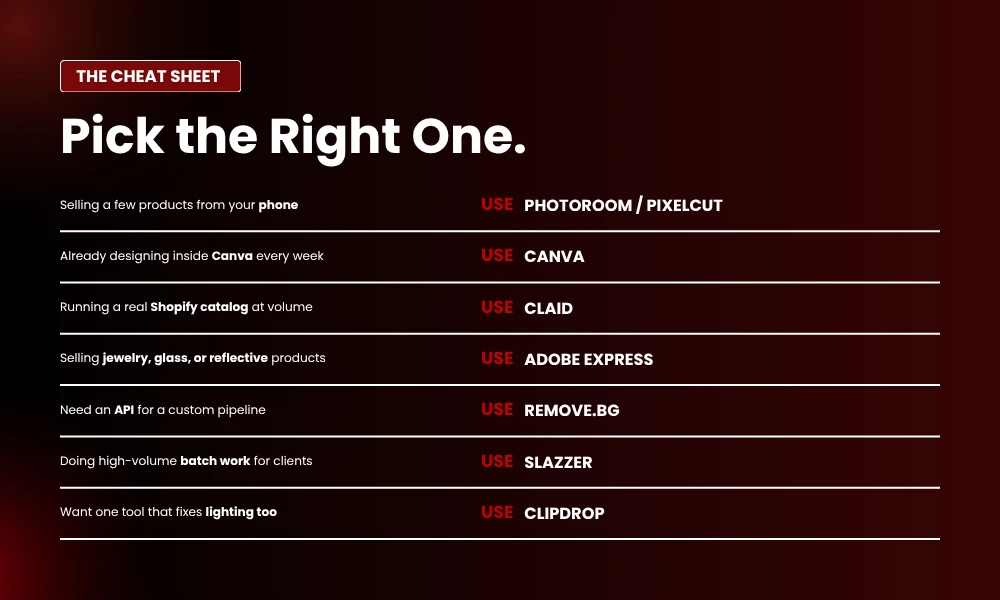
If you’re selling a few products from your phone and you want something quick and friendly, Photoroom or Pixelcut are where you should start. If you’re already designing in Canva every week, you don’t need to add another tool, just use what’s already there.
Running a real Shopify catalog with serious volume? Test Claid against your trickiest twenty SKUs before paying, and see how it handles the difficult ones.
For luxury, jewelry, glassware, or anything reflective, Adobe Express is the consistent winner across my testing. If you need an API for a custom pipeline, Remove.bg or Photoroom’s API are the two reasonable choices.
Doing batch work for clients on a regular basis, Slazzer is the obvious pick. Wanting one tool that fixes lighting alongside backgrounds, Clipdrop has the broader feature set.
There isn’t really a ‘best AI background remover‘ in some absolute sense. There’s the tool that fits your specific products, your actual volume, and the way you genuinely work, and matching those three things correctly is what turns this from a frustrating ongoing problem into a five-minute step in a longer workflow.
How to Test Properly Before You Pay
Demo images on marketing pages always look perfect, that’s their whole job, but your products will not behave the same way. Before paying for any of the tools above, run the same test set through three or four of them and compare the outputs side by side.
The shots you want to test against should include something with fine hair or fur such as a soft toy or a faux fur jacket, something glass or transparent like a perfume bottle or a clear container, a reflective metal item such as jewelry or steel kitchenware, a flat lay where there’s already a natural shadow underneath the product, and a product photographed against a busy or low-contrast background.
Once you’ve run the same five images through each tool, the differences become obvious almost immediately. One tool will leave halos around hair, another will eat into the rim of the glass, a third will drop the natural shadow entirely and leave your product looking like it’s been pasted on top of the page.
The tool that handles your hardest images cleanly is the one to keep, regardless of which one has the slickest landing page.
Final Thoughts
The AI background remover market in 2026 has finally settled into a clear shape, and the best tools aren’t always the loudest ones. They’re the ones that match how you actually work, day-to-day, on the kind of products you actually sell.
A solo Etsy seller and a 200-SKU Shopify brand should not be using the same tool, and they shouldn’t be paying the same monthly subscription either. The right approach is to start with the smallest paid plan that fits your real volume, run your trickiest images through it for a week, and see whether the output drops cleanly into your store without manual touch-ups. If it does, you’ve found the right one. If it doesn’t, move down the list and try the next one.
The tool that wins is the one that lets you stop thinking about backgrounds entirely and start thinking about everything else that actually grows a store, which is product, pricing, reviews, ads, and fulfillment. The boring stuff. The stuff that actually makes the money.
Frequently Asked Questions
What’s the best free AI background remover for e-commerce?
Pixelcut and Photoroom both have genuinely useful free tiers without watermarks on standard exports. Canva’s built-in remover is also free if you’ve got an account already. The right pick comes down to volume, because free plans usually cap either resolution or daily count, so heavy users tend to move to paid plans pretty quickly.
Can AI background removers handle hair and fur properly?
Yes, but not all of them can. Tools with dedicated edge-refinement models like Adobe Express, Remove.bg, Photoroom, and Aiarty handle fine strands well, while cheaper or older tools tend to leave halos or chop edges. Test with your own shots before deciding, and don’t trust the demo videos.
Do I need an API or is the web app fine?
For most small sellers, the web app is genuinely fine. APIs become useful when you’re processing more than a few hundred images a month, automating inside a Shopify or WooCommerce setup, or running a marketplace where users upload images that need cleaning up automatically.