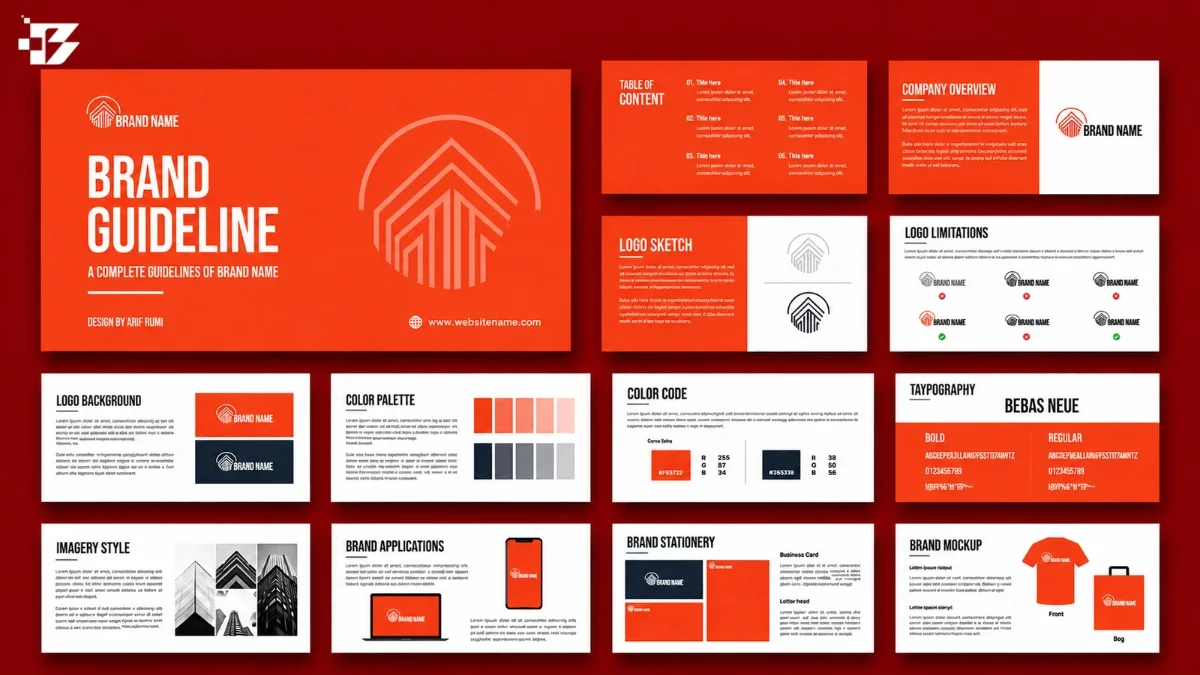
Teams use brand guidelines when they can find the current rule, see it applied to real work, and put it into practice without guesswork. A practical process helps designers, marketers, salespeople, employees, and partners make better choices with less wasted time.
A brand kit is an organized collection of approved brand assets, such as logos, colors, fonts, and images. Without clear guidance, people improvise with logos, colors, and copy, and small differences can weaken trust in your business. Useful rules show what to do in familiar situations.
You can build guidance for daily tasks, not just for a polished document. Start by naming the one recurring inconsistency that frustrates your team most.
Key Takeaways
- Make each rule easy to find and apply.
- Show approved uses and common mistakes.
- Build templates for work your team repeats.
- Test the rules with people outside the brand team.
- Name an owner and keep the current version clear.
What Do Brand Guidelines Help Teams Do?

Brand guidelines give everyone who represents a business a shared standard for making consistent choices. They set how a brand looks, sounds, and behaves across teams, channels, and touchpoints, so each person can make a clear choice without guessing.
The goal is recognizable work that still fits its context, not identical output everywhere. A sales deck, support email, and social post serve different needs, yet they should feel like they come from the same business.
Keep the brand recognizable, then adapt the details to the channel and audience.
Guidelines bring visual, verbal, and strategic rules together. They help teams connect daily choices to the identity and promise the business wants people to remember.
A style guide has a narrower job. It focuses on writing conventions, grammar, terminology, and editorial formatting, such as whether product names use title case.
A style guide can sit inside the larger brand guide, or it can remain a separate resource for writers. Teams that publish across many channels may use both, while a small business can combine them in one document.
Clear guidance also supports recognition beyond a single campaign. Consistent names, visuals, and messages can help people connect a company’s work across search, social media, and customer service. See how brand recognition supports topical relevance across online content.
Use the broader guide for the whole brand system, and a style guide for the specific conventions writers need.
What Should Brand Guidelines Include?
A teammate choosing a logo should be able to find its approved version, minimum size, and clear-space rule in one place. Essential brand guidelines explain both the reason behind a choice and how to use it in real work.
Start with the core identity, then document visual and verbal rules people can apply. Optional extensions can cover tools, access, and newer channels as your needs grow.
Brand core gives every rule its reason
Define the brand core first: its mission, audience, position, values, personality, and main message. These decisions help a designer judge whether a new image fits, or help a writer decide which benefit belongs in a headline.
A clear audience description should name the people you serve and what they need from your business. Keep each point specific enough to guide a real choice, rather than using broad claims that could fit any company.
Visual standards make correct use clear
Give each visual element a rule, a real example, and a place where it applies. The table covers five essential areas that teams often need while producing everyday work.
| What to specify | Useful examples | Where it applies |
|---|---|---|
| Brand core: mission, audience, position | Mission: make local banking easier; audience: first-time home buyers | Campaign briefs and product pages |
| Logo: approved variations and misuse | Full-color logo; reversed logo; no stretching; clear space | Web pages, print, presentations |
| Color: exact HEX, RGB, and CMYK values | Blue: #174EA6, RGB 23/78/166, CMYK 86/53/0/35 | Web, screen graphics, print |
| Typography: font family, weight, size, hierarchy | Arial Bold, 28-point heading; Arial Regular, 12-point body | Reports, email, web content |
| Imagery and iconography: style and subject | Natural-light photography; hand-drawn icons; avoid stock poses | Ads, social posts, product screens |
Logo rules can list approved variations, minimum sizes, and clear space, then show common mistakes. A guide can also state when a logo needs a one-color version or a reversed version for a dark background. Include logo variations and misuse examples so people can compare choices at a glance.
Color values should include HEX and RGB for digital work, plus CMYK for print. Typography rules can name the font family, weight, size, and hierarchy for headings, body copy, and captions.
Voice and applications show rules in context
Describe your voice, the brand’s consistent verbal personality, and tone, the way that voice adapts to context. Then show real examples: “We’ll help you compare plans” for a friendly sales page; “Your payment is late” is blunt and off-brand.
Add templates and applications for recurring work, plus social media rules for captions, hashtags, and replies. Accessibility guidance, AI rules, and design tokens can extend the guide when your teams need them.
For every visual rule, show both an approved use and a specific misuse.
How Do You Gather the Right Brand Inputs?
A sales deck, social post, and customer email can reveal different versions of the same brand. To build a useful identity, gather views from the people who make and receive the work, then compare those views with what exists.
Look for repeated gaps between the intended brand and the work teams actually produce. Those gaps show which choices need a shared answer, rather than another vague reminder.
Listen to the people who create and receive the work
Include customers, users, clients, employees, executives, and other stakeholders. Each group sees a different part of the experience: customers may describe what they remember, while employees can point to rules that slow work down.
Use a mix of research methods to collect clear input:
- Surveys to gather views from many people.
- Interviews to hear examples and reasons.
- Focus groups to compare reactions in a discussion.
- Digital analysis to see how people use content and channels.
Ask about specific experiences, such as which message felt clear or which page was hard to use. For audience research and channel choices, teams can use data to plan stronger content and learn which formats serve people best.
Audit live communications and existing assets
Review current communications and visual assets against the identity you intend to present. Include real emails, sales decks, web pages, social media posts, ads, images, and logo files.
Notice where a documented intention differs from what people make. A guide may call for plain language, while a customer email uses dense terms; a logo folder may hold several files without showing which one is current.
Audit competitors’ brand identities, too. Look for common choices in your market, then find a clear point of distinction that your business can support in its own work.
Record each repeated disagreement as a decision the guidelines need to resolve.
How to Build Brand Guidelines Teams Actually Use

Five practical steps take guidelines from agreed brand choices to rules tested in real work. The process helps you create brand guidelines that teams can use during regular tasks, not just admire in a presentation.
Write each decision as a rule someone can apply to a real choice. That keeps the guide tied to work rather than abstract branding language.
Step 1: Create brand guidelines from an agreed brand core
Begin by agreeing on your audience, positioning, values, personality, and core message. A team should be able to explain who the business serves, what makes it distinct, and what people should understand after an interaction.
Use the repeated disagreements from your input review to focus the discussion. If sales and marketing describe the same product in different ways, settle on the shared promise before writing copy rules.
Record the decision in plain language. “We help new homeowners understand their options” gives teams more direction than “We are customer-focused.”
Then ask whether the decision would change a real choice. If it cannot guide a headline, image, or service response, make it more concrete.
Step 2: Turn visual choices into explicit rules
Translate each agreed visual choice into a rule people can follow. Name the approved file, the colors and fonts to use, and what to avoid in common layouts.
A rule should answer a practical question. For example, say which logo works on a dark slide, how much room it needs, and which file to place in a presentation.
Use examples to remove guesswork. Put the right version beside a stretched or poorly placed version, and explain the difference in a short caption.
Keep exceptions clear. If a print vendor needs a one-color logo, state when that version is allowed and who can approve another change.
Step 3: Show voice and tone through real copy
Make voice and tone concrete with examples your team recognizes. Show an on-brand line beside an off-brand one, then explain which words make the difference.
For example, “Choose a plan that fits your month” sounds helpful and direct. “Act now to secure the ultimate solution” sounds pushy and vague.
Include more than a slogan. A short sales email, a service reply, and a social caption can show how the same voice shifts across situations.
Writers can also see how a brand’s message works in a real page. These landing page copy tips cover clear benefits, audience needs, and calls to action that suit different jobs.
Step 4: Build for the work teams repeat
Choose the tasks people repeat most often, such as presentations, emails, and social posts. Give each task a useful starting point, such as a slide deck with approved type styles or an email signature with the right logo.
Templates should make the right choice easy without locking people into one message. Leave room for different audiences, offers, and lengths while protecting the parts that must stay consistent.
Decide what a user needs to finish the task. A social post template may need a safe area for text, a caption example, and a link to approved photography.
Keep the supporting material close to the task. People are more likely to use a correct file when they can reach it from the design or document they already work in.
Step 5: Test the rules with real users
Ask people outside the brand team to complete realistic tasks using the draft. Give them a brief, such as choosing a logo for a dark slide or writing a short product announcement.
Watch where they hesitate, search, or make different choices. Avoid stepping in too soon, because their pauses reveal where a rule or example needs more detail.
Ask what they expected to find and what they would do next time. A tester may understand the rule but fail to locate the matching file, which points to a practical gap.
Try the same task with people in different roles. A marketer, a salesperson, and a partner may read the same direction in different ways.
Revise any rule that two test users interpret differently.
How Can Teams Find and Apply the Rules?
A correct logo saved in an employee’s downloads folder is less useful than the current logo linked beside its usage rule. Give teams a clear, searchable place to find brand guidelines while they are doing real work.
Design retrieval so a common answer is findable in under 30 seconds. Good access saves time and helps teams make consistent choices without asking the same question again.
Put the current answer where people work
A practical quick-reference guide can run 2-4 pages and cover the answers people need most often. A fuller guide for a small to midsize business usually runs 10-20 pages.
Keep one clearly signposted, searchable online home for the current version. Use plain page names, a visible search tool, and direct links to common rules and approved files.
A static PDF can still work as a download or handoff for an agency or print vendor. Do not make a PDF buried in a shared drive the only place people can find guidance.
A short quick-reference page can sit alongside the full guide. That gives someone making a social post a fast answer without hiding more detailed rules from a designer.
Make common tasks easy to complete
Check whether a colleague can finish these four tasks without help:
- Locate the current logo.
- Find a rule for a common format.
- Download the matching asset or template.
- Identify where to ask about an exception.
Test the paths with someone who does not work on branding. They may find a file but miss its date, or open the right rule without seeing the asset it describes.
Ask a colleague outside the brand team to find one common answer in under 30 seconds.
How Do Templates and Brand Kits Support Everyday Work?

A brand kit stores approved files, brand guidelines explain how to use them, and templates turn those rules into repeatable designs. A brand guidelines template gives you a starting structure, not the decisions that make your business distinct.
The brand owner must supply the approved rules and assets that fill each template. A good brand guidelines example shows a real choice in context, not only an attractive document cover.
Brand guidelines templates turn rules into repeatable tasks
A template provides a pre-built document structure and placeholders for your content. It may include headings for logo use, colors, fonts, and voice, but you must decide what belongs in each part.
Useful brand guidelines examples include a logo-use page, an email signature, and a branded presentation. Each one shows how a rule works in a task a teammate may repeat.
Marketplace listings can differ in file formats and price, so check each listing before downloading. Make sure the file type works with the tools your team uses.
| Main job | What a user finds | What it does not replace |
|---|---|---|
| Brand kit: stores approved assets | Logos, colors, fonts, images, icons | Rules for when and how to use them |
| Brand guidelines: documents brand rules | Visual, verbal, and strategic standards | Working files for each design task |
| Brand template: repeats a design | Layouts, placeholders, and sample content | Approved brand decisions and assets |
Canva Brand Kits organize assets for on-brand designs
Canva Brand Kits can hold logos, color palettes, fonts, images, icons, and other assets. Canva color palettes can use solid colors or gradients, with colors entered using hexadecimal codes.
Canva Brand Templates are reusable designs that suit a brand’s identity. They are different from Brand Kits, which store assets rather than layouts for a repeated task.
Canva lets users add guidelines to each Brand Kit item except Brand Voice. Its features also include sharing, task assignments, comments, and approvals. Canva Brand Kit features can help teams keep work and approved files together.
Teams using AI for brand visuals can also review tools for consistent brand visuals before choosing a workflow.
Before sharing a template, confirm that its linked logo and fonts are the approved versions.
How Should Guidelines Handle Accessibility, Channels, and AI?
Accessibility and AI rules belong alongside visual and voice standards because both affect how people encounter the brand. Write clear checks for each channel, and give teams safe boundaries for new tools.
WCAG 2.1 uses four principles: perceivable, operable, understandable, and robust. Its guidance applies to content across desktop, laptop, kiosk, and mobile devices.
Make digital and visual content accessible
WCAG 2.1 was published as a W3C Recommendation on May 6, 2025. Use its four accessibility principles as a broad check, then list the tasks that matter in your digital work.
Do not use color alone to convey information. Add alt text to meaningful images, show keyboard focus, support keyboard use, and caption prerecorded audio and video.
Web pages work well as the primary format for guidance. When you need digital documents, follow Section 508 and WCAG 2.1 standards.
For example, a chart should use labels or patterns as well as color. A link should show a visible focus state when someone moves through a page using a keyboard.
Adapt rules to each channel and audience
Keep the brand’s voice consistent, but set channel rules for format, caption style, and response tone. A social post may need short copy and a clear caption, while a service reply may need calm language and a direct next step.
Name the audience and task for each channel. A product update for current customers may need different detail from a social post meant to introduce the business.
Review how your content performs with the people it serves. Teams can use a user-focused SEO strategy to plan useful content across formats while keeping a person in charge of quality.
Give AI tools approved context and boundaries
List the approved source material an AI tool may use, such as current product facts, brand messages, and licensed imagery. Name which tools teams may use and what information they must keep out of prompts.
Set usage limits for generated text and images, including rules for customer data and licensed assets. Give teams prompt guidance that names the audience, task, voice, and approved source material.
Require a human to check AI-generated work against approved messaging, assets, and usage permissions before publication.
Who Owns Brand Guideline Updates?
One accountable brand owner should be responsible for the current version, even when several teams contribute to it. The owner keeps one clear record of approved rules and makes sure users know where decisions go.
Review guidelines at least once a year, or quarterly for fast-moving brands. An extra review makes sense after a brand refresh, a new channel launch, or a significant messaging change.
Name the brand owner and the people who can approve changes. Give each team a clear way to request an exception, and record the reason, approval, and end date for any one-off choice.
Set permissions for agencies and partners, including access to the current guide and approved assets. Keep a version history that shows what changed, when it changed, and who approved it.
Include the guidance in onboarding for new employees. A short first-week task, such as finding the correct logo for a slide, can show whether they know where to look.
Start an extra review when any of these events occur:
- A brand refresh changes the identity or message.
- A new channel creates different content needs.
- A significant messaging change affects customers.
- Repeated questions or exceptions reveal unclear rules.
Keep one named owner, a visible version history, and a clear path for decisions that fall outside the rules.
Quarterly reviews suit brands that change quickly. For other brands, an annual review is the minimum cadence; teams can still record small fixes between reviews.
Put the owner’s name and the next review date where every user can see them.
Conclusion
Brand guidelines earn their place when they make consistent work easier for the people creating it. A polished document matters less than a clear answer someone can use while preparing a slide, email, or post.
Start with one common task, then document the rule, an example, and the approved asset needed to finish it. A small guide can grow as real questions show where more help would save time and protect trust.
Choose one recurring task this week and write down the rule, example, and approved asset that would help your team complete it confidently.