Stock photos have a problem nobody talks about enough. Open any SaaS landing page and you’ll see the same five shots. That woman laughing at a salad. The handshake. The “diverse team huddled around a laptop pretending to care about a spreadsheet.”
It’s exhausting.
And here’s the worse part: your readers notice. Maybe not consciously. But when your blog header looks like it was pulled from the same Shutterstock pile as your competitor’s, you blur into the noise.
AI stock photos changed the math on this. Instead of paying $12 for an image somebody else is already using, you describe what you want, hit generate, and have it inside a minute.
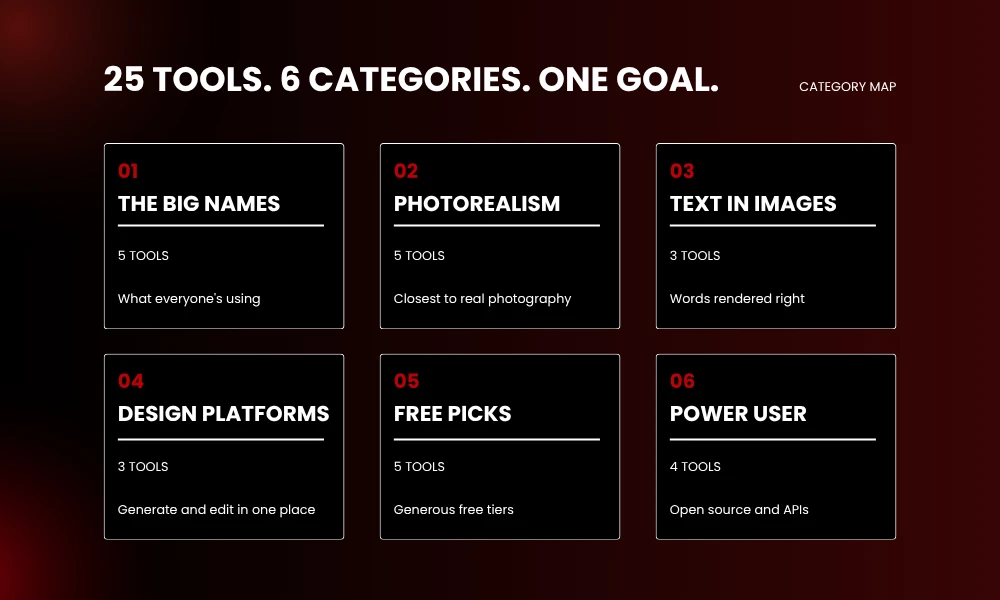
Below are 25 tools we actually use, plus a few worth knowing about. Grouped by job so you can skip to whatever fits.
What People Actually Mean by “AI Stock Photos”
Quick clarification before the list, because this trips people up.
“AI stock photos” usually means one of two things:
Generated from scratch with something like Midjourney, Flux, or DALL·E. You type, the model draws.
Or AI-curated libraries (Adobe Stock, Freepik) that mix real photos with generated ones and license everything for commercial use upfront.
Both replace traditional stock. Rules around copyright and what you can actually do with the output? Very different. We’ll flag it for each one.
Pro tip: If a tool doesn’t spell out commercial rights clearly, don’t use the images for client work.
Screenshot the license page. Future-you will thank present-you.
The Big Names (You’ve Probably Heard of These)
These are the tools showing up in every marketer’s stack right now.
1. Midjourney
Still the aesthetic king. Prompts come out looking like a stylist, a lighting tech, and someone who genuinely understood the brief all got involved.
There’s no free tier anymore, by the way. That ended in 2024 and it’s not coming back. Basic starts at $10/month, Standard at $30/month is where most marketers land, and all paid plans include commercial rights.
Use it for: hero shots, blog feature images, premium-feeling ad work.
2. DALL·E 3 (inside ChatGPT)
DALL·E follows prompts more literally than Midjourney. Ask for “a red ceramic mug on a white desk next to a leather notebook” and that’s what you get. Midjourney might give you something prettier, but DALL·E gives you what you asked for.
Comes with ChatGPT Plus at $20/month. Commercial rights included.
Good when accuracy matters more than vibe.
3. GPT Image 2
OpenAI’s newer model finally fixed the text problem. Posters with words like “Black Friday 50% Off” actually spell things right now. Which sounds basic. It wasn’t basic six months ago.
Available through the OpenAI API and inside ChatGPT.
If your image needs text baked in (ads, posters, social tiles), this one.
4. Adobe Firefly
The safe pick. Firefly was trained only on licensed Adobe Stock material and public domain stuff. Enterprise plans even come with IP indemnification, meaning Adobe legally has your back if a copyright claim ever lands.
Free tier exists. Paid plans start around $4.99/month.
Agencies love this for one reason: no scary legal email three months after a campaign launches.
5. Google Imagen (Nano Banana)
Google’s image model. People call it Nano Banana inside Gemini. The 4K output now competes with real photography on textures, especially skin, fabric, metal grain.
Free through Gemini, paid through Google AI Studio.
If you need a product shot that holds up at billboard size, give this one a real test.
Tools Built for Photorealism
These handle realism better than the rest when your goal is actually replacing stock photography rather than making something painterly.
6. Flux 1.1 Pro
Flux is what developers and agencies have been quietly moving to. Same photorealism as Midjourney. Way less money per image when you run it through an API, somewhere in the $0.003 to $0.05 range per image depending on the provider.
Volume work or anything you’re piping into a script? Flux.
7. Reve AI
Clean realism plus genuinely useful editing tools. Even when an output is off, the editor fixes it instead of forcing you to re-roll the dice.
Worth a look if you hate generating the same prompt twenty times to get one usable result.
8. Krea AI
Real-time generation. The image updates as you type, which sounds gimmicky until you actually use it. Strong photoreal mode and a built-in upscaler.
Great for iterating fast.
9. Magnific
Magnific made its name as an upscaler. The picture generator is now a separate, serious thing. Built for people who care about pixel-level detail.
Best for: pushing other AI outputs to print resolution.
10. Grok Imagine
xAI launched this with cinematic grading already baked in. Film grain, shallow depth of field, color treatment that other tools need three paragraphs of prompt engineering to match.
Editorial blog images, magazine-feel content. That’s the lane.
Tools That Actually Get Text Right
Most AI generators butcher words inside images. These three don’t.
11. Ideogram
Has been the typography champ for over a year now. Paid plans start at $7/month, and honestly, the free tier is pretty generous.
Logos, posters, social graphics, anything where the text matters as much as the image.
12. Recraft
More design tool than generator. Brand color controls, vector exports (SVG, PDF), reusable style sets you can apply across an entire campaign.
When every image needs to look like part of the same brand family, this is it.
13. Nano Banana Pro
Google’s premium tier on Nano Banana. Sits right next to Ideogram for text accuracy. Decent fallback when Ideogram misreads your prompt or you want a different look.
All-in-One Design Platforms with AI Inside
Not pure image generators. These are design platforms that added AI, so you generate, edit, and publish without switching tabs.
14. Canva (Magic Media)
The AI lives inside the editor everyone already uses. Four image options per prompt. Drop the best one straight into a template and you’re done.
Free tier works. Pro is $15/month.
Social media managers and non-designers basically run on this.
15. Microsoft Designer
Free with any Microsoft account. Built into Edge and Windows. Quality isn’t world-class but the price is hard to argue with.
Casual work, internal docs, quick concept rounds.
16. Freepik AI
Freepik bolted AI generation onto its existing stock library. You can mix generated images with their licensed photos and vectors on a single canvas.
Good replacement for the “I’ll just grab something off Freepik” reflex.
Free Picks or Generous Free Tiers
Tight budget? Testing the space? Start here.
17. Leonardo AI
Daily token allowance, strong free tier, working upscalers. The Phoenix model handles photoreal stuff surprisingly well, and there’s a deep library of style presets ready to go.
Game assets, product concepts, anyone who wants real tools without paying day one.
18. Playground AI
One of the most generous free tiers around, with somewhere near 100 free generations a day on the right plan. Includes inpainting too.
Daily volume without spending anything? Playground.
19. NightCafe
Pick your model: FLUX, Stable Diffusion, DALL·E, Google Imagen, others. Free daily credits, plus extra if you join challenges and engage with the community.
Useful for testing how different models handle the exact same prompt.
20. Bing Image Creator
Free, runs on DALL·E, lives inside Microsoft’s ecosystem. Solid quality.
One catch though. Outputs are licensed for personal use only under Microsoft’s terms. Not commercial. People miss this.
21. Craiyon
The no-frills, ad-supported version. No signup. Lower quality than the rest of this list. But no daily limits either.
Disposable images, mood boards, kicking the tires on AI generation with zero commitment.
Power-User and Open-Source Options
More effort to set up. More control. Eventually, zero per-image cost.
22. Stable Diffusion (Self-Hosted)
Runs on your own GPU. After the hardware buy, every single image is free forever. Most power users have actually moved on to Flux models running on top of Stable Diffusion’s infrastructure.
Volume work, agency setups, anyone who needs total privacy on what they’re generating.
23. ComfyUI
Not a model. It’s the most popular interface for running Flux and Stable Diffusion locally. Visual node system, so you build custom pipelines that run the exact same way every time.
Repeatable workflows.
24. ImagineArt
Bundles 57 different AI models into one platform. Useful if you want to bounce between Midjourney-style art and Flux-style realism without juggling five subscriptions.
One login, lots of models.
25. WaveSpeedAI
Aggregates the big models (Flux, GPT Image, Ideogram, Recraft, Nano Banana) into a single interface. Free starter credits, then pay-per-use.
Good for comparing tools before you commit, or for mixed workflows that need different models for different jobs.
How to Actually Pick One
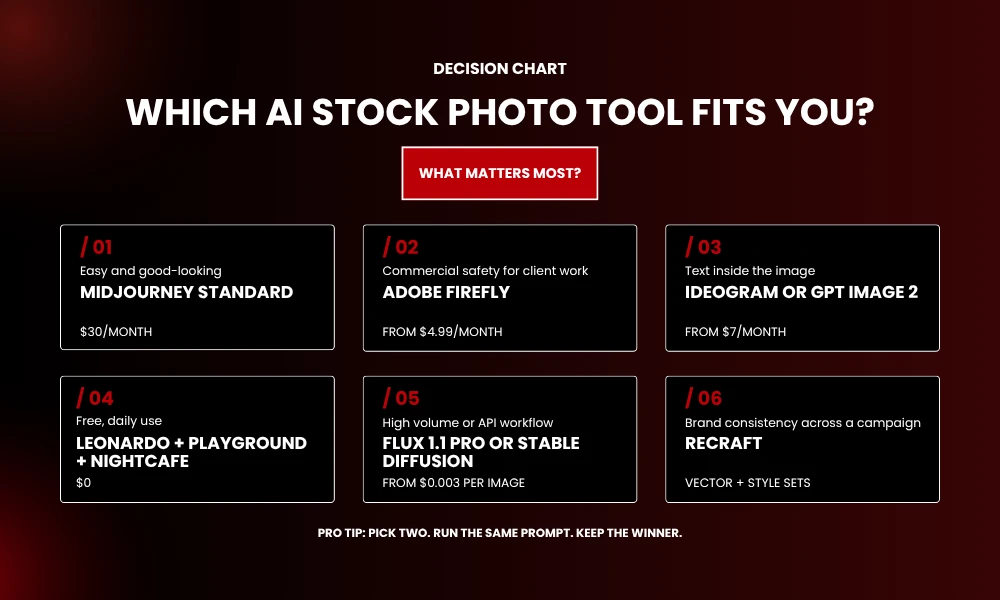
You don’t need 25. Most people land on two or three. Here’s the shortcut.
Want the easiest path to good-looking images? Midjourney Standard.
Need commercial safety because it’s client work? Adobe Firefly.
Text inside the image matters? Ideogram or GPT Image 2.
Want everything free? Run Leonardo AI, Playground AI, and NightCafe side by side.
Generating at scale? Move to Flux through an API or self-host Stable Diffusion.
Care about brand consistency across a campaign? Recraft.
Pro tip: Don’t marry one tool. Every model has a personality. Throw the same prompt at two or three and pick the winner. Five extra minutes. The quality jump is real.
Are AI Stock Photos Actually Better Than the Old Stuff?
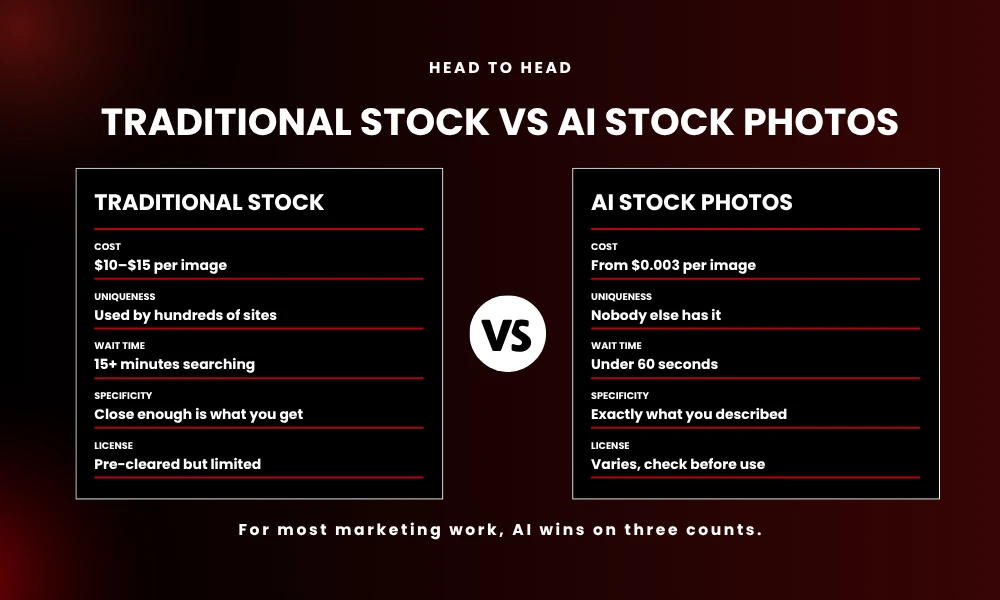
Short answer for most marketing work: yeah.
Three reasons we keep choosing AI over Shutterstock or Getty:
Cost. A single Getty license can run $10-15. A Midjourney sub at $30/month gets you hundreds of unique images.
Uniqueness. Nobody else has the exact image. That alone helps you stand out from competitors pulling from the same stock pile.
Specificity. The image matches your brief exactly. No more scrolling for fifteen minutes hoping someone shot the scene you actually need.
Traditional stock still wins in two specific cases though. Real, recognizable people for editorial or news content. And when legal needs fully licensed, human-shot imagery with proper model releases.
Outside of those? AI wins on cost, speed, and originality.
Stuff to Watch Out For
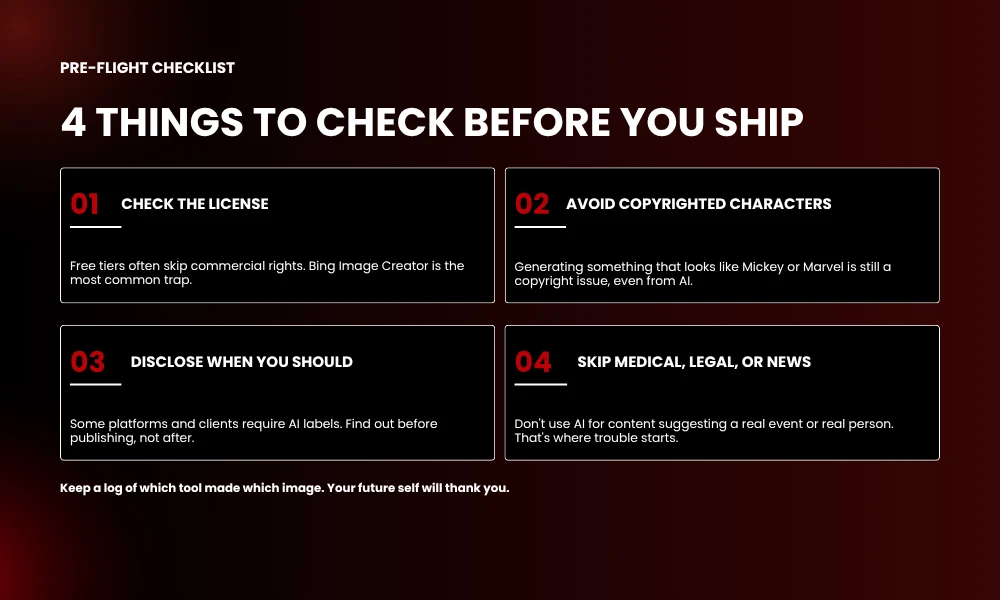
Quick gut check before you generate 200 images and put them live on a client’s site.
Check the license. Free tiers often don’t include commercial rights. Bing Image Creator is the most common trap people fall into.
Avoid copyrighted characters. Generating something that looks like Mickey or a Marvel character is still a copyright problem, even if AI made it.
Disclose when you should. Some platforms (and some clients) want AI-generated images labeled. Find out before you publish, not after.
Don’t use AI for medical, legal, or news content where the image suggests a real event or real person. That’s where the trouble actually starts.
Pro tip: Keep a simple log of which tool generated which image and the prompt you used. If anyone ever asks, you’ve got a paper trail in five seconds.
FAQs About AI Stock Photos
Can I use AI-generated images for commercial purposes?
Yes on most paid tools. Midjourney, DALL·E 3, Adobe Firefly, Leonardo AI (paid), and Playground AI all grant commercial rights. Free tiers vary a lot, so always check the license page before you ship anything.
Are AI stock photos copyright-free?
Not quite. You usually get a commercial license to use the image, but claiming copyright on it the way you would with a photo you actually took? That’s murkier. Adobe Firefly is the safest path since it offers IP indemnification on enterprise plans.
Do AI images replace real photographers?
Not for everything. AI handles concept shots, hero images, and generic scenes well. Products you actually sell, real people, news moments? Real photography still wins.
Which AI stock photo tool is cheapest?
Free ones like Microsoft Designer, Leonardo AI, Playground AI, and NightCafe cost nothing for daily use. For unlimited paid work, Midjourney Standard at $30/month or Flux through an API at fractions of a cent per image are the cheapest at scale.
Will Google penalize content with AI-generated images?
No. Google has confirmed that how an image was made doesn’t affect ranking on its own. What matters is whether the image actually adds value for the reader.
Final Thoughts
Stock photography isn’t dead. It’s just losing ground every month to tools that hand you exactly what you asked for, faster and cheaper.
Pick two from this list. Run the same prompt through both. Whichever wins becomes your default. Then keep the second tool around for the jobs your default is bad at. That’s how most teams we work with build their AI image stack.
The brands winning attention right now aren’t using better stock. They’re generating their own.