
The easiest way to spot a bloated martech stack is to open the renewal calendar. You may find two tools doing nearly the same job. You may find a platform with plenty of paid seats but very few active users. You may even find software nobody can explain anymore except that it has always been there. That is why martech stack consolidation should not start with the biggest invoice. It should start with the work.
The current picture makes that harder to ignore. Marketing teams are using only part of the capability they have paid for. One recent benchmark put martech utilization at 49%. At the same time, the martech market reached 15,505 products in 2026, with 1,488 products added and 1,367 removed during the year.
The real question is not “What can we cancel?” It is “Which systems still earn their place in the way our team works?”
Key Takeaways
- Cut overlapping work before cutting core systems.
- Start a marketing tool audit with contracts and actual usage.
- A paid seat is not the same thing as an active user.
- Data ownership matters as much as software ownership.
- A software saving is not a real saving if the work simply moves to people.
Why do stacks get bloated in the first place?
Most stacks do not become bloated because someone sat down and decided to buy too much software. They grow one problem at a time.
A team needs better reporting, so it adds a reporting tool. A new campaign needs another workflow. Another department already uses a different platform. Then employees change roles and nobody owns the decision to remove the old system. Five patterns cause most of the mess:
- Every problem gets its own tool. The team solves the immediate need without checking what it already owns.
- Buying has an owner but removal does not. Someone requests the software. Nobody is responsible for ending it.
- Marketing does not control every technology decision. Technology and data responsibilities often cross into IT.
- Renewals happen by habit. The contract reaches its date before anyone reviews actual usage.
- The stack inherits old decisions. Acquisitions, reorganizations and team changes leave systems behind.
That last point matters. A tool can become unnecessary without becoming obviously useless.
The software keeps working. The invoice keeps arriving. The business simply stops asking whether it still needs it.
How to audit what you actually have?

A useful marketing tool audit starts with a complete list and ends with a decision about every system.
Do not begin by asking teams which tools they like. Start with what the company is actually paying for. Then connect every system to real work.
1. Build the contract list
Pull current contracts, invoices, renewal dates and notice periods. This gives you the financial reality before opinions enter the process.
2. Map each tool to a workflow
“Analytics” is not enough. Write down the actual job. It could be campaign reporting, lead routing, audience management, customer data or another defined process.
3. Check active use
Look at recent activity instead of purchased seats. A system with 100 licenses and six active users deserves a different review from one used every day across the marketing team.
4. Map the data
Record what enters the system, where the system sends data and which other platforms depend on it. A tool that looks isolated on a software list may sit in the middle of several workflows.
5. Check the exit terms
Record renewal dates, notice periods and cancellation costs. A system can be a poor long-term choice but still be the wrong system to cancel immediately.
6. Ask what breaks
For every tool, ask: What happens if this disappears tomorrow? If nobody can answer, that is a warning sign. If the answer is “lead routing stops” or “customer preferences disappear from the workflow,” you have found a dependency that needs more work before cancellation.
This approach follows the same basic logic used in current martech audit guidance: document the technology, involve the teams using it, map its impact and identify underused or redundant capabilities.
What to cut first in martech stack consolidation?
Start with the systems where the business can remove duplication without removing an important capability.
| Priority | What to look for | Before cutting, check |
| 1 | Duplicate tools | Which system handles the real workflow better |
| 2 | Very low active use | Whether a small group still depends on it |
| 3 | No clear owner | Who would take responsibility after removal |
| 4 | Heavy manual data work | Whether another system can handle the flow |
| 5 | Finished project tools | Whether the data or workflow still matters |
1. Cut duplicate point solutions
This is usually the clearest place to start. If two systems handle substantially the same job, compare actual usage, integrations, data dependencies and contract terms. Do not choose based only on the lower price. The cheaper tool can become the expensive one if it forces the team to rebuild workflows or move data manually.
2. Cut software almost nobody uses
Low usage is a signal. It is not proof that the tool should disappear. Find the people still using it. Ask what they do with it. Then check whether that work can move somewhere else without creating a new problem.
3. Cut ownerless tools
If nobody knows who owns a system, you have more than a software problem. You have an accountability problem. Someone should know why the tool exists, what data it holds, what depends on it and when its contract ends.
4. Cut tools that create manual data work
A small subscription can hide a large labor cost. If someone exports a file every week, cleans it, uploads it somewhere else and checks whether the transfer worked, the license price is only part of the cost.
5. Cut tools built for work that has ended
Campaigns finish. Launches finish. Projects finish. The software does not always leave with them. Check whether the historical data still needs to be retained. If the operating workflow is over and no important dependency remains, this becomes a straightforward consolidation candidate.
That is the heart of martech rationalization: make every remaining system prove that it has a current job.
What not to cut, even when it looks cuttable
Some systems are harder to judge from a license report. Customer data platforms and other core data layers can connect information across several marketing processes. More than two-thirds of respondents in one 2023 benchmark reported adopting a customer data platform yet estimated using only 47% of the capabilities available in those systems.
That does not mean the unused capability should trigger cancellation. It means the system needs a closer capability review. Consent and preference records also need special care. So does a small team-dependent system.
Four people using a tool does not make it unnecessary if those four people run a critical process. Contract timing matters too. An expensive exit can change the right decision from “cancel now” to “prepare the migration and cancel at renewal.” Low usage tells you where to investigate. It does not make the cancellation decision for you.
Why does data governance matter after consolidation?
Because removing a tool does not automatically fix the rules around the data. Before moving information, decide who owns important fields, which system is the record of truth and who can create or change records.
This becomes especially important when marketing and IT share responsibility. In a 2023 survey of 405 marketing leaders, 78% said customer data management was centralized within IT. The same research found 78% had to select solutions from pre-approved vendors or platforms.
So consolidation is not only a marketing decision. The system may belong to marketing. The data may sit with IT. The contract may involve procurement. If those owners do not agree before migration, the company can end up with fewer tools and the same data problem.
What does consolidation change for the marketing team?
Removing software does not automatically remove work. Someone still has to own the remaining workflow. Someone has to manage the new process. Someone has to monitor integrations and keep the documentation current.
This is why team structure belongs in the audit. A consolidation project that saves $50,000 in licenses but adds hundreds of hours of manual work has not created the same savings the invoice suggests. The better question is: What work disappears and what work moves? That distinction should be made before the cancellation is approved.
How can you consolidate a stack in one quarter?
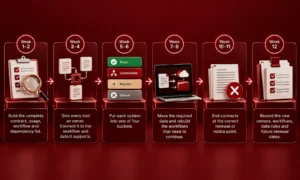
Use this as a planning framework rather than a promise that every company can complete the entire process in 90 days.
The One-Quarter Stack Cut Framework
Week 1–2: Audit
Build the complete contract, usage, workflow and dependency list.
Week 3–4: Map
Give every tool an owner. Connect it to the workflow and data it supports.
Week 5–6: Decide
Put each system into one of four buckets:
- Keep
- Consolidate
- Migrate
- Cancel
Week 7–9: Migrate
Move the required data and rebuild the workflows that need to continue.
Week 10–11: Cancel
End contracts at the correct renewal or notice point.
Week 12: Document
Record the new owners, workflows, data rules and future renewal dates. The order matters. Do not cancel first and investigate later.
What do martech consolidation trends tell us about 2026?
The martech market is no longer simply adding products at the same pace. In 2026, the tracked market reached 15,505 products, up just 0.79%. Under that nearly flat total, 1,488 products were added while 1,367 were removed. That is useful context for marketing leaders.
A flat market total does not mean nothing is changing. Products are entering and leaving while companies decide which capabilities still deserve investment. Inside an individual company, the same principle applies. The next stack does not need to be the smallest. It needs to be the stack where every important system has a reason to exist.
The read: what should marketing leaders do first?
I would not start with the largest software contract.
- I would start with the renewal calendar.
- Find every system coming up for renewal.
- Add active users.
- Add the workflow it supports.
- Add the data it touches.
- Then put duplicate systems next to each other.
That one exercise can expose the real consolidation opportunities before anyone starts arguing about vendors. And there is a second lesson worth keeping. The goal of martech stack consolidation is not to make the technology diagram look smaller. The goal is to make the operating model easier to own.
AI tools should go through the same audit. They should have an owner, a defined workflow, measurable use and a clear reason for staying. Their individual return is a separate investment question.
FAQs
What is martech stack consolidation?
Martech stack consolidation means reducing overlapping or unnecessary marketing technology while keeping the systems, workflows and data the business still needs. It can involve removing duplicate tools, combining capabilities or moving work into an existing platform.
How many tools does a marketing team actually need?
There is no useful universal number. The right stack depends on the team’s workflows, data needs, channels and operating model. A smaller stack is not automatically better if it creates manual work or removes important capabilities.
What should you cut first in a martech audit?
Start with duplicate point solutions. Then investigate tools with very low active use, no clear owner, heavy manual data work and software tied to finished projects. Check dependencies and contract terms before making the final cancellation decision.
How do you run a marketing tool audit?
Start with contracts and financial records. Map every tool to a real workflow. Check active users, data flows, owners, renewal dates and what would break if the tool disappeared. Then classify each system as keep, consolidate, migrate or cancel.
Does martech consolidation save money?
It can reduce software spending, but the full financial effect depends on what happens to the work after a tool is removed. A license saving can be reduced or eliminated if the team takes on substantial manual work or migration costs.
What is the difference between consolidation and rationalization?
Consolidation focuses on reducing overlapping systems or combining capabilities. Rationalization is the broader process of deciding which technology fits the business, which capabilities overlap and which systems should remain.