A creator spends hours creating the perfect Instagram post. The visuals are strong, the caption is ready, and the audience starts engaging. Then they notice one problem: the audio does not match the content, or the song choice simply feels outdated a few weeks later.
Before July 2026, fixing that mistake often meant deleting the post and uploading it again. That meant losing the comments, likes, shares, and the natural momentum the post had already built.
Now, Instagram allows users to change audio on published posts through a new feature called Replace Audio. Instead of starting over, eligible users can swap the music on existing feed posts and carousel posts while keeping their original engagement completely intact.
This update fundamentally changes how creators, businesses, and everyday users manage their Instagram grids. In this guide, you will understand how Replace Audio works, how to use it, what limitations exist, and why this feature matters for your social media content strategy.
AI Overview
Instagram has launched a “Replace Audio” feature that lets users change the music or soundtrack on already published feed posts and carousel posts. The update allows creators to replace audio without deleting the original post or losing existing likes, comments, shares, and reach. Users can access the option through the Edit menu on eligible posts. The feature is rolling out gradually, meaning availability varies by account.
Key Takeaways
Engagement Preservation: Replacing audio keeps existing likes, comments, shares, and reach history.
Native Access: The feature is accessed directly through the post’s standard Edit menu.
Format Constraints: Current support is focused on standard feed photo/video posts and carousels.
No Algorithmic Boost: Swapping a track updates the content but does not give the post a fresh push in the algorithm.
What Changed with Instagram Audio Editing?
For years, Instagram users had limited control over published content. After posting, you could update captions, tags, and locations, but changing the audio on a feed post was locked. If you selected the wrong song, wanted a different mood, or needed to update content for a campaign, deleting and reposting was the only painful workaround.
Instagram head Adam Mosseri announced the Replace Audio feature, introducing a direct way to swap music on existing feed posts and carousel posts without losing social proof. The change solves a long-standing workflow bottleneck for creators who depend on long-term content performance.
It is important to note that this is different from Instagram’s older audio replacement system. Previously, users could only replace audio reactively when a song was entirely removed due to copyright or licensing issues. The new Replace Audio tool gives users proactive control to change music whenever creative tastes or marketing needs shift.
How to Replace Audio on a Published Instagram Post
Changing the music on an eligible Instagram post takes only a few quick steps inside the native mobile interface:
Open Your Published Post: Go to your profile grid and select the specific feed post or carousel you want to update.
Open the Post Options: Tap the three-dot menu icon in the upper-right corner of the post.
Choose Edit: Select the standard Edit option from the pop-up menu.
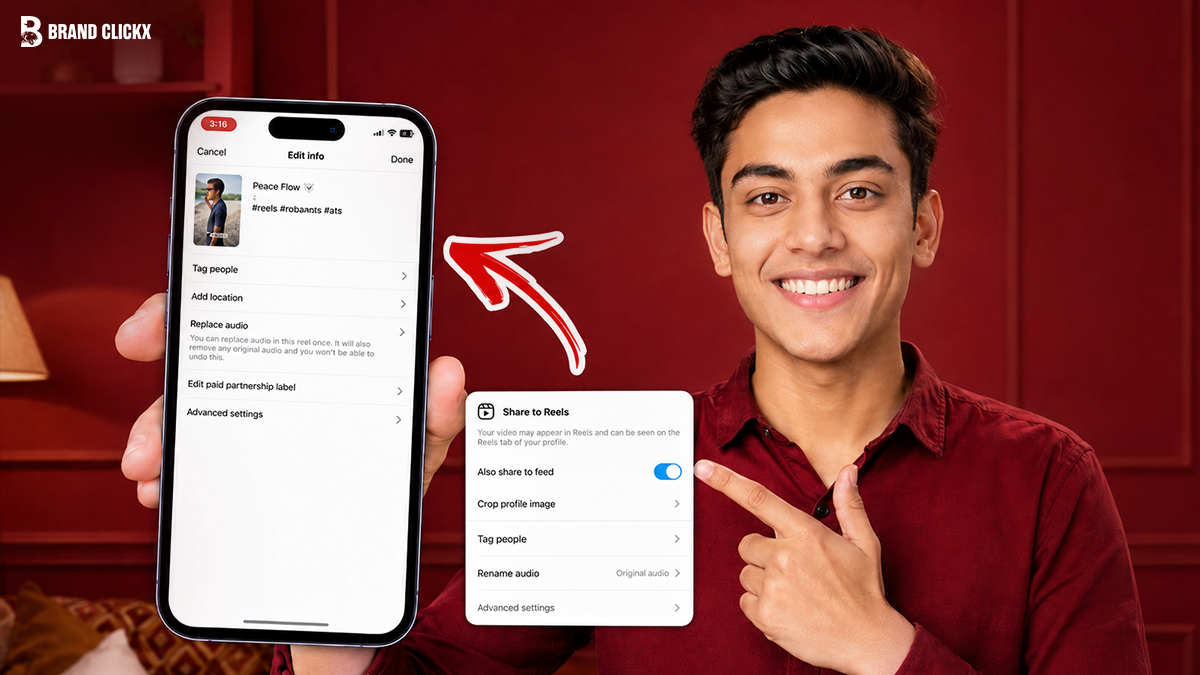
Select Replace Audio: Inside the editing workspace, tap the audio/music section and choose Replace Audio.
Pick a New Track: Browse Instagram’s music library, select the new soundtrack, adjust the audio clip timing, and save your changes.
The update goes live immediately on your feed without changing the post’s original publishing date or URL.
Critical Limitations to Keep in Mind
While the feature is a massive quality-of-life upgrade, creators should be aware of a few clear boundaries:
Account Rollout and Availability
Like most global Meta rollouts, the feature rolls out in phases. If the option is missing on an updated version of your app, your account or region may still be waiting for the server-side deployment to hit.
Reels Integration
The official initial release explicitly covers standard feed posts and photo/video carousels. A matching, seamless workflow specifically for independent Reels is handled separately or restricted based on how the audio tracks interact with original voiceovers.
Licensing Restrictions
Your replacement options are entirely bound to Instagram’s commercial or standard music library licensing agreements. Business accounts will still see a filtered list of copyright-cleared commercial tracks compared to personal or creator profiles.
Strategy: When to Use Replace Audio (and When to Avoid It)
Instagram’s head of creator product marketing, Jimmy O’Keefe, noted that the tool is built to let content grow and change with the creator, though changing the music will not result in a visibility or algorithm boost. Because of this, creators should use the tool strategically.
When to Swap the Audio
Refreshing Evergreen Content: If an old high-value carousel is still getting steady traffic, updating the soundtrack can make it feel fresh for new profile visitors.
Fixing Instant Mistakes: Correcting an accidental mismatch or an awkward audio choice immediately after posting without losing early likes.
Aligning with Active Campaigns: Brands can retroactively update older media assets to feature a new track linked to an active seasonal product launch.
When to Leave It Alone
Avoid replacing audio repeatedly on a single post simply to chase every minor daily audio trend. If a post is already viral or performing exceptionally well with its original sound, changing the track purely for the sake of editing risks disrupting the exact creative synergy that connected with your audience in the first place.
Frequently Asked Questions
Does changing the audio on a post delete existing comments or likes?
No. One of the primary benefits of the Replace Audio tool is that all likes, comments, shares, and reach metrics remain perfectly intact while the background music changes.
Can I use this feature on older Instagram posts?
Yes, as long as the post belongs to an eligible format (feed photos, videos, or carousels) and your account has received the update, you can alter the music on older archived posts.
Can business accounts change audio to any song?
Business accounts are still restricted by standard commercial music rights. When you use the Replace Audio tool, you will only be able to select from tracks available in Instagram’s Commercial Music Library.
Can you change the music on a post multiple times?
Yes. Instagram allows creators to edit and replace the soundtrack multiple times on the same post without penalizing the account.