Here is the thing nobody tells you about AI image generators in 2026.
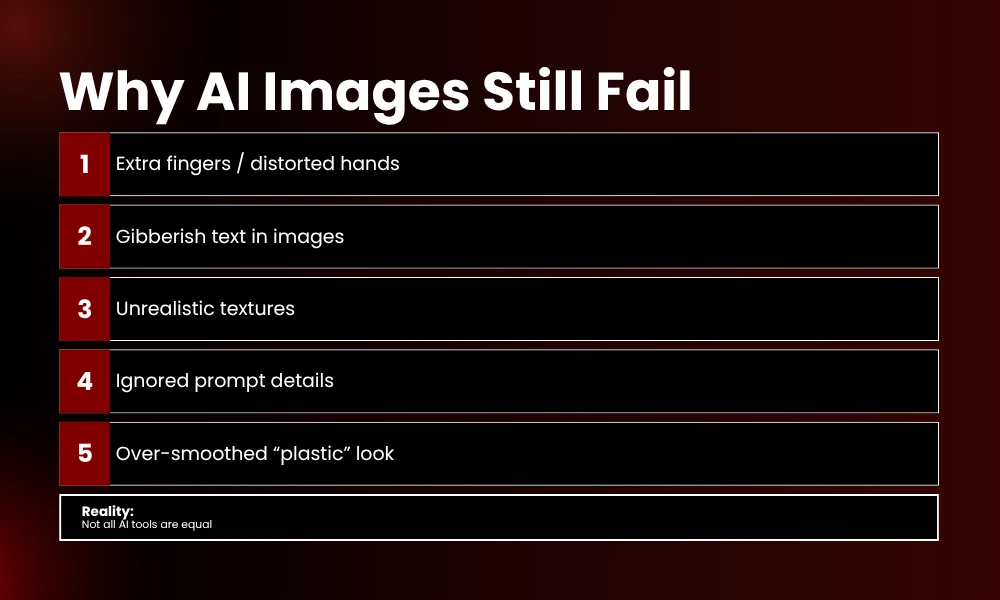
They all look amazing in the marketing screenshots. Every single landing page shows these hyper-realistic portraits, cinematic landscapes, and perfectly composed product shots. Then you sign up. You type your first prompt. And what comes back is… fine. Sometimes good. Often weird. Occasionally embarrassing.
I have been there. Spent three hours last Tuesday trying to get a simple product mockup for a client. Tool number one gave me a coffee cup with seven fingers holding it. Tool number two rendered the logo text as complete gibberish. Tool number three looked decent until I zoomed in and realized the “wooden table” had the texture of melted plastic.
That is the real experience. Not the polished demos. The actual day-to-day frustration of finding an AI image generator that does what it promises.
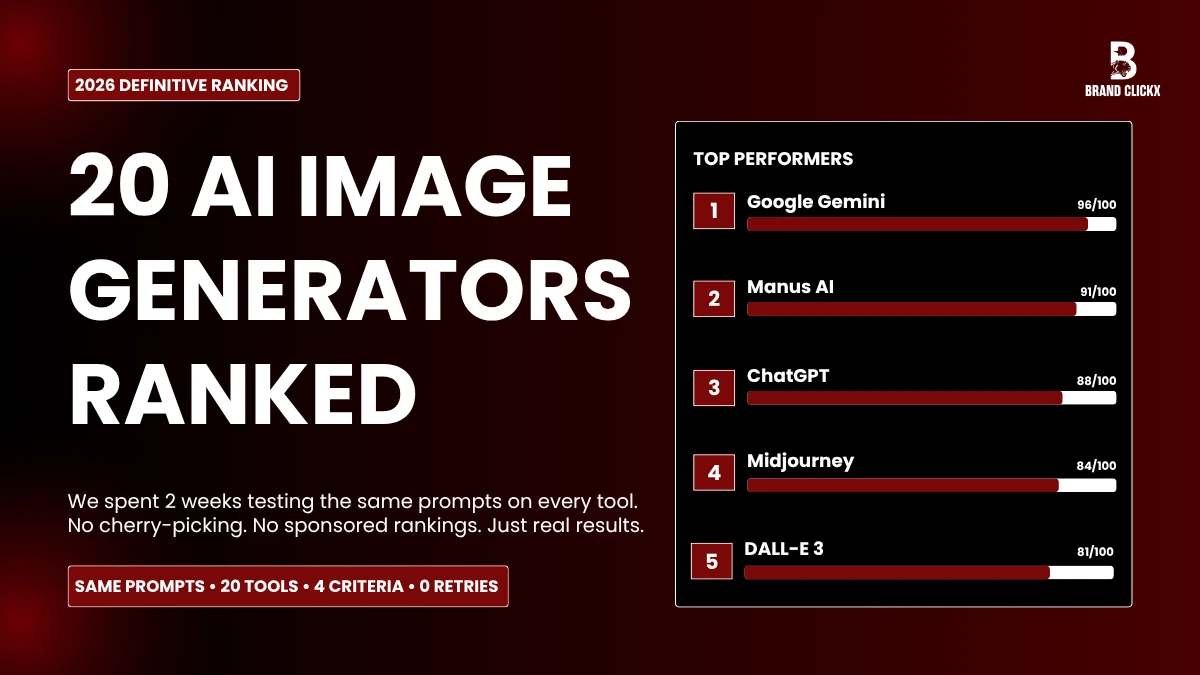
So we did something about it. My team and I spent two weeks testing 21 different AI image generators. Same prompts. Same lighting conditions. No retries, no cherry-picking. We ranked them purely on output quality, because at the end of the day, that is what matters.
The Problem With Most AI Image Generator Rankings
Before we get to the list, let me vent for a second.
Most “best AI image generator” articles you find online are useless. They list features. They copy pricing tables from the websites. They do not actually test anything. I read one last month that ranked a tool as “best for photorealism” and the sample image they showed had a person with three elbows. Three.
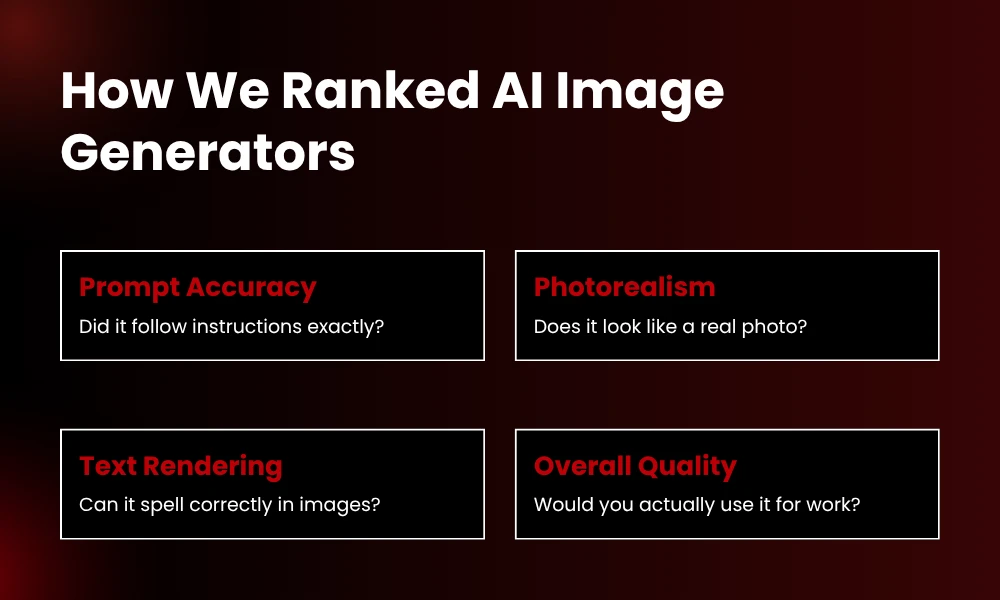
We did this differently. Every tool on this list was fed the exact same two prompts. A complex photorealistic scene and a text-heavy design task. We scored them on four things:
– Prompt accuracy (did it actually include what we asked for?)
– Photorealism (does it look like a real photo or a video game render?)
– Text rendering (can it spell “OPEN” correctly on a storefront sign?)
– Overall polish (the intangible “would I actually use this for a client?” factor)
Here is what we found.
The Top Tier: These Actually Deliver
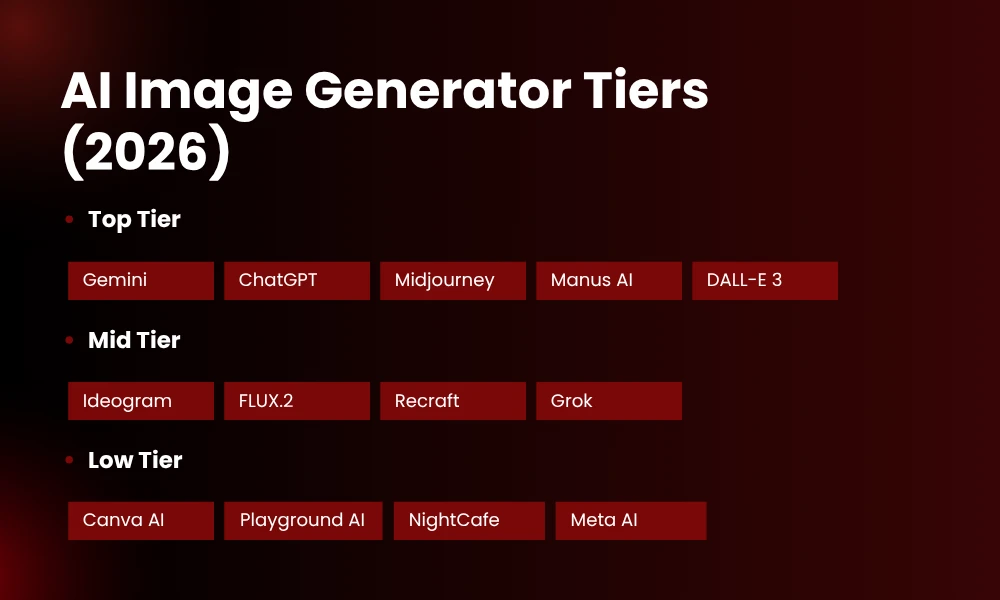
1. Google Gemini (Nano Banana 2) — The Clear Winner
I did not expect this. Honestly, I thought Gemini would be mid-tier at best. Google has a reputation for making things that are technically impressive but somehow still frustrating to use.
Not here. Gemini’s image generation, powered by the Nano Banana 2 model, is the most consistent tool we tested .
We gave it this prompt: “A highly realistic street-side tea shop on a rainy evening in India, with no people present. A metal kettle sits on a stove with steam rising into the air. Glass tea cups are placed on a wooden counter. A single warm yellow bulb lights the shop, creating reflections on the wet road outside.”
What came back was genuinely shocking. The steam looked like actual steam, not white smudges. The wood grain on the counter was visible. The warm bulb cast realistic shadows. Even the raindrop reflections on the wet road were there. Other tools either missed details (where is the steam?) or added weird stuff (why is there a random cat?).
The good: 20 free images per day. Fast generation, around 3-5 seconds. Follows prompts better than anything else we tested.
The catch: No batch generation. You wait for one image to finish before starting the next. Also, the built-in editor is pretty basic. You can scribble on it and add text, but do not expect Photoshop .
Pricing: Free tier is genuinely usable. Paid starts at 7.99/month for Google AI Plus, up to 124.99/month for Ultra .
2. Manus AI — Best for Editing After Generation
Manus AI surprised us. It is owned by Meta now, which made me skeptical. Meta’s AI tools usually feel like afterthoughts bolted onto social media platforms.
But Manus AI creates images that are almost as good as Gemini, sometimes better depending on the prompt . The lighting is strong. The details are sharp. Where it really pulls ahead is the post-generation workflow.
Every image opens in a canvas editor. You can upscale to 8K with one click. Remove backgrounds. Edit text inside the image. It is the only tool where you can generate an image and then actually fix it without exporting to another app .
The good: 300 free credits daily, which equals roughly 20-25 images. The editor is genuinely useful, not a gimmick.
The catch: Slightly slower than Gemini, around 15-30 seconds per image. The interface feels a bit cluttered if you just want quick generation.
Pricing: Free tier is generous. Paid plans start at 17/month billed yearly .
3. ChatGPT (GPT Image 1.5) — Best All-Rounder
If you already pay for ChatGPT Plus, you have access to one of the best image generators available. That is almost annoying, because most people do not realize how good it has gotten .
Where ChatGPT shines is text rendering. We asked every tool to create a coffee shop sign that said “ROAST DAILY.” ChatGPT got it right on the first try. Midjourney gave us “ROATS DAILY.” Grok produced something that looked like a ransom note. Gemini was close but the font was slightly off .
The conversational editing is also a genuine time-saver. You can say “make the background darker” or “move the text to the top right” and it understands. No need to learn parameters or open a separate editor .
The good: Best text-in-image accuracy of any tool tested. Natural language editing actually works.
The catch: Only about 10 free images per day. Generation takes 10-20 seconds, slower than Gemini. Sometimes the images feel slightly too polished, like stock photos with the soul removed .
Pricing: Free tier exists but is limited. Plus is 20/month. Pro is 200/month for unlimited generation
4. Midjourney v6.1 — The Artist’s Choice
Okay, I need to be honest here. Midjourney is not number one on this list because of prompt accuracy. It is number four because when it gets things right, the results are breathtaking. There is a reason 73% of professional creatives use it alongside other tools .
Midjourney does not follow prompts literally. It interprets them. You ask for a portrait and it gives you something that looks like it belongs in a gallery. The skin textures, the depth of field, the way light catches individual pores — it is on another level .
But. And this is a big but. It struggles with text (we got “OPEEN LAET” instead of “OPEN LATE”). It sometimes adds elements you never asked for. The Discord interface still confuses new users, even with the web app improvements .
The good: The most aesthetically intelligent tool available. Character consistency with –cref is genuinely useful for series work.
The catch: Free trial is basically nonexistent now. Text rendering is poor. The creative interpretation can be frustrating when you need literal accuracy .
Pricing: Basic plan starts at 10/month. Standard is 30/month .
5. DALL-E 3 (via ChatGPT/API) — The Precision Tool
DALL-E 3 lives inside ChatGPT, so it shares a lot of DNA with number three on this list. But we tested it separately via API and through Microsoft Designer, and the results were consistent .
This is the tool you use when accuracy matters more than artistry. “Three red apples on a blue table” means exactly three red apples. No creative interpretation. No extra potted plant because the AI thought it looked better .
The text rendering is excellent, second only to ChatGPT’s integrated version. The API pricing makes it affordable at scale, which is why developers love it .
The good: Literal prompt following. Excellent text rendering. Mature API for building products.
The catch: Images can feel slightly synthetic, like well-done renders rather than photographs. Less “soul” than Midjourney .
Pricing: ChatGPT Plus includes it at 20/month. API pricing is roughly 0.04 per image at standard quality .
6. Synthesia – More Than an Image Generator
Synthesia is one of the best AI video platforms on the market right now. If you have seen those clean, professional talking-head videos generated from just a script, there is a good chance Synthesia was behind them.
The core product is built around turning text into video. You write a script, choose an AI avatar, and it generates a full video with voice, visuals, and timing handled for you. No filming. No editing. For training content, product demos, and internal videos, it is one of the fastest workflows available.
What a lot of people miss is that Synthesia also offers a free AI image generator. It is built directly into the platform and designed to create visuals you can drop into your scenes. Backgrounds, supporting images, simple concepts – it handles those without needing to switch tools.
The results are solid for that use case. Clean, usable, and fast. You can generate an image, place it into a video scene, and move on. But it is not trying to compete with tools like Gemini or Midjourney on pure image quality.
And that is fine. Because in context, it works. Instead of generating images in one tool and exporting them somewhere else, you keep everything in a single workflow. That is the real value here.
The good: One of the best AI video tools available. Built-in image generation makes creating full scenes fast and seamless.
The catch: Image quality is solid for most use cases, but you will still get more control and detail from dedicated image generators.
Pricing: Free image generation available. Full platform plans start around 18/month.
The Solid Middle Tier: Good, Not Great
7. Reve AI — Best Free Editing Features
Reve AI sits in this interesting middle ground. The image quality is good, around 4.6 out of 5 for realism, but not quite top-tier . Where it wins is the editing ecosystem.
Background removal, upscaling, precise text editing — all built in. The energy-based free tier lets you generate roughly 100+ images before needing to wait for a refill, which is more generous than it sounds .
8. FLUX.2 by Black Forest Labs — Best for Professionals
FLUX.2 is technically excellent. It handles complex prompts with multiple elements better than almost anything else. The text rendering is reliable. Character consistency across variations is strong .
But there is no free tier. At all. You buy credits or you use it through third-party platforms. That immediately excludes casual users. It also has a learning curve that feels more like a production tool than a creative app .
9. Ideogram — Text King
If your image needs readable words, Ideogram is essential. We tested it with poster designs, logo mockups, and signage. It spelled everything correctly about 90% of the time, which is unheard of in this space .
The downside is that non-text images feel slightly flat compared to Gemini or Midjourney. And the free tier only gives you about 10-25 images per day depending on current limits .
10. Grok Imagine — Fast But Shallow
Grok generates images in about 3 seconds. That is stupid fast. The results look impressive at first glance .
But look closer. The details fall apart. Fine textures get smoothed over. Background figures become blurry messes. It is the tool you use when you need something NOW and quality is secondary .
Also, Grok killed its free image generation for non-paying users in March 2026. So the free tier is basically dead .
11. Recraft — Designer’s Friend
Recraft targets graphic designers, not photographers. It outputs vector graphics (SVG), which is huge for logos and branding work. The brand palette locking means your colors stay consistent across assets .
For photorealism, though, it is not competitive. This is a design tool that happens to generate images, not an image tool that happens to do design .
The “Okay for Free” Tier
12. Meta AI — Unlimited But Unreliable
Meta AI is the most generous free tool. We generated over 100 images without hitting a limit. That is genuinely impressive .
The problem is quality control. Complex prompts get simplified. Details get missed. The text rendering is basically non-functional. And if you generate too quickly, the speed slows to a crawl .
Use this for volume work where “good enough” is actually good enough.
13. Qwen AI — Sharp But Limited
Alibaba’s Qwen creates clean, sharp images with good color balance. The unique animation feature (turning still images into short clips) is genuinely cool .
But 5 free images per day is rough. And it misses small details in complex prompts more often than the top tier tools .
14. Adobe Firefly — Safe But Boring
Firefly is trained exclusively on licensed content, so there is zero copyright risk. The Photoshop integration is seamless. For enterprise teams, that matters .
The output, though, feels “stock-like.” Too clean. Too safe. It will not generate anything edgy or experimental. And the free tier is only 25 credits per month, which is basically a teaser .
15. Leonardo AI — Feature Overload
Leonardo has a massive model selection and a canvas editor. In theory, it should be amazing. In practice, the auto mode often picks the wrong model for your prompt .
We asked for a robot holding a stuffed animal. Leonardo gave us a robot with two sheep standing next to it. The treehouse we requested ended up on the ground. When you manually select the right model, quality improves. But most users will not do that .
16. Microsoft Designer (Bing Image Creator) — Zero Friction, Medium Quality
Sign in with a Microsoft account and go. No learning curve. DALL-E 3 powers it, so the quality is solid if not spectacular .
After your first 15 fast generations per day, everything slows down. And the 1024×1024 resolution cap feels limiting in 2026 .
The Bottom Tier: Skip These
17. Playground AI — Quantity Over Quality
500 free images per day sounds incredible until you realize most of them look like they came from 2023. The advanced models are paywalled, and the free outputs have that telltale AI smoothness that screams “generated” .
18. Canva AI — Convenience Tax
Built right into Canva’s editor, which is convenient. But the quality is noticeably below dedicated tools. Use it for quick social posts where you will slap a filter over it anyway .
19. NightCafe — Community First, Quality Second
The community features are fun. You earn credits by voting on art and joining challenges. But the actual generation quality lags behind the top tools, and the credit system feels restrictive unless you engage constantly .
20. Stable Diffusion (Web Interfaces) — For Techies Only
Running Stable Diffusion locally with a good GPU gives you unlimited, unfiltered generation. The open-source models are incredibly powerful in the right hands .
But the web interfaces? DreamStudio’s free tier is a joke. Hugging Face Spaces has long queue times. Unless you are technical enough to self-host, this is not practical .
21. RapidDirect AI Creator — Too Niche
Built specifically for product manufacturing visuals. Generates PRDs alongside images. Completely free during trial .
But it is not a general-purpose tool. Asking it for artistic or abstract work is like using a forklift to paint a portrait. Wrong tool for the job.
The Real Talk: Which One Should You Actually Use?
Here is my honest recommendation based on who you are:
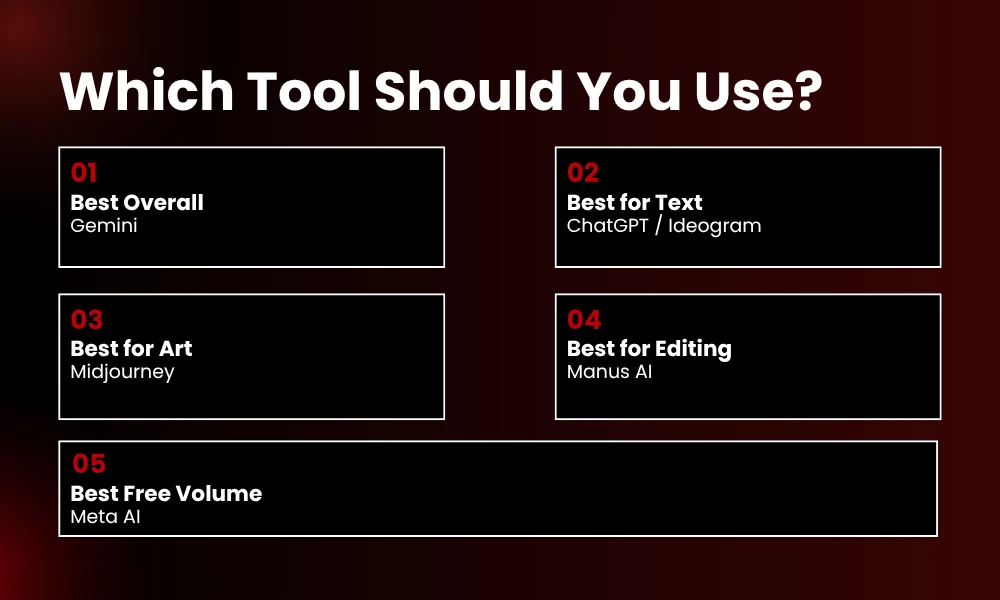
If you are a solo creator on a budget: Start with Gemini. The free tier is actually usable, the quality is top-tier, and you do not need to learn anything complicated.
If you need text in images: ChatGPT or Ideogram. ChatGPT for the conversational editing. Ideogram if you only care about text and do not need photorealism.
If you are a professional designer: Midjourney for the art direction, DALL-E 3 for the accuracy. Most pros use both. The 30/month combined is cheaper than one hour of a designer’s time .
If you need to edit after generating: Manus AI. The 8K upscaling and background removal are genuinely workflow-changing .
If you just need volume: Meta AI. It is not the best, but it is unlimited and free. For internal mockups and brainstorming, that is enough.
Frequently Asked Questions
Which AI image generator has the best output quality in 2026?
Google Gemini with Nano Banana 2 consistently produced the most accurate, realistic, and detailed images in our testing. It followed complex prompts better than any competitor .
What is the best free AI image generator?
For quality, Gemini (20 images/day). For unlimited volume, Meta AI. For text rendering, ChatGPT’s free tier (10/day). For editing features, Manus AI (20-25/day) .
Why does Midjourney rank below Gemini if professionals love it?
Midjourney creates more beautiful images, but it fails at prompt accuracy and text rendering. Our ranking prioritizes “does it actually create what you asked for?” over pure aesthetics. For many use cases, that matters more .
Can I use these images commercially?
Most paid plans allow commercial use. Gemini, ChatGPT Plus, Manus AI, and Midjourney paid tiers all include commercial rights. Always check the current terms before using generated images for client work .
Why do AI image generators struggle with text?
Text requires the model to understand both visual composition and linguistic structure simultaneously. Most models prioritize visual coherence over spelling accuracy. ChatGPT and Ideogram are the exceptions because they were specifically optimized for this .
Is there a tool with no daily limits?
Meta AI has no clear daily cap. Bing Image Creator is technically unlimited but slows down after 15 fast generations. Self-hosted Stable Diffusion has no limits if you have the hardware
What changed in AI image generation in 2026?
The biggest shifts: Grok Imagine killed free generation for non-payers. OpenAI shut down Sora. Gemini’s Nano Banana 2 leapfrogged most competitors in realism. Midjourney improved character consistency with –cref. And text rendering finally became reliable in a few tools .
Final Thoughts
I started this test thinking I would find one clear winner. Instead, I found that each tool occupies a specific niche. Gemini for accuracy. Midjourney for beauty. ChatGPT for text. Manus for editing.
The real skill in 2026 is not knowing which AI image generator is “best.” It is knowing which one to use for which job. The professionals we surveyed do not subscribe to one tool. They subscribe to three or four and pick the right one for each project .
My advice? Do not overthink it. Pick one tool from the top tier. Use it for a week. Learn its quirks. Then add a second tool when you hit its limitations. That is how you actually get value from these things.
Not by reading rankings. By making images, breaking things, and figuring out what works for your specific needs.
Now go generate something. And if you get seven fingers on a coffee cup, well, now you know which tool probably did it.